.synthesis { max-width: 640px; margin: 2em auto; padding: 1.5em 1.8em; color: #3a2d0d; font-family: “Inter”, “Segoe UI”, sans-serif; text-align: left; position: relative; box-sizing: border-box; background: #f7f9f9; border: 1px solid #10b58b; border-left: 6px solid #10b58b; border-radius: 12px; box-shadow: 0 8px 24px rgba(251, 191, 36, 0.15); }
.synthesis h2, .synthesis .synthesis-header { font-size: 1.15em; font-weight: 700; margin-bottom: 0.6em; color: #d97706; }
.synthesis p, .synthesis li { font-size: 1em; line-height: 1.65; margin: 10px; }
.synthesis strong { color: #1c1917; }
.synthesis table { width: 100%; border-collapse: collapse; }
.synthesis th { background: rgba(16, 181, 139, 0.12); color: #d97706; text-align: left; }
.synthesis td, .synthesis th { padding: 8px 12px; border-bottom: 1px solid rgba(16, 181, 139, 0.18); vertical-align: top; }
.synthesis tbody tr:nth-child(even) { background: rgba(16, 181, 139, 0.05); }
.key-takeaways { max-width: 640px; margin: 2em auto; padding: 1.5em 1.8em; color: #3a2d0d; font-family: “Inter”, “Segoe UI”, sans-serif; text-align: left; position: relative; box-sizing: border-box; background: #f7f9f9; border: 1px solid #10b58b; border-left: 6px solid #10b58b; border-radius: 12px; box-shadow: 0 8px 24px rgba(251, 191, 36, 0.15); }
.key-takeaways h2, .key-takeaways .key-takeaways-header { font-size: 1.15em; font-weight: 700; margin-bottom: 0.6em; color: #d97706; }
.key-takeaways p, .key-takeaways li { font-size: 1em; line-height: 1.65; margin: 10px; }
.key-takeaways strong { color: #1c1917; }
.key-takeaways ul { list-style: none; padding-left: 0; }
.key-takeaways li { margin: 0.45em 0; padding-left: 0.2em; }
.magic-pdf-download{margin:2em 0;padding:1.25em 1.5em;border:1px solid #e3e6ea;border-left:4px solid #0ea5e9;border-radius:10px;background:#f8fafc;display:flex;align-items:center;gap:1.2em;flex-wrap:wrap}.magic-pdf-download .mpd-txt{flex:1;min-width:220px}.magic-pdf-download .mpd-txt strong{display:block;font-size:1.05em;color:#0f172a;margin-bottom:.15em}.magic-pdf-download .mpd-txt span{color:#64748b;font-size:.92em}.magic-pdf-download a.mpd-btn{display:inline-block;background:#0ea5e9;color:#fff;text-decoration:none;padding:.7em 1.5em;border-radius:8px;font-weight:600;white-space:nowrap}.magic-pdf-download a.mpd-btn:hover{background:#0284c7}
.magic-lb-overlay{position:fixed;inset:0;background:rgba(15,23,42,.92);display:none;align-items:center;justify-content:center;z-index:99999;cursor:zoom-out;padding:20px}
.magic-lb-overlay.open{display:flex}
.magic-lb-overlay img{max-width:95vw;max-height:95vh;object-fit:contain;border-radius:8px;box-shadow:0 8px 32px rgba(0,0,0,.5)}
.magic-lb-close{position:absolute;top:16px;right:20px;color:#fff;background:rgba(0,0,0,.5);border:none;width:40px;height:40px;border-radius:50%;font-size:24px;cursor:pointer;display:flex;align-items:center;justify-content:center}
.magic-lb-close:hover{background:rgba(0,0,0,.8)}
.wp-block-image img{cursor:zoom-in;transition:transform .15s ease}
.wp-block-image img:hover{transform:scale(1.01)}
.magic-img-link{display:inline-block;text-decoration:none}
(function(){
var ov=document.getElementById(‘magic-lb’);if(!ov)return;
var img=ov.querySelector(‘img’),btn=ov.querySelector(‘.magic-lb-close’);
function open(src){img.src=src;ov.classList.add(‘open’);document.body.style.overflow=’hidden’}
function close(){ov.classList.remove(‘open’);img.src=”;document.body.style.overflow=”}
document.addEventListener(‘click’,function(e){
var a=e.target.closest(‘a.magic-img-link’);
if(a){e.preventDefault();open(a.getAttribute(‘href’));return}
var i=e.target.closest(‘.wp-block-image img’);
if(i&&!e.target.closest(‘a’)){e.preventDefault();open(i.currentSrc||i.src)}
});
ov.addEventListener(‘click’,function(e){if(e.target===ov||e.target===btn)close()});
document.addEventListener(‘keydown’,function(e){if(e.key===’Escape’)close()});
})();
How to Install and Configure Minziv Step by Step
When trying to install Minziv, you quickly encounter a small vocabulary trap: in most cases, it is not an application to download, but a service to properly open in a browser. So, the real issue is not so much the installation as the configuration of access, the browser, and good security habits.
The idea of this article is simple: to show you how to access Minziv without mistyping the address, how to prepare your device, and how to react if the page refuses to load or if the video freezes. In other words, we will replace guesswork with a clear, fast, and safer method.
| 📌 | Minziv is not necessarily an application: in many cases, it is accessed via a web browser. |
| 💡 | Installing Minziv mainly means configuring it properly: correct URL, up-to-date browser, cookies and JavaScript enabled. |
| 🔐 | The correct address matters more than anything: fake sites and clones are the real traps to avoid. |
| 🧰 | A compatible device is often enough: PC, mobile, or tablet, provided you have a recent browser. |
| 🚧 | If it blocks, the problem often comes from the browser: cache, extension, ad blocker, or network setting. |
| ✅ | The most practical: create a shortcut and keep the correct URL handy. |
In Brief
Minziv generally opens in a browser, not via a real software installation. The right reflex is therefore to check the address, then prepare your browser.
If a page does not load, the first useful test remains simple: try another browser, clear the cache, disable extensions. This trio solves a good part of common blockages without complicated tinkering.
And if you still hesitate about the service, also keep handy the complete Minziv guide to understand the overall functioning before getting started.
What is Minziv and Do You Really Need to Install It?
In most cases, installing Minziv does not mean downloading software: you mainly open the service in a recent browser, then adjust a few basic settings. The idea is to go straight to the point, without falling into the trap of fake installers or dubious clones.
Minziv: Streaming Platform or Application?
Minziv behaves, in spirit, like an online streaming platform. This means that a browser is often enough, which avoids installing an additional program on the computer or phone.
If you use it rarely, creating a bookmark can be smarter than a classic installation. If you open it often, a shortcut on the home screen or desktop provides the same convenience without weighing down the device.
A good access is better than a fake installation: better a well-configured browser than a dubious file downloaded too quickly.
What to prepare before accessing it
Before attempting to install Minziv, especially check three things: your connection, your browser, and the exact site address. This basic trio already avoids a large part of initial errors.
- A stable Internet connection, especially if you are starting a long video.
- A recent browser like Chrome, Safari, Firefox, or Edge.
- JavaScript and cookies enabled, if the site requires them.
- Some free space for cache and temporary files.
If you want to delve into the topic of security, the article checking Minziv’s security helps distinguish a normal access from a suspicious site.
Verify the correct Minziv address and avoid fake sites
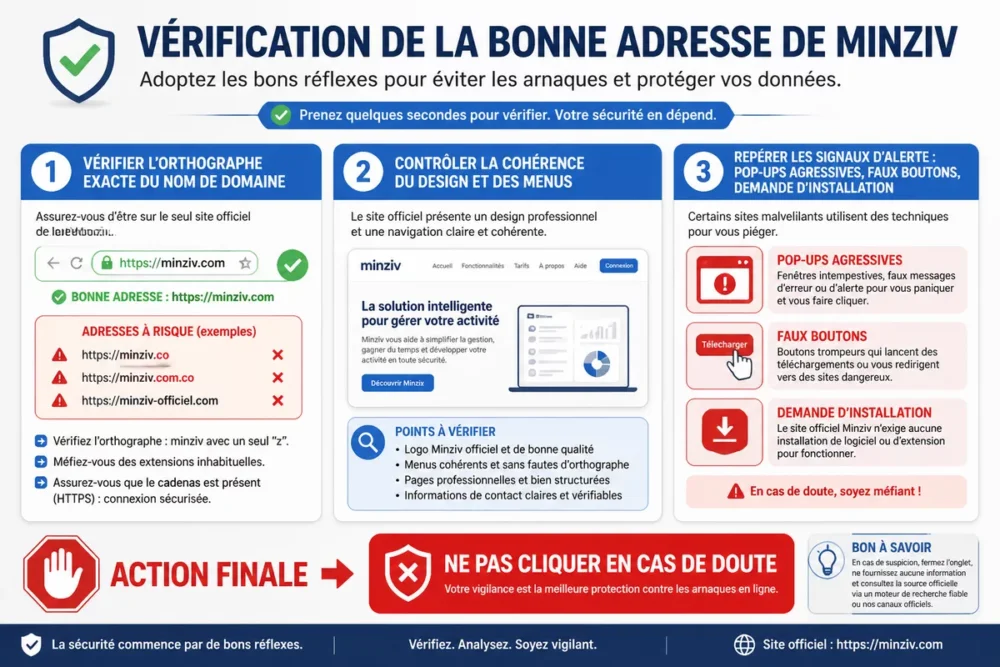
The correct address is the real starting point. If you open the wrong domain, you may encounter a clone, a trap redirect, or a page pushing you to install anything. Verification takes a minute but saves you much longer troubles.
Recognizing a reliable address
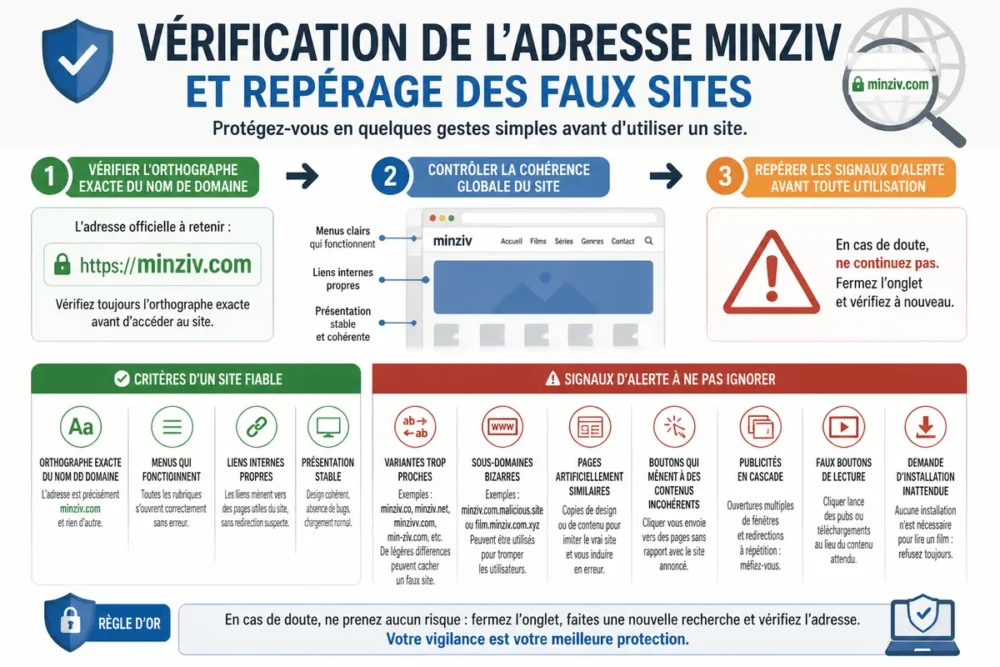
A credible site has overall consistency: correct spelling of the name, working menus, clean internal links, and stable presentation. If everything seems cobbled together or if the domain name looks “almost” right, you should slow down.
- Check the exact spelling of the domain name.
- Beware of very close variants or strange subdomains.
- Check if the pages all look artificially similar.
- See if buttons lead to coherent content.
Spotting warning signs
Fake sites often play the urgency card: aggressive pop-ups, fake play buttons, registration windows that pop up too quickly. As soon as a site asks you to install an unexpected extension or program, you must stop immediately.
- Ads that open in cascades as soon as you arrive on the page.
- “Play” buttons that redirect to unrelated pages.
- Unexpected registration or payment requests.
- Invitation to install a file, extension, or unofficial external player.
If the address seems “almost right” to you, it’s not good enough. When in doubt, close the tab and start over.
What technical prerequisites are needed before opening Minziv?
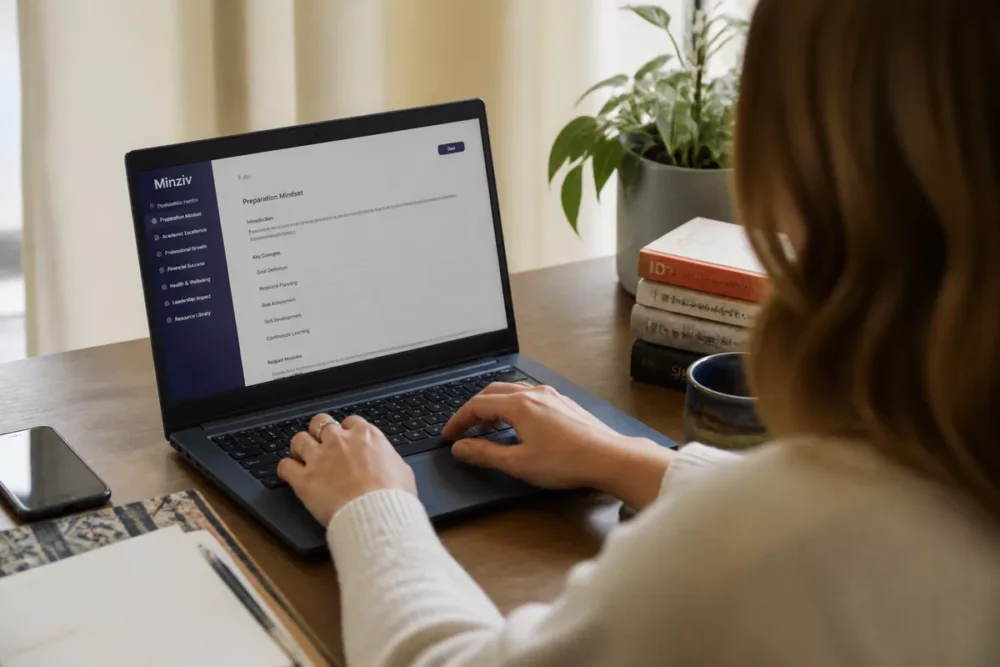
You generally don’t need heavy hardware to install Minziv in the practical sense. An up-to-date device, a modern browser, and some clean settings are often enough to start playback without hassle.
Check technical compatibility
The key point is browser compatibility with online video. If your system is a bit old or your browser is not up to date, display errors or players that don’t start become much more frequent.
- Operating system up to date, as much as possible.
- Recent and maintained browser.
- JavaScript enabled.
- Cookies allowed if the site depends on them.
- Video and audio playback not blocked by the browser.
Gather useful settings
Before multiplying attempts, prepare your basic settings. The goal is not to change everything but to keep a clean environment so that Minziv opens smoothly.
- Temporarily disable overly aggressive extensions if necessary.
- Check proxy, DNS, or firewall if you are on a particular network.
- Keep some free space for cache.
- Close unnecessary tabs to lighten the session.
How to access Minziv step by step?
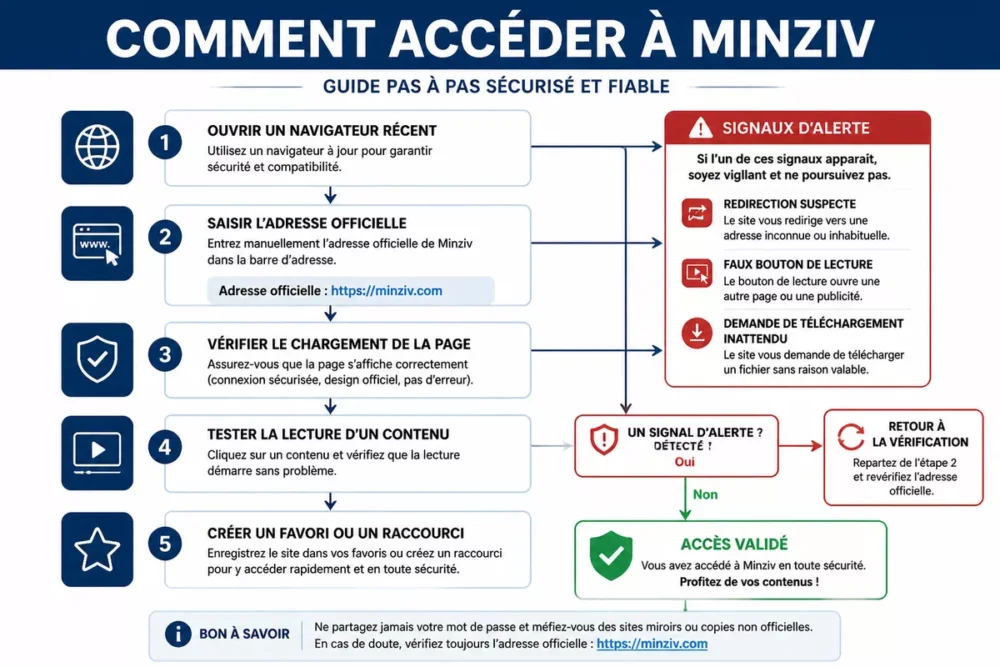
The right method involves a few steps but avoids many back-and-forths. If you want to install Minziv in the proper sense, start by opening it cleanly, then secure access, and finally create a convenient shortcut.
Open the site from the right browser
Enter the address in the URL bar, not in a search engine filled with sponsored results. If the site loads poorly, try another recent browser before overcomplicating things.
- Open up-to-date Chrome, Safari, Firefox, or Edge.
- Enter the official address in the URL bar.
- Check that the page displays without suspicious redirection.
- Test loading content before going further.
- If needed, add the page to your favorites.
Navigate the catalog
Once the page is open, locate the categories, internal search, and reading options. If you use the service often, the point is not just to enter it, but to quickly find what you’re looking for without getting lost again.
To understand how this daily use can save you time, also take a look at the practical uses of Minziv: it helps to see if the service really fits your way of consuming streaming.
Create a shortcut on mobile or computer
On mobile, adding the site to the home screen can replace an app. On a computer, a bookmark or favorite does the job without heavy installation, which often remains the cleanest option.
Cherry on top: you find Minziv with one click, without going through a search that might take you to the wrong domain.
What to do if Minziv doesn’t open or if playback is stuck?
When a page refuses to load, the most effective solution is not always the most spectacular. In practice, a blockage often comes from the cache, an extension, the browser, or the network, not the content itself.
Site inaccessible or address changed
Start by checking if the address has changed or if you have kept an old favorite. Then, try another browser, refresh the page, and see if the site responds elsewhere, without multiplying random attempts.
Video playback blocked
If the video doesn’t start, temporarily disable the most aggressive blockers, then clear the cache if needed. It’s often small technical frictions that break the player, not the screen itself.
- Check the Internet connection.
- Disable suspicious or too strict extensions.
- Try a new window or another browser.
- Control cookies and autoplay settings.
Compatibility and security issues
If the site is blocked by antivirus or firewall, take time to understand the cause before forcing anything. A security block is not a detail: it is sometimes a real warning signal, especially if the page pushes you to download something.
To stay cautious about online access, you can also consult these tips to secure your connection when using a shared network, public Wi-Fi, or a device that is not yours.
Minziv compared to streaming alternatives
If your priority is simplicity, Minziv may suit you for quick web access. If your priority is stability, clarity of the offer, and long-term availability, a known legal alternative often remains more comfortable on a daily basis.
| Option | For whom | Main advantage | Limit to be aware of |
|---|---|---|---|
| Minziv | User who wants simple web access | Quick opening in a browser | Address and stability to be checked depending on the time |
| Netflix | Person looking for a very curated catalog | Stable interface and very widespread use | Paid subscription |
| Prime Video | User already in the Amazon ecosystem | Integrated access to an existing account | Catalog and navigation sometimes less clear depending on usage |
| Pluto TV | Profile wanting free and simple | Free access to part of the catalog | More limited choice than on paid services |
The right choice mainly depends on your tolerance for technical hiccups. If you want to compare usage, cost, and service logic, the article Minziv free or paid helps to see more clearly without getting lost in vague promises.
When a service often changes access or behavior, the best “configuration” is sometimes the simplest: a clean browser, a shortcut, and realistic expectations.
How to decide based on your usage?
If you watch content occasionally and accept a more variable experience, Minziv may suffice. If you want a stable interface, clear rules, and fewer surprises, a well-established mainstream platform will often be more reassuring.
- Occasional use: quick web access, simple shortcut, vigilance on the address.
- Regular use: browser stability, favorites, and extension cleanup.
- Use without surprises: legal service with clearer conditions and support.
To remember
- 🔎 Minziv often opens in a browser, not via a real installation.
- 🛡️ The correct address matters as much as the content itself.
- ⚙️ Updated browser, clean cache, and active cookies simplify access.
- 🚫 A fake play button or a file to download should alert you.
- 📌 A well-placed shortcut is better than a complicated setup.
Your questions about Minziv
Is Minziv installed like an application?
Not really, in most cases. It is more about web access: you open the service in a browser and possibly add a shortcut. If a page offers you an unexpected download, be wary.
Should I use a VPN to access Minziv?
A VPN can sometimes help protect your connection, but it does not solve a bad link, a fake site, or a broken player. Before thinking about a VPN, first check the address, browser, and basic settings.
How to know if the Minziv address is correct?
Look at the exact spelling of the domain, then check the overall consistency of the site. If you see strange redirects, aggressive pop-ups, or unexpected installation requests, stop access immediately.
What to do if the video does not start?
Start by changing the browser, temporarily disabling overly strict extensions, and clearing the cache. If the blockage persists, test your connection and cookie or autoplay settings.
Which legal alternatives to Minziv should I choose?
If you mainly seek stability, services like Netflix, Prime Video, or Pluto TV are simpler benchmarks to verify. The right choice mainly depends on your budget, desired catalog, and tolerance for access changes.









