.en-bref { max-width: auto; margin: 2em auto; padding: 1.5em 1.8em; color: #78350f; font-family: “Inter”, “Segoe UI”, sans-serif; text-align: left; position: relative; box-sizing: border-box; background: #fff2d7; border: 0; border-left: 0px solid #b45309; border-radius: 0; box-shadow: none; }
.en-bref h2, .en-bref .en-bref-header { font-size: 1.15em; font-weight: 700; margin-bottom: 0.6em; color: #b45309; }
.en-bref p, .en-bref li { font-size: 1em; line-height: 1.65; margin: 10px; }
.en-bref strong { color: #451a03; }
.mg-callout{margin:1.5em 0;padding:.9em 1.1em;border:1px solid;border-left-width:4px;border-radius:10px;font-size:.97em;line-height:1.65}.mg-callout>:first-child{margin-top:0}.mg-callout>:last-child{margin-bottom:0}.mg-callout__label{display:block;margin:0 0 .35em;font-weight:700;font-size:.82em;letter-spacing:.03em;text-transform:uppercase}.mg-callout__label::before{margin-right:.45em;font-size:1.05em;vertical-align:-.06em}.mg-callout–info{background:#eff6ff;border-color:#bfdbfe;color:#1e3a5f}.mg-callout–info .mg-callout__label{color:#2563eb}.mg-callout–info .mg-callout__label::before{content:”\2139\FE0F”}.mg-callout–tip{background:#f0fdf4;border-color:#bbf7d0;color:#14532d}.mg-callout–tip .mg-callout__label{color:#15803d}.mg-callout–tip .mg-callout__label::before{content:”\1F4A1″}.mg-callout–warning{background:#fffbeb;border-color:#fde68a;color:#7a4a10}.mg-callout–warning .mg-callout__label{color:#b45309}.mg-callout–warning .mg-callout__label::before{content:”\26A0\FE0F”}.mg-callout–danger{background:#fef2f2;border-color:#fecaca;color:#7f1d1d}.mg-callout–danger .mg-callout__label{color:#dc2626}.mg-callout–danger .mg-callout__label::before{content:”\1F6D1″}.mg-proscons{display:grid;grid-template-columns:1fr 1fr;gap:16px;margin:1.5em 0}@media(max-width:560px){.mg-proscons{grid-template-columns:1fr}}.mg-proscons__col{padding:.9em 1.1em;border:1px solid;border-radius:10px}.mg-proscons__title{display:flex;align-items:center;gap:.4em;margin:0 0 .5em;font-weight:700;font-size:.9em;letter-spacing:.02em}.mg-proscons__col ul{margin:.3em 0 0;padding-left:1.15em}.mg-proscons__col li{margin:.3em 0;line-height:1.55}.mg-proscons__col–pro{background:#f0fdf4;border-color:#bbf7d0;color:#14532d}.mg-proscons__col–pro .mg-proscons__title{color:#15803d}.mg-proscons__col–pro .mg-proscons__title::before{content:”\2705″}.mg-proscons__col–con{background:#fef2f2;border-color:#fecaca;color:#7f1d1d}.mg-proscons__col–con .mg-proscons__title{color:#dc2626}.mg-proscons__col–con .mg-proscons__title::before{content:”\274C”}ol.mg-steps{list-style:none!important;counter-reset:mgstep;margin:1.6em 0;padding-left:0!important}ol.mg-steps>li.mg-steps__item{counter-increment:mgstep;list-style:none!important;padding-left:0!important;padding-bottom:1.4em}ol.mg-steps>li.mg-steps__item:last-child{padding-bottom:0}ol.mg-steps>li.mg-steps__item>:last-child{margin-bottom:0}ol.mg-steps>li.mg-steps__item>.mg-steps__title{margin:0 0 .25em;font-weight:600}ol.mg-steps>li.mg-steps__item>.mg-steps__title::before{content:counter(mgstep) “. “;opacity:.45;font-weight:500;font-variant-numeric:tabular-nums}ol.mg-steps>li.mg-steps__item:not(:has(.mg-steps__title))::before{content:counter(mgstep) “. “;opacity:.45;font-weight:500;font-variant-numeric:tabular-nums}.mg-kpis{display:grid;grid-template-columns:repeat(auto-fit,minmax(140px,1fr));gap:14px;margin:1.5em 0}.mg-kpi{padding:1em .9em;border:1px solid #e5e7eb;border-radius:12px;background:#f9fafb;text-align:center}.mg-kpi__value{display:block;font-size:1.7em;font-weight:800;line-height:1.15;color:#111827}.mg-kpi__label{display:block;margin-top:.35em;font-size:.85em;color:#6b7280;line-height:1.35}
.wp-block-image,.ai-image{margin-bottom:1.75em}.wp-block-image>figcaption,.ai-image>figcaption{margin-top:.5em}
.magic-lb-overlay{position:fixed;inset:0;background:rgba(15,23,42,.92);display:none;align-items:center;justify-content:center;z-index:99999;cursor:zoom-out;padding:20px}
.magic-lb-overlay.open{display:flex}
.magic-lb-overlay img{max-width:95vw;max-height:95vh;object-fit:contain;border-radius:8px;box-shadow:0 8px 32px rgba(0,0,0,.5)}
.magic-lb-close{position:absolute;top:16px;right:20px;color:#fff;background:rgba(0,0,0,.5);border:none;width:40px;height:40px;border-radius:50%;font-size:24px;cursor:pointer;display:flex;align-items:center;justify-content:center}
.magic-lb-close:hover{background:rgba(0,0,0,.8)}
.wp-block-image img{cursor:zoom-in;transition:transform .15s ease}
.wp-block-image img:hover{transform:scale(1.01)}
.magic-img-link{display:inline-block;text-decoration:none}
(function(){
var ov=document.getElementById(‘magic-lb’);if(!ov)return;
var img=ov.querySelector(‘img’),btn=ov.querySelector(‘.magic-lb-close’);
function open(src){img.src=src;ov.classList.add(‘open’);document.body.style.overflow=’hidden’}
function close(){ov.classList.remove(‘open’);img.src=”;document.body.style.overflow=”}
document.addEventListener(‘click’,function(e){
var a=e.target.closest(‘a.magic-img-link’);
if(a){e.preventDefault();open(a.getAttribute(‘href’));return}
var i=e.target.closest(‘.wp-block-image img’);
if(i&&!e.target.closest(‘a’)){e.preventDefault();open(i.currentSrc||i.src)}
});
ov.addEventListener(‘click’,function(e){if(e.target===ov||e.target===btn)close()});
document.addEventListener(‘keydown’,function(e){if(e.key===’Escape’)close()});
})();
A Robux purchase not received must first be verified in the correct Roblox account and in the payment method history. Do not repurchase immediately: identify if the transaction is declined, pending, canceled, or definitively charged, then contact the party who actually processed the purchase with the receipt and transaction ID.
An unchanged balance alone does not prove that the payment is lost. Robux may be associated with another Roblox session, while an amount reserved by the bank may still disappear if the order is canceled.
In brief
🔎 First check the Roblox account, bank status, and transaction history before placing any new order.
🧾 Keep the receipt, amount, date, platform, and transaction ID, but mask sensitive data.
📱 Refunds or processing depend on the channel that received the payment: Roblox, Apple, Google, Microsoft, Xbox, PlayStation, or gift card vendor.
🛡️ In case of unauthorized purchase, secure the account and payment method before filing a claim.
Identify the situation before repurchasing Robux
A Robux purchase not received can correspond to several different situations. The status displayed by the bank or store indicates the first step: wait for confirmation of an order in process, verify a cancellation, compare a confirmed charge with Roblox history, or report an unknown operation. No refund is automatic.
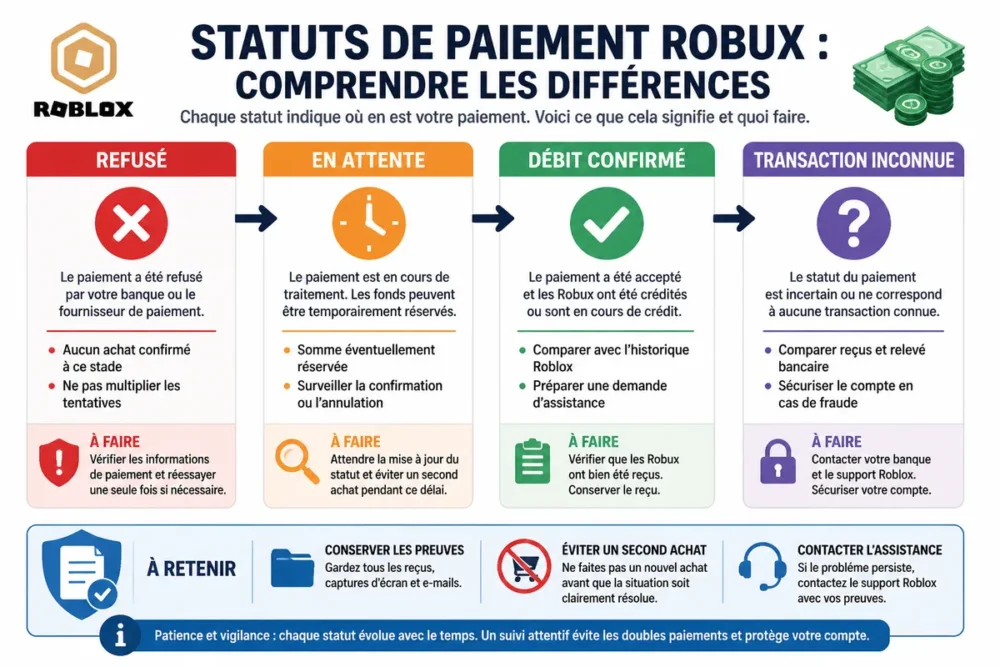
Do not repurchase Robux now.
A declined payment should not be treated as a delivered purchase. A temporary bank authorization corresponds to a reserved amount, not necessarily a final charge. A pending payment remains to be monitored, while a confirmed charge with missing Robux justifies filing a case with the seller or relevant support.
Unchanged balance, pending debit or final debit: what this changes
The wording of the bank transaction must be read with its exact status. The mentions “pending,” “authorization,” “canceled,” “refused,” or “completed” do not describe the same stage of the payment. A reserved amount can be released without becoming a final debit; only the bank confirms the status of its transaction.
When the debit is final and the Roblox history does not contain the purchase, the file must gather information from both sides: payment reference and Roblox account used. When the transaction is still pending, a premature request may be redirected to the payment platform or remain without effect.
Information to keep from the start
Keep the receipt, date, amount, platform used, name of the account concerned, and transaction ID. These elements allow matching a bank line, an Apple or Google order, a console purchase, and the Roblox history.
- Mask the full card number, the security code, and any unnecessary banking data in screenshots.
- Never share your Roblox password, a security code, or the full code of a gift card.
- Keep confirmation emails, case numbers, and support responses.
Perform Roblox checks in the correct order
The connected account is the first point to check. Roblox is a service that associates Robux with the user account that made or received the purchase, not simply with the device used. An open session on a family or shared device can therefore display a balance different from the expected one.
-
Confirm the account
Check the username, the associated email address, and the Roblox account open on the purchase device.
-
Refresh the session
Close then reopen Roblox, log back in, and check the balance from the official site or another device. Do not delete receipts or evidence.
-
Compare histories
Search for the transaction by date, amount, and purchase type in the Roblox history, then compare it with the store or payment method receipt.
-
Qualify the discrepancy
Note if the payment is absent, pending, canceled, or confirmed. This qualification determines which support to contact.
Confirm that the purchase was made on the correct Roblox account
The username must correspond to the account used during the purchase. Also check session changes, the associated email address, and the Roblox profile open on the family device, phone, or console.
Robux credited to the wrong account cannot be assumed transferable. Report the error precisely to support without promising that a transfer or correction will be accepted.
Check the balance and transaction history
Roblox support recommends consulting information related to Robux and receipts from the concerned account. The official page “Where are my Robux?” helps verify the account and balance, while the Roblox purchase receipt history allows finding the payment channel.
A refresh can correct a delayed display, but it does not turn a refused payment into a confirmed purchase. The transaction history and receipt remain the most useful elements to distinguish a display problem from a truly undelivered order.
Verify the payment depending on where the purchase was processed
The support to contact depends on the seller who processed the payment. An in-app purchase on a phone is primarily handled by the store associated with the Apple or Google account, while a purchase made within the Roblox environment may require Roblox support. Interfaces and refund rules may evolve depending on the country and platform.
| Purchase Channel | Priority Verification | Contact to Reach | Useful Evidence |
|---|---|---|---|
| Roblox website or app | Receipt, connected account, and Roblox history | Roblox Support | Username, receipt, date, amount, and reference |
| iPhone or iPad | Apple account and order history | Apple or Roblox depending on the displayed procedure | Apple receipt and order ID |
| Android | Google Play account and order status | Google Play or Roblox depending on payment processing | Google Play receipt and transaction ID |
| Xbox or PlayStation | Console profile, store account, and Roblox account | Console platform or Roblox | Console receipt, used profile, and reference |
| Robux gift card | Entered account, code validation, and activation | Seller or Roblox support | Physical card, receipt, and activation proof |
Purchase on the Roblox website or app
Compare the receipt, bank status, and Roblox history. If the debit is confirmed and the Robux remain missing after verifying the account and session, prepare a request to Roblox support with the available references.
Robux generators, sites offering free Robux, and pages requesting credentials are not a valid recourse. They may expose the account to fraudulent recovery or data theft.
In-app purchase on iPhone, iPad, or Android
Check the Apple or Google account used for payment and open its order history. The status “completed,” “cancelled,” or “pending” must be noted before any request; the store name usually appears on the receipt.
For Android, the official Roblox resources dedicated to purchase issues and the Google Play history should be consulted together. Store support can be the first contact when the store has processed the purchase, but Roblox support may also be necessary for a credit problem on the account.
Purchase on Xbox, PlayStation, or other console
Check separately the player profile, the console store account, and the associated Roblox account. The console wallet, in-app purchase, and Robux balance are three distinct elements that must not be confused.
Find the receipt and order status in the platform’s history. Since Microsoft, Xbox, PlayStation, and Roblox instructions may change, use only their official help pages at the time of the procedure.
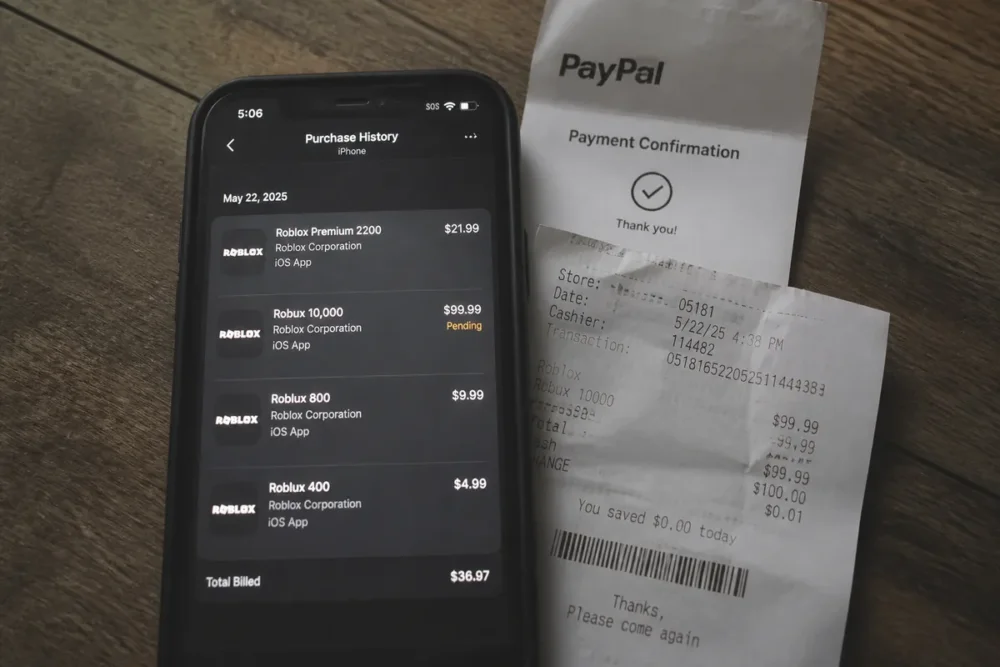
Uncredited Robux gift card
Verify that the code was entered on the correct Roblox account and that the exchange was validated. Keep the physical card, receipt, and any activation proof: the seller or Roblox may request these items to review the transaction.
Never publish the full code in a screenshot or an unofficial conversation. A visible code can be used by someone else before your request is reviewed.
Contact the right party with a complete file
The seller or platform that processed the payment must be identified before sending a claim. A useful request indicates the Roblox account, date, amount, channel, transaction status, and receipt reference, without including passwords or full banking data.
Submitting a request to Roblox support
Use the official page Contact Roblox Support. Describe the problem with verifiable facts: missing Robux, payment confirmed or not, concerned account, platform used, and transaction number.
Attach only the necessary evidence, after masking the full card number, the cryptogram, security codes, and any personal information unrelated to the purchase. Roblox support may request additional details; the initial submission should remain limited to the relevant file.
Requesting help or a refund from the payment platform
For an in-app purchase, follow the procedure of the store that processed the purchase. The request must include the exact status of the order and the actual reason: undelivered purchase, accidental purchase, double charge, or unauthorized transaction.
A refund is not automatic. Eligibility depends on the platform, the country, the order status, and the information provided.
The bank or payment provider should not be contacted first for a simple pending payment. In case of clear fraud, securing the payment method becomes a priority; in other cases, first document the exchanges with the seller and the store.
Responding in case of double charge, fraud, or unauthorized purchase
Undelivered Robux and an unknown transaction are not the same incident. The first concerns the delivery or display of an identified purchase; the second may reveal unauthorized use of the account, payment method, or family account.
Double charge or unknown charge
Compare each bank statement line with the receipts and Roblox transaction history. A double charge is only established after this reconciliation; two notifications or two temporary holds do not necessarily prove two final payments.
Quickly report an unknown transaction to the seller, the platform, then the payment provider depending on the context. Keep records of communications and do not immediately block the bank card for a simple pending payment.
Purchase made by a child without authorization
Change the password if unauthorized use is suspected, check active sessions, and strengthen available protections. Remove or restrict saved payment methods when possible.
The Roblox parental control can help better supervise account use, but it does not replace the platform’s claim procedure that processed the purchase.
When to seek external assistance
If the seller and payment platform do not respond or refuse the request, summarize the steps taken, dates, case numbers, and documents sent. Then check the applicable rights in your country with an official consumer protection agency.
Suspected fraud requires prompt reporting to the payment provider and, depending on circumstances, to the competent authority. A persistent commercial dispute may justify consulting a legal professional; no procedure alone guarantees recovery of Robux or the amount paid.
Frequently asked questions about Robux not received after payment
Answers depend on the actual status of the transaction and the purchase channel. First check the Roblox account and order history, then use the official procedure of the platform that processed the payment.
How long to wait after purchasing Robux?
There is no universal guaranteed timeframe here. Check the order status with the bank or store, then verify the Roblox history before contacting support if the charge is confirmed and Robux are missing.
My account was charged but Robux do not appear: what to do?
Verify the username, log back in, and compare the Roblox history with the receipt. If payment is confirmed, contact Roblox support or the platform that processed the purchase with the date, amount, and transaction ID.
Who to contact first for a Roblox purchase refund?
Contact first the platform that processed the payment. For an in-app purchase, this is usually the relevant store; for a credit issue on the Roblox account, Roblox support may also need to review the case.
Can Robux credited to the wrong account be recovered?
Do not assume a transfer will be possible. Report the purchase to support with both accounts involved if known, the receipt, and transaction reference, without sharing any password.
What to do in case of a double Roblox charge?
Reconcile the two bank lines with receipts and Roblox history. Then request verification from the seller or store, attaching both references; a pending bank hold does not necessarily constitute a final double charge.
How to respond to an unauthorized Robux purchase by a child?
Secure the account, check active sessions, and remove saved payment methods. File a claim with the platform that processed the purchase, as refund acceptance depends on its rules and the case.
Can a Robux gift card that was activated but not credited be verified?
Yes, prepare the physical card, receipt, proof of activation, and the account used during the exchange. Never share the full code with an unofficial contact and use the seller’s or Roblox’s help channels.
The safest approach is to establish the actual status of the transaction, avoid any new purchase, then contact the party that actually processed the payment with evidence limited to what is necessary.









