.synthesis { max-width: 640px; margin: 2em auto; padding: 1.5em 1.8em; color: #3a2d0d; font-family: “Inter”, “Segoe UI”, sans-serif; text-align: left; position: relative; box-sizing: border-box; background: #f7f9f9; border: 1px solid #10b58b; border-left: 6px solid #10b58b; border-radius: 12px; box-shadow: 0 8px 24px rgba(251, 191, 36, 0.15); }
.synthesis h2, .synthesis .synthesis-header { font-size: 1.15em; font-weight: 700; margin-bottom: 0.6em; color: #d97706; }
.synthesis p, .synthesis li { font-size: 1em; line-height: 1.65; margin: 10px; }
.synthesis strong { color: #1c1917; }
.synthesis table { width: 100%; border-collapse: collapse; }
.synthesis th { background: rgba(16, 181, 139, 0.12); color: #d97706; text-align: left; }
.synthesis td, .synthesis th { padding: 8px 12px; border-bottom: 1px solid rgba(16, 181, 139, 0.18); vertical-align: top; }
.synthesis tbody tr:nth-child(even) { background: rgba(16, 181, 139, 0.05); }
.key-takeaways { max-width: 640px; margin: 2em auto; padding: 1.5em 1.8em; color: #3a2d0d; font-family: “Inter”, “Segoe UI”, sans-serif; text-align: left; position: relative; box-sizing: border-box; background: #f7f9f9; border: 1px solid #10b58b; border-left: 6px solid #10b58b; border-radius: 12px; box-shadow: 0 8px 24px rgba(251, 191, 36, 0.15); }
.key-takeaways h2, .key-takeaways .key-takeaways-header { font-size: 1.15em; font-weight: 700; margin-bottom: 0.6em; color: #d97706; }
.key-takeaways p, .key-takeaways li { font-size: 1em; line-height: 1.65; margin: 10px; }
.key-takeaways strong { color: #1c1917; }
.key-takeaways ul { list-style: none; padding-left: 0; }
.key-takeaways li { margin: 0.45em 0; padding-left: 0.2em; }
.magic-pdf-download{margin:2em 0;padding:1.25em 1.5em;border:1px solid #e3e6ea;border-left:4px solid #0ea5e9;border-radius:10px;background:#f8fafc;display:flex;align-items:center;gap:1.2em;flex-wrap:wrap}.magic-pdf-download .mpd-txt{flex:1;min-width:220px}.magic-pdf-download .mpd-txt strong{display:block;font-size:1.05em;color:#0f172a;margin-bottom:.15em}.magic-pdf-download .mpd-txt span{color:#64748b;font-size:.92em}.magic-pdf-download a.mpd-btn{display:inline-block;background:#0ea5e9;color:#fff;text-decoration:none;padding:.7em 1.5em;border-radius:8px;font-weight:600;white-space:nowrap}.magic-pdf-download a.mpd-btn:hover{background:#0284c7}
.magic-lb-overlay{position:fixed;inset:0;background:rgba(15,23,42,.92);display:none;align-items:center;justify-content:center;z-index:99999;cursor:zoom-out;padding:20px}
.magic-lb-overlay.open{display:flex}
.magic-lb-overlay img{max-width:95vw;max-height:95vh;object-fit:contain;border-radius:8px;box-shadow:0 8px 32px rgba(0,0,0,.5)}
.magic-lb-close{position:absolute;top:16px;right:20px;color:#fff;background:rgba(0,0,0,.5);border:none;width:40px;height:40px;border-radius:50%;font-size:24px;cursor:pointer;display:flex;align-items:center;justify-content:center}
.magic-lb-close:hover{background:rgba(0,0,0,.8)}
.wp-block-image img{cursor:zoom-in;transition:transform .15s ease}
.wp-block-image img:hover{transform:scale(1.01)}
.magic-img-link{display:inline-block;text-decoration:none}
(function(){
var ov=document.getElementById(‘magic-lb’);if(!ov)return;
var img=ov.querySelector(‘img’),btn=ov.querySelector(‘.magic-lb-close’);
function open(src){img.src=src;ov.classList.add(‘open’);document.body.style.overflow=’hidden’}
function close(){ov.classList.remove(‘open’);img.src=”;document.body.style.overflow=”}
document.addEventListener(‘click’,function(e){
var a=e.target.closest(‘a.magic-img-link’);
if(a){e.preventDefault();open(a.getAttribute(‘href’));return}
var i=e.target.closest(‘.wp-block-image img’);
if(i&&!e.target.closest(‘a’)){e.preventDefault();open(i.currentSrc||i.src)}
});
ov.addEventListener(‘click’,function(e){if(e.target===ov||e.target===btn)close()});
document.addEventListener(‘keydown’,function(e){if(e.key===’Escape’)close()});
})();
Is Minziv secure? Checks to do before using it
When trying to assess Minziv security, the real question is not just “does the site load?”, but rather “to what extent does using it expose your device, your data, and your browsing?”. With this type of service, the risk often comes less from the displayed content than from redirects, fake players, and clones that imitate the original interface.
In this article, we review the concrete technical risks, useful checks before clicking, and cleaner alternatives if you prefer a more transparent solution. The goal is simple: to help you decide quickly, with concrete criteria, whether Minziv is worth a try or if you’d better move on.
| 📌 | Definition: Minziv’s security mainly depends on the visited address, intermediate pages, and granted permissions. |
| ⚠️ | Main risk: fake buttons, pop-ups, redirects, and clones that push you to click too quickly. |
| 🔎 | Useful check: consistent URL, HTTPS, legal notices, privacy policy, and the actual behavior of the site. |
| 🛡️ | Good practice: reduce permissions, keep your browser and antivirus up to date, and avoid unnecessary accounts. |
| 🧭 | Warning sign: extension requests, forced notifications, or downloads before even watching. |
| 🆚 | Safer alternative: favor legal and transparent platforms if you want to reduce risks. |
In brief
Minziv is not “safe” by default: it all depends on the address used, redirects, and granted permissions.
The most common trap remains the fake player or clone that pushes you to click without checking.
A VPN can mask your IP, but it does not block phishing or malware.
If you want to limit risks, check the URL, legal notices, and permissions before any use.
Minziv security: what exactly are we talking about?
Minziv security is not just about an HTTPS lock or a fast-loading page. It concerns the site’s reliability, protection of your device, respect for your data, and, depending on the content offered, the legality of what you are viewing.
If you are starting from scratch, the guide on understanding Minziv in practice complements the reading well, because it puts the general functioning before the security question. In other words, it’s better to know what you’re looking at before checking if it’s clean.
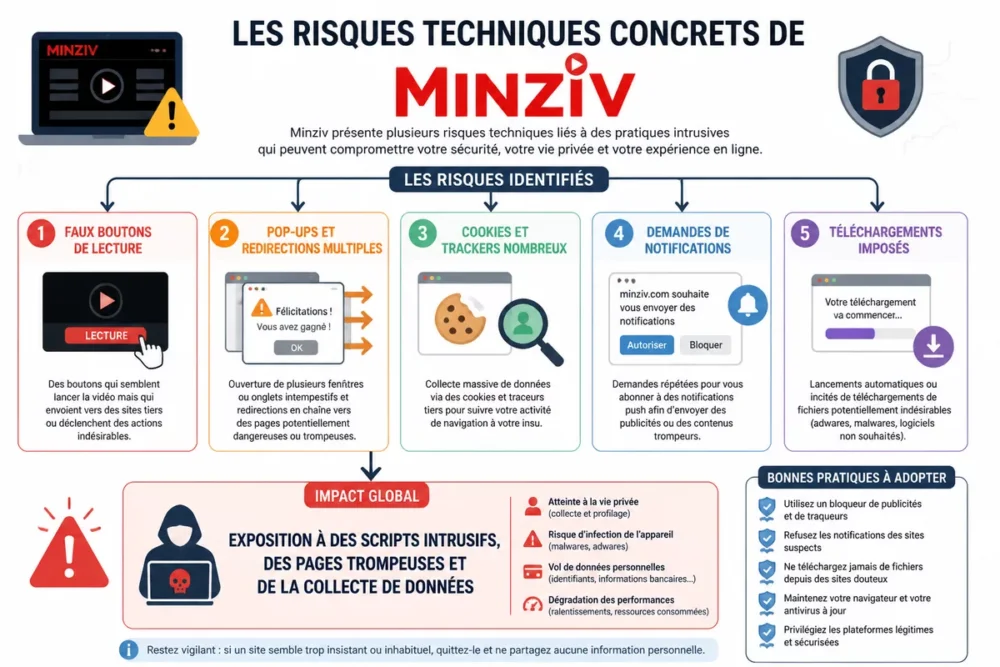
What concrete technical risks should you know before using Minziv?
The risk is not abstract: it often materializes through aggressive ads, redirects, fake play buttons, or pages that ask you for unnecessary actions. The main danger is confusing the access interface with the real content, then authorizing too quickly what should never have been authorized.
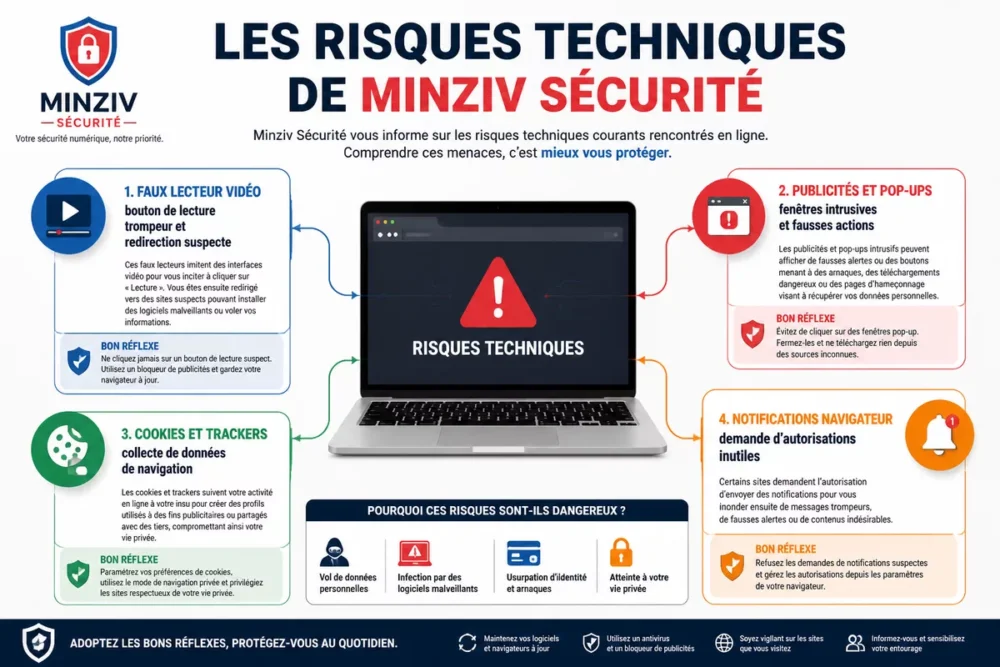
A site can appear smooth and still expose you to redirects, trackers, and false actions.
The most common technical risks can be quickly identified if you keep your eyes open. Here are the signals that most often appear with this type of service:
- Fake play buttons: they look like a video player but sometimes trigger an external page or disguised advertisement.
- Pop-ups and multiple redirects: each additional jump increases the chances of encountering intrusive scripts or deceptive pages.
- Numerous cookies and trackers: not all are dangerous, but they can track your browsing in a more or less opaque way.
- Notification requests: if the site tries to push you to allow alerts, be wary, as this channel is often used to push unwanted content.
- Forced downloads: a site that requires an extension or file to play a video deserves a serious red flag.
What criteria to check before using Minziv?
Before testing Minziv, the right reflex is to check the site’s consistency, not just its appearance. If the URL changes often, if the legal notices are vague, or if the service pushes you to accept unnecessary permissions, caution should prevail.
- Exact URL: compare the address with the one provided by a reliable source and beware of very close variants.
- Consistent HTTPS: the padlock does not guarantee content reliability, but its absence or poor configuration remains a bad sign.
- Privacy policy: check what is collected, stored, and possibly shared.
- Terms of use: a clear page is better than artistic vagueness, especially if the site requires an account.
- Credible contact details: a contact, a support address, or a clear editorial identity help gauge the seriousness of the service.
- Site behavior: an excess of ads, redirects, or notification requests is rarely a good sign.
- Local protection: an up-to-date browser, active antivirus, and blocking suspicious downloads remain useful basics.
If Minziv offers several plans, the article on Free vs Paid Minziv helps compare without confusing economy and security. Just because a version is free does not necessarily mean it is risky, but the access conditions then deserve even more reading.
How to recognize the official Minziv address and avoid clones?
The official address, if communicated by the publisher, should remain your only reference point. In practice, a clone is often identified by an almost identical URL, chain redirects, and an interface that pushes you to allow notifications or click on a fake play button.
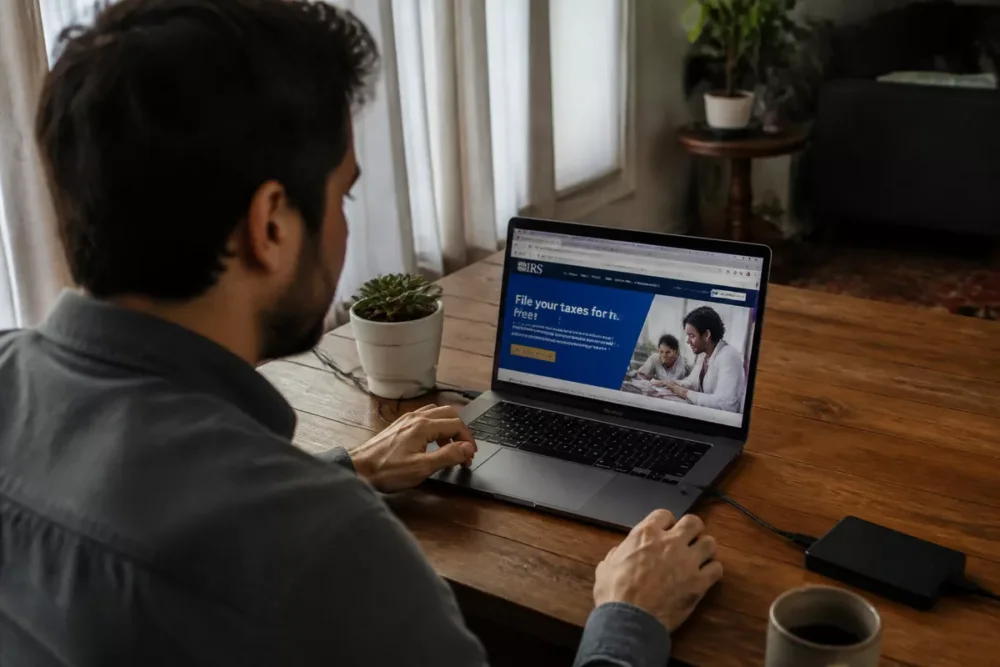
Here are the most useful signs to sort the real from the fake:
- Suspicious domain name: an extra letter, a strange dash, or an incoherent extension can sometimes fool a hurried eye.
- Approximate interface: blurry logos, awkward texts, broken menus, or poorly aligned pages are clues not to be brushed off.
- Intrusive advertisements: the more the site forces you to bypass windows, the higher the probability of a clone.
- Request for extension or notification: if access to content depends on one too many authorizations, the site may be seeking something other than your comfort.
- Sharing via unverified link: a link seen on a forum, in a message, or on social media always deserves cross-checking.
How to check Minziv before using it: the steps
The right method takes just a few minutes if you stay methodical. The real security gain comes from a series of simple small checks, not a magic gadget or obscure setting.
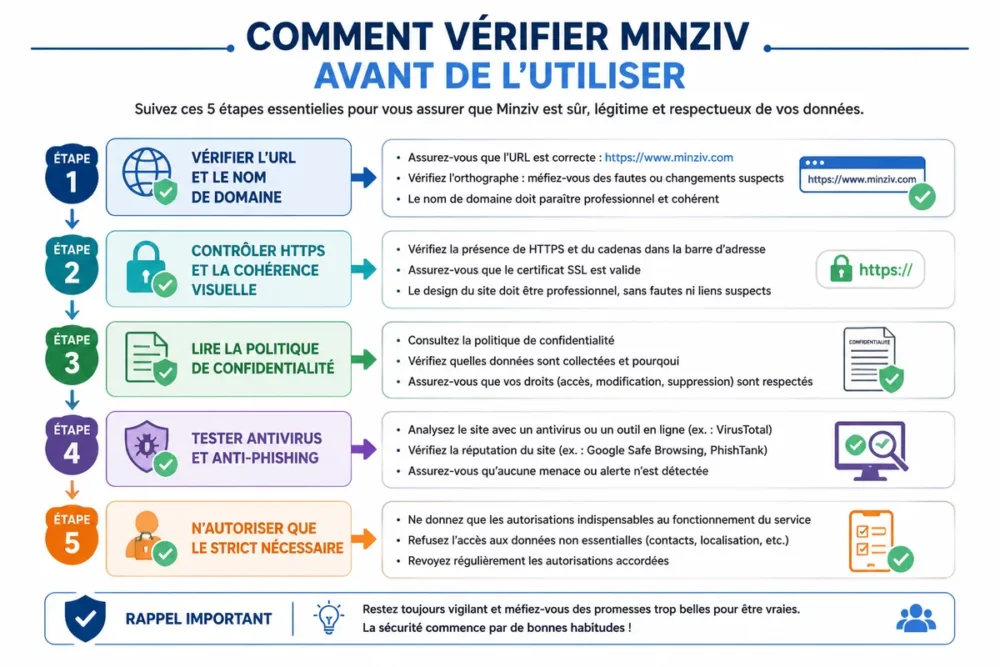
- Check the URL: verify the domain name character by character, especially if you arrived via a shared link.
- Inspect the homepage: look for legal notices, privacy policy, and signs of graphic consistency.
- Test the behavior: if a click opens multiple windows, offers a download, or forces a notification, stop there.
- Run a security check: keep your antivirus and browser up to date before proceeding.
- Decide the level of use: occasional use, personal device, separate account, or more reliable alternative, depending on your risk tolerance.
If you want to start from a clean base, the guide to installing and configuring Minziv can help set up the environment before any browsing. The idea is not to lock everything down excessively, but to limit unnecessary openings from the start.
Is Minziv secure for daily use?
For daily use, the short answer is cautious: not necessarily, especially if the service relies on clones, intrusive ads, or broad permissions. The more often you return, the more traces, potential accounts, and open sessions you leave, so the cumulative risk increases.
On a well-protected personal device, with little shared information and careful browsing, the risk remains more contained. However, on a family computer, a workstation, or an already logged-in session, careless mistakes quickly become problematic.
The page on frequently asked questions about Minziv can also complement this point if you are looking for concrete cases of access, compatibility, or support. This is not the same topic as pure security, but the two are linked as soon as you need to log in or reuse a device.
Does the VPN really protect with Minziv?
A VPN can hide your IP address and reduce the visibility of your browsing on certain networks, especially on public Wi-Fi. But it does not protect against a fake site, malware, or a fake download button. In other words, it covers part of the route, not the content you agree to load.
A VPN does not make a site safe: it masks the connection, not the site’s traps themselves.
The VPN therefore has a limited but real interest, provided you see it for what it is: a partial privacy tool, not an all-risk insurance. It remains useful to reduce exposure on an unreliable network, but it never replaces verifying the address, permissions, and page behavior.
What mistakes should be avoided with Minziv?
The most costly mistakes are often the most mundane. The problem is not just encountering a suspicious site, but giving it too quickly the rights or attention it seeks to obtain.
- Click on the first button you see: a “play” button can very well hide an advertising redirect.
- Allow notifications: this reflex opens a door to permanent follow-ups, often annoying to close afterwards.
- Install an extension without a clear source: an unknown extension can read your pages, track your browsing, or inject ads.
- Reuse a password: if you create an account, a password already used elsewhere increases the impact of a potential leak.
- Forget to log out: on a shared device, an open session can sometimes expose your history or preferences.
What good practices should be applied to strengthen security with Minziv?
If you decide to use it anyway, it is better to minimize the attack surface as much as possible. The right reflex is not to check everything, but to remove permissions, extensions, and habits that unnecessarily expose you.
- Keep your browser, system, and antivirus up to date.
- Disable browser notifications if they are not essential.
- Use a separate browser profile to isolate history and cookies.
- Avoid any unnecessary downloads, even if they seem related to playback.
- Close sessions after use, especially on a shared or professional device.
- Regularly check installed extensions and remove those no longer needed.
Like solutions to protect all your accounts, safer usage often comes from small routines, not from a big miracle promise. A clean browser, unique passwords, and limited permissions are better than blind trust.
What safer and legal alternatives to Minziv exist?
If your priority is to watch content without struggling with clones, redirects, and dubious permissions, a legal alternative will often be more comfortable. The real choice is not just “free or paid,” but “simple, transparent, and low-risk” versus “free but sometimes messy.”
| Alternative | Main advantage | Limitation | For whom? |
|---|---|---|---|
| France.tv | Replay, French content, clear interface | Catalog dependent on rights and broadcast periods | If you want mainstream content with little friction |
| ARTE.tv | Documentaries, culture, simple and free access | Less focused on mainstream films/series | If you seek a calm and editorialized access |
| Pluto TV | Free offer funded by advertising | Forced ads and variable catalog | If you accept ads in exchange for access without subscription |
In practice, France.tv and ARTE.tv are often the clearest options if you primarily seek peace of mind. Pluto TV may be suitable if you accept advertising interruptions, while a service like Minziv should be approached with more caution as soon as it multiplies ambiguous signals.
Useful sources to consult
On a topic like Minziv security, the smartest approach is to cross-check with official sources. Here are three useful references to verify the most common risks:
- CNIL — Cookies and other trackers: useful to understand what a site can record via trackers and why the cookie banner deserves to be read.
- Cybermalveillance.gouv.fr: useful to identify phishing, fake sites, malware, and basic reflexes in case of doubt.
- ANSSI: useful for best practices on updates, browsing, and reducing the attack surface.
Key Takeaways
- 🔐 Minziv is not secure by default: the URL and permissions make all the difference.
- 🧨 Fake buttons, clones, and redirects are the most common traps.
- 🛡️ A VPN helps with privacy, but does not block phishing or malware.
- 🧭 Checking the address, legal notices, and notifications remains the best reflex.
- ✅ A legal and transparent alternative is often easier to live with daily.
Frequently Asked Questions
Can Minziv infect my device?
Yes, like any site that pushes redirects, pop-ups, or unwanted downloads. The risk does not always come from the content itself, but from the clicking path around it. If your browser asks you to install something to watch a video, stop immediately.
Do I need a VPN to use Minziv?
A VPN can reduce the visibility of your browsing, but it does not protect you from a fake site or fake player. So it is not a security requirement, rather a complementary tool. If the URL is suspicious, the VPN will not change the underlying problem.
How to spot a clone or fake site?
Watch for small URL variations, rough interfaces, multiple redirects, and abusive permission requests. A clone often tries to act fast and get you to click quickly. As soon as a detail seems off, it’s better to cross-check the address with a reliable source.
Does a personal account increase the risk?
Yes, especially if you reuse a password already used elsewhere or if you leave a session open on a shared device. Creating an account also means transmitting more data and browsing signals. If the service does not clearly justify this account, be cautious.
What alternative should I choose if I want to avoid risks?
France.tv and ARTE.tv are often the simplest choices if you want a free, watchable, and more transparent solution. Pluto TV may be suitable if advertising does not bother you. The right criterion remains the clarity of access, not just the absence of cost.









