.synthesis { max-width: 640px; margin: 2em auto; padding: 1.5em 1.8em; color: #3a2d0d; font-family: “Inter”, “Segoe UI”, sans-serif; text-align: left; position: relative; box-sizing: border-box; background: #f7f9f9; border: 1px solid #10b58b; border-left: 6px solid #10b58b; border-radius: 12px; box-shadow: 0 8px 24px rgba(251, 191, 36, 0.15); }
.synthesis h2, .synthesis .synthesis-header { font-size: 1.15em; font-weight: 700; margin-bottom: 0.6em; color: #d97706; }
.synthesis p, .synthesis li { font-size: 1em; line-height: 1.65; margin: 10px; }
.synthesis strong { color: #1c1917; }
.synthesis table { width: 100%; border-collapse: collapse; }
.synthesis th { background: rgba(16, 181, 139, 0.12); color: #d97706; text-align: left; }
.synthesis td, .synthesis th { padding: 8px 12px; border-bottom: 1px solid rgba(16, 181, 139, 0.18); vertical-align: top; }
.synthesis tbody tr:nth-child(even) { background: rgba(16, 181, 139, 0.05); }
.key-takeaways { max-width: 640px; margin: 2em auto; padding: 1.5em 1.8em; color: #3a2d0d; font-family: “Inter”, “Segoe UI”, sans-serif; text-align: left; position: relative; box-sizing: border-box; background: #f7f9f9; border: 1px solid #10b58b; border-left: 6px solid #10b58b; border-radius: 12px; box-shadow: 0 8px 24px rgba(251, 191, 36, 0.15); }
.key-takeaways h2, .key-takeaways .key-takeaways-header { font-size: 1.15em; font-weight: 700; margin-bottom: 0.6em; color: #d97706; }
.key-takeaways p, .key-takeaways li { font-size: 1em; line-height: 1.65; margin: 10px; }
.key-takeaways strong { color: #1c1917; }
.key-takeaways ul { list-style: none; padding-left: 0; }
.key-takeaways li { margin: 0.45em 0; padding-left: 0.2em; }
.magic-pdf-download{margin:2em 0;padding:1.25em 1.5em;border:1px solid #e3e6ea;border-left:4px solid #0ea5e9;border-radius:10px;background:#f8fafc;display:flex;align-items:center;gap:1.2em;flex-wrap:wrap}.magic-pdf-download .mpd-txt{flex:1;min-width:220px}.magic-pdf-download .mpd-txt strong{display:block;font-size:1.05em;color:#0f172a;margin-bottom:.15em}.magic-pdf-download .mpd-txt span{color:#64748b;font-size:.92em}.magic-pdf-download a.mpd-btn{display:inline-block;background:#0ea5e9;color:#fff;text-decoration:none;padding:.7em 1.5em;border-radius:8px;font-weight:600;white-space:nowrap}.magic-pdf-download a.mpd-btn:hover{background:#0284c7}
.magic-lb-overlay{position:fixed;inset:0;background:rgba(15,23,42,.92);display:none;align-items:center;justify-content:center;z-index:99999;cursor:zoom-out;padding:20px}
.magic-lb-overlay.open{display:flex}
.magic-lb-overlay img{max-width:95vw;max-height:95vh;object-fit:contain;border-radius:8px;box-shadow:0 8px 32px rgba(0,0,0,.5)}
.magic-lb-close{position:absolute;top:16px;right:20px;color:#fff;background:rgba(0,0,0,.5);border:none;width:40px;height:40px;border-radius:50%;font-size:24px;cursor:pointer;display:flex;align-items:center;justify-content:center}
.magic-lb-close:hover{background:rgba(0,0,0,.8)}
.wp-block-image img{cursor:zoom-in;transition:transform .15s ease}
.wp-block-image img:hover{transform:scale(1.01)}
.magic-img-link{display:inline-block;text-decoration:none}
(function(){
var ov=document.getElementById(‘magic-lb’);if(!ov)return;
var img=ov.querySelector(‘img’),btn=ov.querySelector(‘.magic-lb-close’);
function open(src){img.src=src;ov.classList.add(‘open’);document.body.style.overflow=’hidden’}
function close(){ov.classList.remove(‘open’);img.src=”;document.body.style.overflow=”}
document.addEventListener(‘click’,function(e){
var a=e.target.closest(‘a.magic-img-link’);
if(a){e.preventDefault();open(a.getAttribute(‘href’));return}
var i=e.target.closest(‘.wp-block-image img’);
if(i&&!e.target.closest(‘a’)){e.preventDefault();open(i.currentSrc||i.src)}
});
ov.addEventListener(‘click’,function(e){if(e.target===ov||e.target===btn)close()});
document.addEventListener(‘keydown’,function(e){if(e.key===’Escape’)close()});
})();
Minziv: your frequently asked questions about access, compatibility, and support
Minziv frequently asked questions often revolve around the same things: does the address change, why does the site load poorly, and what to do if your device gets stuck? It’s a more practical topic than it seems, because a wrong reflex can make you lose time… or send you to a dubious clone.
This guide answers the most common questions without promising the impossible. We will mainly see how to verify an address, diagnose an access problem, check compatibility, and prepare a clear message for support, to move forward quickly and cleanly.
| 📌 | Subject: Minziv is addressed here as a streaming platform often sought after for its access, compatibility, and support. |
| 🔎 | Reflex #1: check the active address and beware of clones, typos, and strange redirects. |
| 🛠️ | Access: test the browser, cache, connection, and if needed, the local network route. |
| 📱 | Compatibility: check browser, system, mobile device, and possible connected TV. |
| ⚠️ | Security: avoid unusual requests, suspicious downloads, and overly aggressive pages. |
| 📩 | Support: gather the error message, the device used, and the tests already performed. |
In brief
Minziv mainly raises three useful questions: what is the correct address, why is access blocked, and is your device compatible. These three points explain most of the problems encountered by users.
The smartest approach is to verify the domain, then isolate the cause of the issue before multiplying random attempts. In other words, diagnose first, click later.
If a security doubt arises, it’s better to slow down and compare with more stable alternatives. Cherry on the cake: a precise support message often saves a lot of time.
What is Minziv and what should you know before using it?
Minziv is generally presented as a streaming site for movies and series. Before using it, the most useful thing is to check the active address, the possible need for an account, and security signals, because these are the three points that often tip the experience to the good side… or the bad.
If you are looking for a broader overview, the complete Minziv guide helps to put the service into context. Here, the goal is more direct: to answer Minziv frequently asked questions without getting lost in the scenery.
Overall, the interest of such a service often rests on three very simple expectations: find content quickly, play without friction, and navigate without struggling with a complicated interface. It should be noted that, depending on the version or address used, the experience can vary significantly.
- Check if an account is required before trying to go further.
- Spot the truly useful features: search, categories, quick playback.
- Observe if the platform displays language, quality, or subtitle options.
- Check for suspicious elements before entering personal information.
What is the real address of Minziv and how to avoid clones?
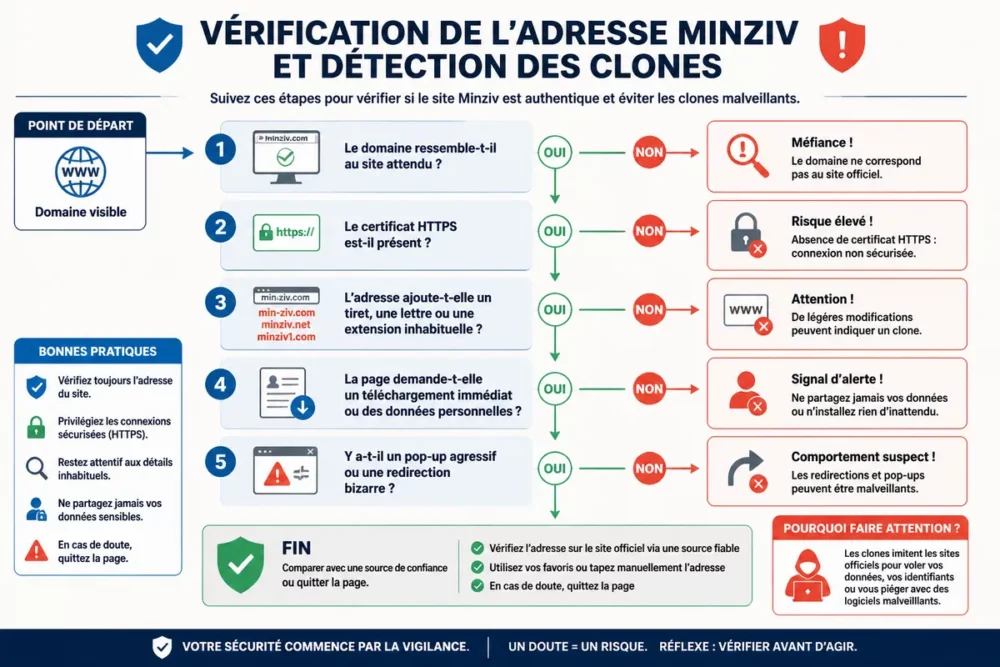
The right method is to start from the visible domain, then check if it looks like the expected site, without trusting the first results that come up. When a service changes address, malicious clones and mirrors quickly take advantage of the confusion, which means caution is far better than haste.
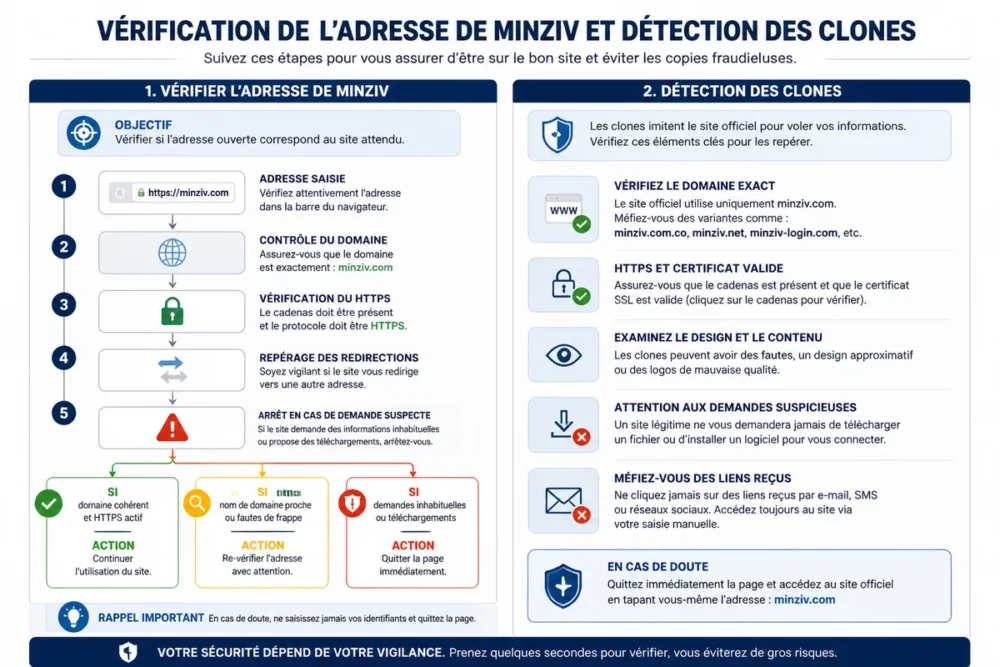
To limit unpleasant surprises, compare the address with a trusted source, observe the HTTPS certificate, and beware of very similar domains that add a hyphen, a letter, or an unusual extension. That is why a simple visual detail can be enough to unmask a fake site.
If you want to go further on the caution part, reading Is Minziv secure recalls the basic checks before any use. The idea is not to play detective, but to avoid the classic trap: believing a site looks like the real one when it is only a copy.
- Look at the domain name character by character.
- Be wary of pages that push immediate downloads.
- Avoid forms that ask for too much personal data.
- Close the page at the slightest aggressive pop-up or strange redirect.
When an address changes or looks like a clone, the best reflex is to slow down, not to click faster.
How to access Minziv when the site is not working?
The right diagnosis is to test access layer by layer: browser, cache, network, then only possible bypass tools. If you jump straight to complicated solutions, you risk masking the real problem, whereas a simple session restart or another browser can sometimes suffice.
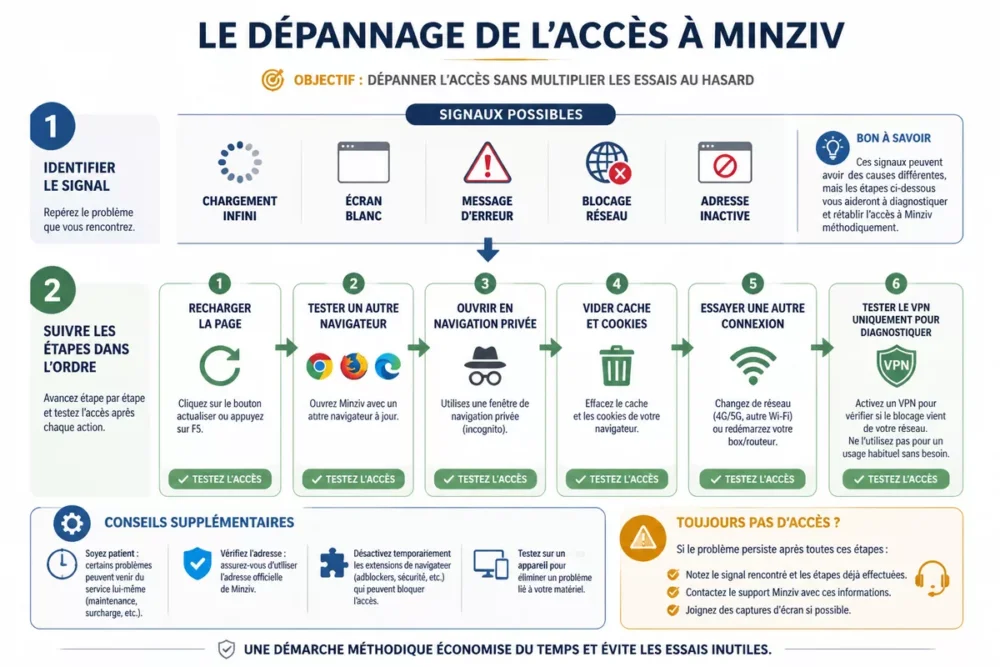
Here is a clear method, without unnecessary chatter:
- Reload the page once, then wait a few seconds before trying again.
- Open the site in another recent browser to check if the problem comes from the software.
- Test private browsing to rule out a heavy cache or corrupted cookies.
- Temporarily disable extensions that block scripts, ads, or redirects.
- Try another Internet connection to see if the blockage comes from the current network.
- If needed, use a VPN only to diagnose a restriction related to the network or location, not to hide a deeper issue.
If you have just started with the service, the tutorial install and configure Minziv can help isolate a bad initial configuration. In other words, you don’t fix the house by starting with the roof: first check the foundations.
The site is inaccessible or stuck loading
In this case, the most common issue is a temporary problem on the browser, network, or domain side. Start with a private page, another browser, and another connection to see if the blockage follows your device or not.
Should you use a VPN?
A VPN can be used to test if the blockage depends on your location or network, but it is not a magic wand. If the address is wrong or the site is down, the VPN will not change anything at all.
Is Minziv legal and secure?
The cautious answer is simple: legality depends on broadcasting rights and security mainly depends on the source you open. If the service broadcasts protected content without authorization, the issue of copyright clearly arises, and if the site multiplies aggressive advertisements, caution becomes truly necessary.
If a site asks you too quickly for an unusual action, a download, or sensitive data, it’s better to close the tab and check before going further.
For security, keep three habits: check the domain, watch for redirects, and avoid entering personal information without a real reason. If you want a more detailed view on warning signs, the article Is Minziv secure usefully complements this point.
- Do not download anything if the site pushes you to do so without a clear explanation.
- Avoid accounts or forms that ask for more information than necessary.
- Disconnect as soon as a page shows a suspicious redirect or a fake button.
- Always compare the address with a reliable source before continuing.
How to check if your device is compatible with Minziv?
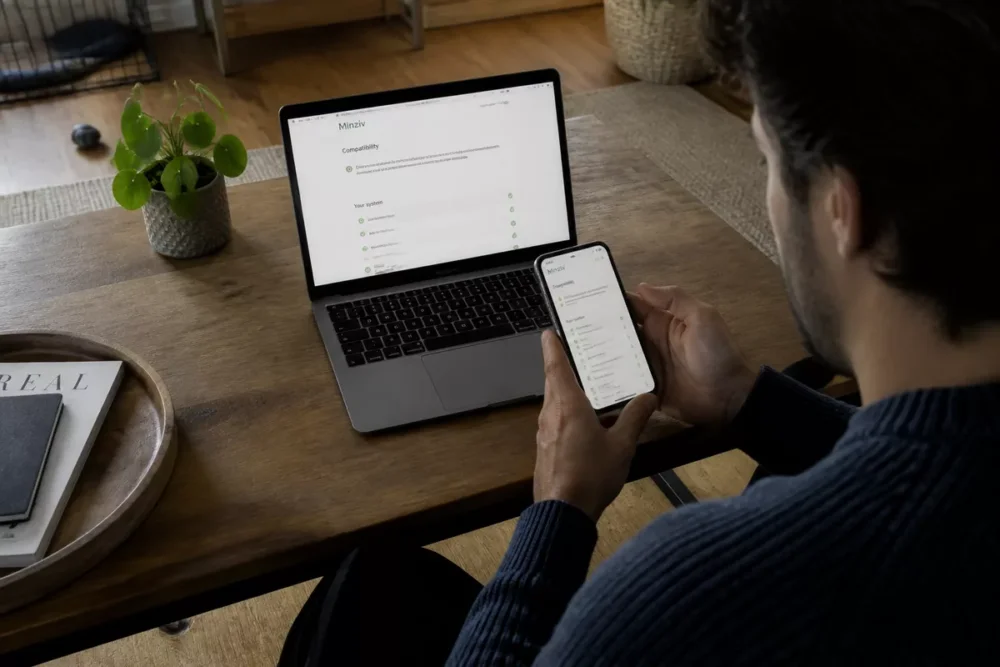
Compatibility rarely boils down to “it works” or “it doesn’t work”: you need to look at the browser, the system, and the type of device. A recent device can still have issues due to an outdated browser version, a misconfigured extension, or a cache that has taken itself a bit too much for a warehouse.
| Device | To check | Warning sign |
|---|---|---|
| Computer | Recent browser, clean cache, extensions disabled if needed | White screen, player won’t start, broken display |
| Smartphone | Browser version, fullscreen mode, rotation, permissions | Choppy playback, invisible buttons, no sound |
| Tablet | Interface readability and video player stability | Too tight interface, cut-off subtitles |
| Connected TV | Browser or cast compatibility depending on the case | Hard controls, audio delay, page refuses to open |
The simplest check is to test video playback, audio, and subtitles on a stable and updated browser. If the problem disappears on another device, you already have a serious clue about the real cause.
Browser compatibility
A recent browser remains the first criterion to check, because it better handles scripts, videos, and modern web protections. If the display goes awry, clear local data then try another browser to compare.
Operating system compatibility
An outdated system version can block certain functions, especially on devices that no longer receive regular updates. It is always advisable to also check the device’s security restrictions, as they can cut off the player without warning.
On mobile, tablet or TV
On a small screen, the main challenge is interface readability and fullscreen stability. On a connected TV, comfort mainly depends on the access mode used, the built-in browser, and the connection quality.
What problems do Minziv users encounter most often?
The most common issues are rarely mysterious: page not loading, interrupted session, finicky video playback, or missing subtitles. The good news is that a simple diagnosis often allows sorting out what comes from the browser, the network, or the content itself.
When users get stuck, the classic trap is to change ten settings at once. It’s better to proceed by elimination, otherwise you no longer know what really helped.
Page Not Loading
Start by refreshing the page, then open it in private browsing mode to see if local data is disrupting the display. If the site remains stuck, try another network before concluding there is a general outage.
Unable to Connect or Session Interrupted
First check the entered credentials and keyboard case, because a tiny detail can sometimes cause a connection to fail. If the session cuts off for no reason, close it completely then restart access under good conditions.
Video, Audio Playback and Subtitles
If the video starts but the sound, quality, or subtitles have issues, test another content to determine if the error comes from the player or the file. It’s a small step, but it avoids many unnecessary guesses.
If access is stuck, the most useful diagnosis is often the simplest: browser, cache, network, then only advanced settings.
What Information to Prepare Before Contacting Minziv Support?
A good support message must be precise, brief, and helpful, otherwise it will waste time for both of you. Before writing, gather the error message, the device used, the browser, the system, and the tests already performed, because this is exactly what helps understand the blockage.
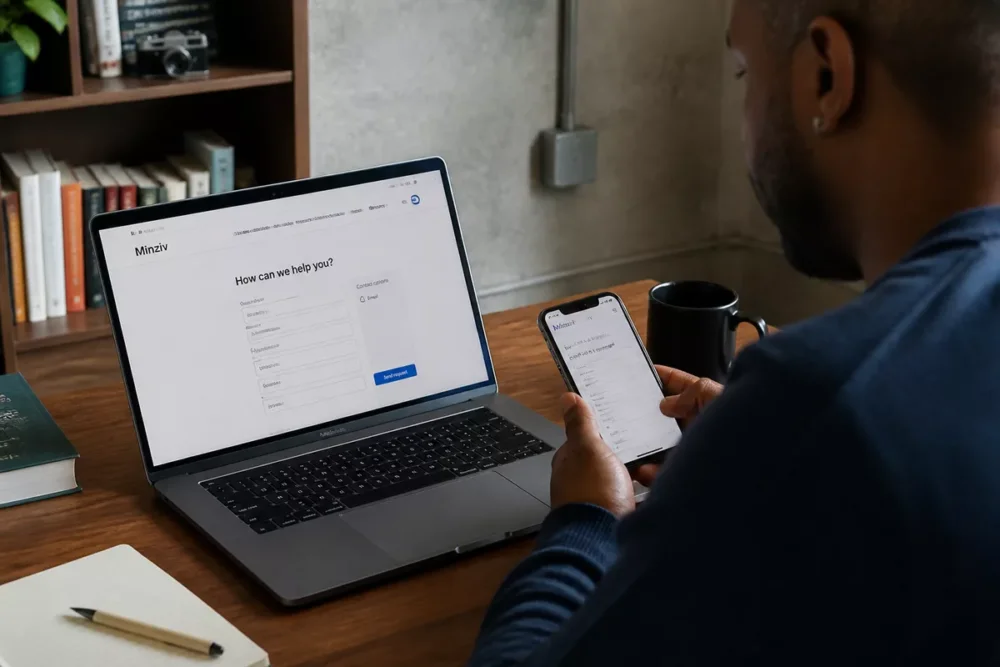
If the issue seems more like a somewhat shaky initial configuration, the tutorial installing and configuring Minziv can serve as a checkpoint before contacting support. It’s better to come with concrete elements than with a simple “it doesn’t work.”
- Note the exact error message, word for word if possible.
- Specify the device used: computer, mobile, tablet, or connected TV.
- Indicate the browser and its approximate version.
- Describe the actions already tested: another browser, private browsing, another network, cache clearing.
- Add a screenshot if support can easily read it.
- Explain if the problem also affects another address or another device.
Technical Elements to Provide
The browser version, operating system, and device type are often the three pieces of information that save the most time. Without them, support has to guess, and guessing is never a very elegant strategy.
Useful Elements to Speed Up Processing
The approximate date of the problem, the displayed content, and the tests already performed help isolate the issue. The clearer your description, the faster and more helpful the response can be.
Minziv, Netflix or Disney+: which solution to choose according to your usage?
If you are mainly looking for stability, official support, and a clean experience, legal platforms have the advantage. Minziv may attract with its apparent ease of access, but a service like Netflix, Prime Video, or Disney+ often remains more predictable in the long term, especially when you want to avoid clones and address bugs.
If your real question is about cost or access model, the article Minziv free or paid helps to set the right decision framework. Here, the important thing is not to crown a universal “winner,” but to choose according to actual use.
| Solution | Strength | Limit | For whom |
|---|---|---|---|
| Minziv | Access often sought for its apparent simplicity | Address, reliability, and security must be checked each time | User comfortable with caution controls |
| Netflix | Known interface, official support, stable usage | Catalog subject to rights and local availability | Viewer who wants simple and robust |
| Prime Video | Integrated into a broad ecosystem, multi-device access | Navigation sometimes less clear depending on usage | User already registered in the Amazon ecosystem |
| Disney+ | Very good reference for family content and well-known franchises | Less suitable if looking for a very broad and varied offer | Households and fans of very identifiable catalogs |
In other words, Minziv may seem appealing if access is immediate, but legal platforms remain simpler as soon as you want lasting comfort, clear assistance, and fewer unpleasant surprises.
Common mistakes to avoid with Minziv
The most costly mistakes are not the most spectacular: they often consist of clicking the wrong address, neglecting the browser, or trusting too quickly. That is why a little initial check often prevents an hour of hassle afterward.
- Clicking on an almost identical address without verifying the exact domain.
- Multiplying extensions, VPNs, and settings at the same time, which clouds the diagnosis.
- Ignoring signs of a clone: redirects, pop-ups, fake buttons, strange requests.
- Thinking a playback problem always comes from the site when it may come from the browser.
- Contacting support without providing the error message or tests already performed.
If you avoid these traps, you save time and keep a clear view of the real cause of the problem. This allows you to decide faster whether the issue comes from the site, your device, or simply the address used.
Useful sources to consult
On a topic as fluid as access to a web platform, official or recognized sources remain the most useful. They do not always provide the “magic” answer, but they already avoid many false shortcuts.
| Source | Useful data | Practical use | Vigilance |
|---|---|---|---|
| Official browser support | Management of cache, cookies, extensions, and updates | Diagnose a display or loading problem | Check the correct browser, not a dubious third-party help page |
| Official operating system help | Permissions, updates, and device compatibility | Understand why a video or audio function is blocked | Do not confuse system settings with site problems |
| Cybermalveillance.gouv.fr | Reflexes against suspicious pages, phishing, and fake sites | React if you encounter a clone or a strange redirect | Follow precautionary steps before entering any information |
To remember
- 🔎 First check the address, domain, and signs of a clone before any connection.
- 🧭 Troubleshoot access in order: browser, cache, network, then advanced tests.
- 📱 Check browser, system, and device before concluding incompatibility.
- ⚠️ A site that redirects, overloads pop-ups, or asks for too much info deserves caution.
- 📩 The more precise your support message, the faster the response can be.
Frequently Asked Questions
Does Minziv require an account to read content?
This depends on the version or the address used. The simplest way is to check before going too far, as some pages display free access while others require an additional step.
Why does the Minziv address change so often?
An address change can result from blocks, migrations, or simply the need to start over on another domain. In any case, the site should be checked carefully and avoid clicking on variants that are too similar or too obscure.
Is a VPN enough to restore access?
No, not always. A VPN can help test if the block comes from the network or location, but it will not fix a wrong address, an outage, or a misconfigured browser.
What should be checked if the video does not start?
Start with the browser, then test the cache, extensions, and another device if possible. If the video plays elsewhere, you already have a solid lead on the source of the problem.
What information should be sent to support?
Send the exact error message, the device used, the browser, the system, and the tests already performed. A screenshot can also help if it clearly shows the blockage.









