.en-bref { max-width: 640px; margin: 2em auto; padding: 1.5em 1.8em; color: #3a2d0d; font-family: “Inter”, “Segoe UI”, sans-serif; text-align: left; position: relative; box-sizing: border-box; background: #f7f9f9; border: 1px solid #10b58b; border-left: 6px solid #10b58b; border-radius: 12px; box-shadow: 0 8px 24px rgba(251, 191, 36, 0.15); }
.en-bref h2, .en-bref .en-bref-header { font-size: 1.15em; font-weight: 700; margin-bottom: 0.6em; color: #d97706; }
.en-bref p, .en-bref li { font-size: 1em; line-height: 1.65; margin: 10px; }
.en-bref strong { color: #1c1917; }
.key-takeaways { max-width: 640px; margin: 2em auto; padding: 1.5em 1.8em; color: #3a2d0d; font-family: “Inter”, “Segoe UI”, sans-serif; text-align: left; position: relative; box-sizing: border-box; background: #f7f9f9; border: 1px solid #10b58b; border-left: 6px solid #10b58b; border-radius: 12px; box-shadow: 0 8px 24px rgba(251, 191, 36, 0.15); }
.key-takeaways h2, .key-takeaways .key-takeaways-header { font-size: 1.15em; font-weight: 700; margin-bottom: 0.6em; color: #d97706; }
.key-takeaways p, .key-takeaways li { font-size: 1em; line-height: 1.65; margin: 10px; }
.key-takeaways strong { color: #1c1917; }
.key-takeaways ul { list-style: none; padding-left: 0; }
.key-takeaways li { margin: 0.45em 0; padding-left: 0.2em; }
.magic-pdf-download{margin:2em 0;padding:1.25em 1.5em;border:1px solid #e3e6ea;border-left:4px solid #0ea5e9;border-radius:10px;background:#f8fafc;display:flex;align-items:center;gap:1.2em;flex-wrap:wrap}.magic-pdf-download .mpd-txt{flex:1;min-width:220px}.magic-pdf-download .mpd-txt strong{display:block;font-size:1.05em;color:#0f172a;margin-bottom:.15em}.magic-pdf-download .mpd-txt span{color:#64748b;font-size:.92em}.magic-pdf-download a.mpd-btn{display:inline-block;background:#0ea5e9;color:#fff;text-decoration:none;padding:.7em 1.5em;border-radius:8px;font-weight:600;white-space:nowrap}.magic-pdf-download a.mpd-btn:hover{background:#0284c7}
.magic-lb-overlay{position:fixed;inset:0;background:rgba(15,23,42,.92);display:none;align-items:center;justify-content:center;z-index:99999;cursor:zoom-out;padding:20px}
.magic-lb-overlay.open{display:flex}
.magic-lb-overlay img{max-width:95vw;max-height:95vh;object-fit:contain;border-radius:8px;box-shadow:0 8px 32px rgba(0,0,0,.5)}
.magic-lb-close{position:absolute;top:16px;right:20px;color:#fff;background:rgba(0,0,0,.5);border:none;width:40px;height:40px;border-radius:50%;font-size:24px;cursor:pointer;display:flex;align-items:center;justify-content:center}
.magic-lb-close:hover{background:rgba(0,0,0,.8)}
.wp-block-image img{cursor:zoom-in;transition:transform .15s ease}
.wp-block-image img:hover{transform:scale(1.01)}
.magic-img-link{display:inline-block;text-decoration:none}
(function(){
var ov=document.getElementById(‘magic-lb’);if(!ov)return;
var img=ov.querySelector(‘img’),btn=ov.querySelector(‘.magic-lb-close’);
function open(src){img.src=src;ov.classList.add(‘open’);document.body.style.overflow=’hidden’}
function close(){ov.classList.remove(‘open’);img.src=”;document.body.style.overflow=”}
document.addEventListener(‘click’,function(e){
var a=e.target.closest(‘a.magic-img-link’);
if(a){e.preventDefault();open(a.getAttribute(‘href’));return}
var i=e.target.closest(‘.wp-block-image img’);
if(i&&!e.target.closest(‘a’)){e.preventDefault();open(i.currentSrc||i.src)}
});
ov.addEventListener(‘click’,function(e){if(e.target===ov||e.target===btn)close()});
document.addEventListener(‘keydown’,function(e){if(e.key===’Escape’)close()});
})();
Brawl Stars Sensitivity: The Complete Guide to Better Aiming and Gaining Precision
The best Brawl Stars sensitivity is not a magic number, but a setting that makes your movements stable, your shots cleaner, and your corrections less frequent. The real priority is to adjust the size of the attack button, its placement, and your tactile comfort before looking for a pseudo-perfect setting.
This guide shows how to find a useful setting, test it without getting lost, and adapt it to your phone, your grip, and your brawlers. Above all, you will understand what to change, in what order, and how to recognize a setting that truly helps you aim more accurately.
In Brief
🎯 Brawl Stars sensitivity mainly depends on tactile comfort: button size, placement, and gesture stability matter more than an isolated number.
📱 An attack button that is too small or too far causes missed shots: precision drops as soon as the thumb corrects its trajectory too often.
🧪 A good setting is validated over several games, not just one trial: test in training then in real matches with the same brawler.
🧭 The right profile is not the same for everyone: a beginner, an aggressive player, and a precision shooter do not expect the same responsiveness.
Why Doesn’t Brawl Stars Sensitivity Have a Magic Value?
Brawl Stars sensitivity is mainly a compromise between responsiveness and control. An overly aggressive setting gives a feeling of speed, but often forces the thumb to correct the shot mid-fight. A more stable setting helps keep the hand calm, especially on brawlers that require cleaner aiming.
In Brawl Stars, the difference rarely comes down to a single slider. The result depends more on the size of the attack button, the playable area actually accessible to the thumb, reaction time, and the type of brawler used. An automatic shot can save a short action, but it does not replace good gesture mastery.
The right sensitivity is not the one that feels faster; it’s the one that makes you miss fewer shots.
The useful setting is therefore the one that reduces hesitation at the moment of shooting. Good gameplay comfort is quickly noticeable: you stop “searching” for the button and start playing your exchanges without tension.
How to Adjust Your Controls to Aim More Easily?
The most useful adjustment starts with ergonomics, not speed. Before changing your shooting habits, check if your thumb reaches the attack button without strain, if your joystick remains natural, and if the screen leaves you a clear zone to aim without slipping. This simple base often changes more than micro-adjustments.
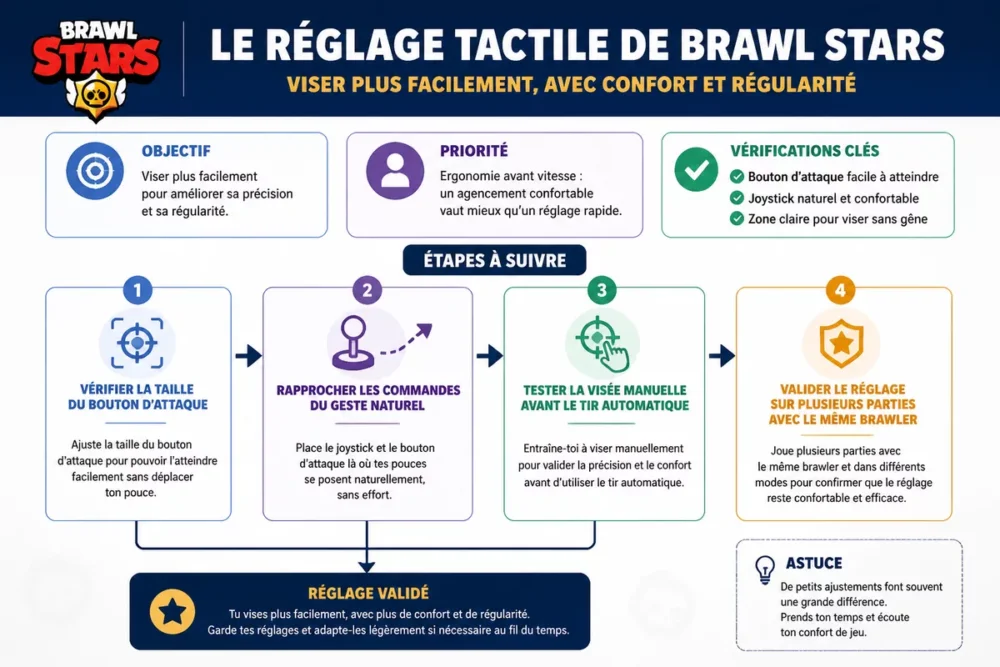
Here is the logic to follow before playing several matches:
- check that the attack button remains easy to reach without covering the entire screen;
- place the controls to limit unnecessary thumb movements;
- test the setting in training, then in real matches with the same brawler.
Step 1: Check the Size of the Attack Button
A button that is too small pushes you to aim hastily, while a button that is too large takes up useful screen space. The right compromise depends on the size of your thumb and your phone model. On a compact screen, a slightly larger button often helps reduce touch errors; on a large screen, a smaller button better preserves the view of the action.
Step 2: Bring the shot closer to your natural movement
The placement of the controls must follow the natural movement of the thumb, not the other way around. If your hand has to twist to reach the shot, accuracy drops as soon as the fights get fast. The goal is simple: keep the thumb relaxed, with a short travel between the press and the aiming.
Step 3: Test manual aiming before relying on automatic shooting
Automatic shooting remains useful, but it should not become a reflex that hides your placement errors. Test your manual shots on simple actions, then on faster movements, to see if the button responds in the right place at the right time. This test helps identify movements that are forced and those that remain fluid.
Step 4: Validate the setting over several games
A setting that works in training must still hold up under pressure in a real game. Play a few matches with the same brawler, without changing anything else in the meantime, then note if you miss fewer shots, aim faster, and if your movements remain stable when the fight speeds up.
Which setting to choose according to your player profile?
The right setting depends on your play style, your screen, and the type of brawler you play the most. A beginner mainly seeks to reduce touch errors. An aggressive player wants a quick reaction. A more precise player prefers a readable, stable command that is easy to repeat in tense phases.
| Profile | Recommended setting | What it improves | Main risk |
|---|---|---|---|
| Beginner | Larger and closer attack button | Fewer touch errors | Lose a bit of screen space |
| Aggressive player | Compact and responsive controls | Faster chaining | More nervous movements |
| Precision brawlers | Stable placement and free space around the shot | Cleaner aiming | Setting too slow if the screen is poorly organized |
| Short range | Immediate access to the attack button | Faster triggering | Tendency to spam automatic shooting |
Precision brawlers often require more stability, while contact brawlers require more immediate access. If you play profiles that punish missed shots, like long-range shooters, you should also check out our analysis of the Brawl Stars tier list to link your settings to your brawler choices.
Aggressive brawlers often benefit from a more direct movement and an attack button that is easy to reach. If you want to exploit their power spikes, our guide on the best Brawl Stars gadgets helps better understand the timings that require a quick response.
A good setting doesn’t make you better on its own, but it removes enough friction to let your aiming work.
How to test your sensitivity without losing your bearings?
The best test is to modify only one element at a time, then evaluate it in comparable situations. If you change the button size, its position, and your shooting method all at once, you won’t know what really helped. The cleanest method remains simple: one change, several games, one verdict.
- choose a single reference brawler;
- play some actions in the training area;
- play several matches without adjusting the setting;
- note if missed shots come from the movement or the interface.
A good setting should produce fewer visible corrections in real fights. If your hand cramps, if you miss moving targets, or if you have to reposition your thumb at every exchange, the problem often comes less from your skill level than from the layout of the controls.
What mistakes prevent better aiming?
The most costly mistakes are almost always comfort errors, not “reflex” errors. A button that is too small, a placement too far away, a change that is too abrupt, or overreliance on auto-fire are enough to degrade accuracy even with simple brawlers.
- Attack button too small: the thumb constantly corrects and loses stability.
- Button too far away: the hand gets tired and aiming becomes irregular.
- Change too often: the brain never stabilizes the new gesture.
- Systematic auto-fire: the learning of the shooting angle progresses more slowly.
- Copying another player’s settings: a good configuration on another screen can be bad on yours.
The most common trap is to believe that a “pro” setting is necessarily better for everyone. A player who plays with finesse does not have the same needs as a player who mainly wants to get into the fight quickly. The right configuration is the one that matches your actual speed, not a video seen online.
A copied setting without adaptation can cause you to lose more shots than it gains.
Useful sources to consult
The best check remains the official game help and your own tests in real conditions. Supercell support allows you to confirm the settings and options actually available after an update. Your own games tell you if the attack button helps you aim or if it forces you to correct too often.
- Official Supercell support: check the game controls and options.
- Your phone settings: ensure that no system option interferes with touch.
- Built-in training area: measure comfort without match pressure.
Key takeaways
- 🎮 Brawl Stars sensitivity is first adjusted for comfort, not by a magic number.
- 📏 The size and placement of the attack button often change more than the perceived speed.
- 🧪 Changing only one thing at a time remains the most reliable method to improve.
- ⚡ Auto-fire helps, but manual aiming increases accuracy.
- 📱 The right setting depends on the phone, the thumb, and the brawler played.
Frequently asked questions
Is there a best Brawl Stars sensitivity for all players?
No, a universal Brawl Stars sensitivity does not exist. The right setting depends on your screen, the size of your thumb, how you hold the phone, and the brawlers you play most. A setting useful for an aggressive player can be inconvenient for a precision player.
Should you change your controls depending on your phone?
Yes, a large screen and a small screen do not require the same tactile layout. On a large phone, you can leave more space around the controls. On a compact screen, you often need to bring buttons closer to limit unwanted movements and keep quick access to shooting.
Can you aim better without changing everything?
Yes, a slight adjustment of the attack button is sometimes enough to make a difference. Many players look for a radical setting while a simple repositioning of the control, or a slightly more visible button, already improves accuracy and reduces touch errors.
Is auto-fire useful for improving?
Auto-fire helps to trigger quickly, but it does not replace manual aiming. It mainly serves to secure simple or fast actions. To improve, you also need to work on controlled shots, especially with brawlers that require better trajectory reading.
How long does it take to validate a setting?
A few games are enough to feel an improvement, but several matches are necessary to confirm a real gain. A good setting must remain comfortable when the game speeds up, when the map changes, and when exchanges tighten. Stability matters as much as speed.
Ultimately, the right setting is the one that makes you aim faster without forcing your movement. If your Brawl Stars sensitivity allows you to jump into action without adjusting your hand with every shot, you already have a solid setting. The rest then depends on consistent testing and adapting to your play style.









