.synthesis { max-width: 640px; margin: 2em auto; padding: 1.5em 1.8em; color: #3a2d0d; font-family: “Inter”, “Segoe UI”, sans-serif; text-align: left; position: relative; box-sizing: border-box; background: #f7f9f9; border: 1px solid #10b58b; border-left: 6px solid #10b58b; border-radius: 12px; box-shadow: 0 8px 24px rgba(251, 191, 36, 0.15); }
.synthesis h2, .synthesis .synthesis-header { font-size: 1.15em; font-weight: 700; margin-bottom: 0.6em; color: #d97706; }
.synthesis p, .synthesis li { font-size: 1em; line-height: 1.65; margin: 10px; }
.synthesis strong { color: #1c1917; }
.synthesis table { width: 100%; border-collapse: collapse; }
.synthesis th { background: rgba(16, 181, 139, 0.12); color: #d97706; text-align: left; }
.synthesis td, .synthesis th { padding: 8px 12px; border-bottom: 1px solid rgba(16, 181, 139, 0.18); vertical-align: top; }
.synthesis tbody tr:nth-child(even) { background: rgba(16, 181, 139, 0.05); }
.key-takeaways { max-width: 640px; margin: 2em auto; padding: 1.5em 1.8em; color: #3a2d0d; font-family: “Inter”, “Segoe UI”, sans-serif; text-align: left; position: relative; box-sizing: border-box; background: #f7f9f9; border: 1px solid #10b58b; border-left: 6px solid #10b58b; border-radius: 12px; box-shadow: 0 8px 24px rgba(251, 191, 36, 0.15); }
.key-takeaways h2, .key-takeaways .key-takeaways-header { font-size: 1.15em; font-weight: 700; margin-bottom: 0.6em; color: #d97706; }
.key-takeaways p, .key-takeaways li { font-size: 1em; line-height: 1.65; margin: 10px; }
.key-takeaways strong { color: #1c1917; }
.key-takeaways ul { list-style: none; padding-left: 0; }
.key-takeaways li { margin: 0.45em 0; padding-left: 0.2em; }
.magic-pdf-download{margin:2em 0;padding:1.25em 1.5em;border:1px solid #e3e6ea;border-left:4px solid #0ea5e9;border-radius:10px;background:#f8fafc;display:flex;align-items:center;gap:1.2em;flex-wrap:wrap}.magic-pdf-download .mpd-txt{flex:1;min-width:220px}.magic-pdf-download .mpd-txt strong{display:block;font-size:1.05em;color:#0f172a;margin-bottom:.15em}.magic-pdf-download .mpd-txt span{color:#64748b;font-size:.92em}.magic-pdf-download a.mpd-btn{display:inline-block;background:#0ea5e9;color:#fff;text-decoration:none;padding:.7em 1.5em;border-radius:8px;font-weight:600;white-space:nowrap}.magic-pdf-download a.mpd-btn:hover{background:#0284c7}
.magic-lb-overlay{position:fixed;inset:0;background:rgba(15,23,42,.92);display:none;align-items:center;justify-content:center;z-index:99999;cursor:zoom-out;padding:20px}
.magic-lb-overlay.open{display:flex}
.magic-lb-overlay img{max-width:95vw;max-height:95vh;object-fit:contain;border-radius:8px;box-shadow:0 8px 32px rgba(0,0,0,.5)}
.magic-lb-close{position:absolute;top:16px;right:20px;color:#fff;background:rgba(0,0,0,.5);border:none;width:40px;height:40px;border-radius:50%;font-size:24px;cursor:pointer;display:flex;align-items:center;justify-content:center}
.magic-lb-close:hover{background:rgba(0,0,0,.8)}
.wp-block-image img{cursor:zoom-in;transition:transform .15s ease}
.wp-block-image img:hover{transform:scale(1.01)}
.magic-img-link{display:inline-block;text-decoration:none}
(function(){
var ov=document.getElementById(‘magic-lb’);if(!ov)return;
var img=ov.querySelector(‘img’),btn=ov.querySelector(‘.magic-lb-close’);
function open(src){img.src=src;ov.classList.add(‘open’);document.body.style.overflow=’hidden’}
function close(){ov.classList.remove(‘open’);img.src=”;document.body.style.overflow=”}
document.addEventListener(‘click’,function(e){
var a=e.target.closest(‘a.magic-img-link’);
if(a){e.preventDefault();open(a.getAttribute(‘href’));return}
var i=e.target.closest(‘.wp-block-image img’);
if(i&&!e.target.closest(‘a’)){e.preventDefault();open(i.currentSrc||i.src)}
});
ov.addEventListener(‘click’,function(e){if(e.target===ov||e.target===btn)close()});
document.addEventListener(‘keydown’,function(e){if(e.key===’Escape’)close()});
})();
Minziv: 7 Practical Uses to Go Faster Daily
When talking about the uses of Minziv, the real question is not just “what can we see?”, but especially “how to get straight to the point without losing ten minutes along the way?”. With this type of service, time savings come as much from the search as from the way you navigate, choose the version, and avoid false clicks.
In this article, we will therefore scrutinize the uses of Minziv that really matter: finding a title faster, choosing between VF and VOSTFR, understanding security reflexes, and comparing the tool to more traditional alternatives. The idea is simple: to help you decide, navigate more cleanly, and avoid unnecessary detours.
| 📌 | Definition: Minziv is presented here as a streaming service for movies and series, designed to be fast. |
| 💡 | Main gain: time is mainly saved in searching, choosing the version, and navigation. |
| ⚠️ | Caution: verifying the active address and false buttons avoids wasting time… and clicking the wrong place. |
| 🧭 | Method: verify, search, choose the language, test playback, then adjust if needed. |
| 🎯 | Profile: cinephiles, series lovers, mobile or TV use do not imply the same reflexes. |
| 🔁 | Alternative: if stability and legality are priorities, a legal service may be more comfortable. |
In Brief
Minziv mainly serves to get faster to a specific content, without superfluous navigation.
The proper use depends on your screen, your need for VF/VOSTFR, and your tolerance for unexpected issues.
The real trap is not the lack of options: it’s clicking too quickly on the first button you see.
For the most effective uses of Minziv, a simple method is better than random exploration.
What is Minziv and What is it Really For?
Minziv is generally presented as a streaming platform for movies and series that focuses on easy access. Its value, in everyday use, lies mainly in the promise to go from the searched title to playback in a few clicks, with options like VF, VOSTFR, or displayed image quality when available.
If you are looking for a broader overview, the complete Minziv guide remains the best base. Here, we focus on the concrete: which uses really save time, which limits deserve your attention, and how to avoid scattering yourself.
The Most Visible Features
On paper, Minziv’s uses rely on a few very simple building blocks to understand. Generally, you find navigation by categories, a search bar, a choice of player or version, and an experience designed for multiple screens, which allows going to the essentials without having to relearn the interface at each visit.
- Navigation by categories to quickly filter content.
- Search engine to find a title without searching everywhere.
- Language choice, often between VF and VOSTFR depending on the listings.
- Variable playback quality depending on what is offered.
- Multi-screen access, useful if you switch from mobile to computer.
The real time saver does not come from one more click, but from a better framed search.
How to use Minziv step by step?
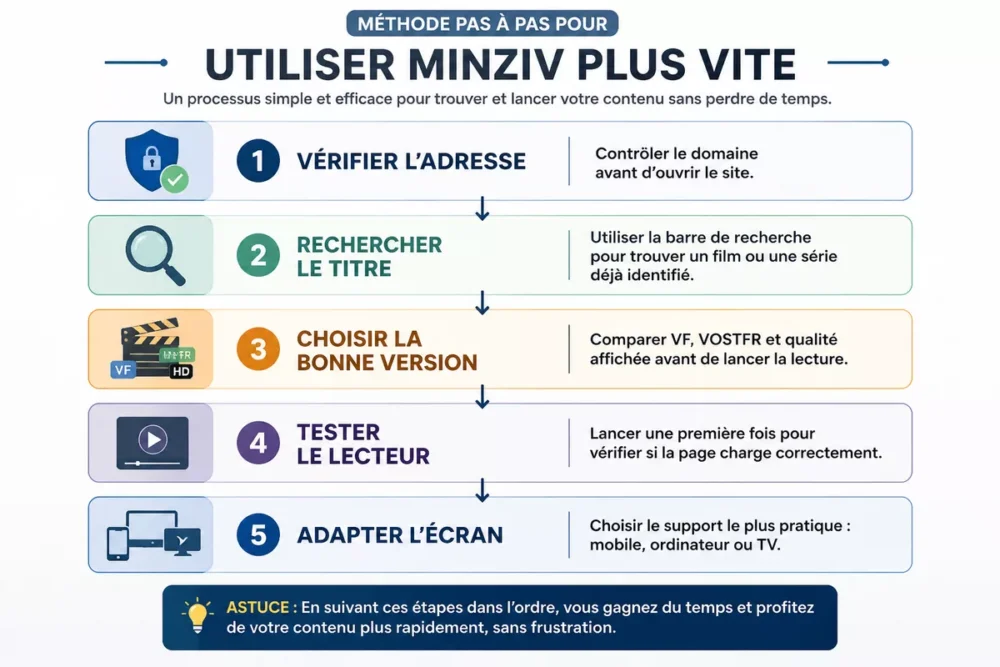
To go fast on Minziv, the most effective way is to follow a short and stable sequence: check the address, search for the right title, choose the right version, test the player, then only settle in. This method avoids the usual detours, such as wrong pages, misleading links, or players that don’t start on the first try.
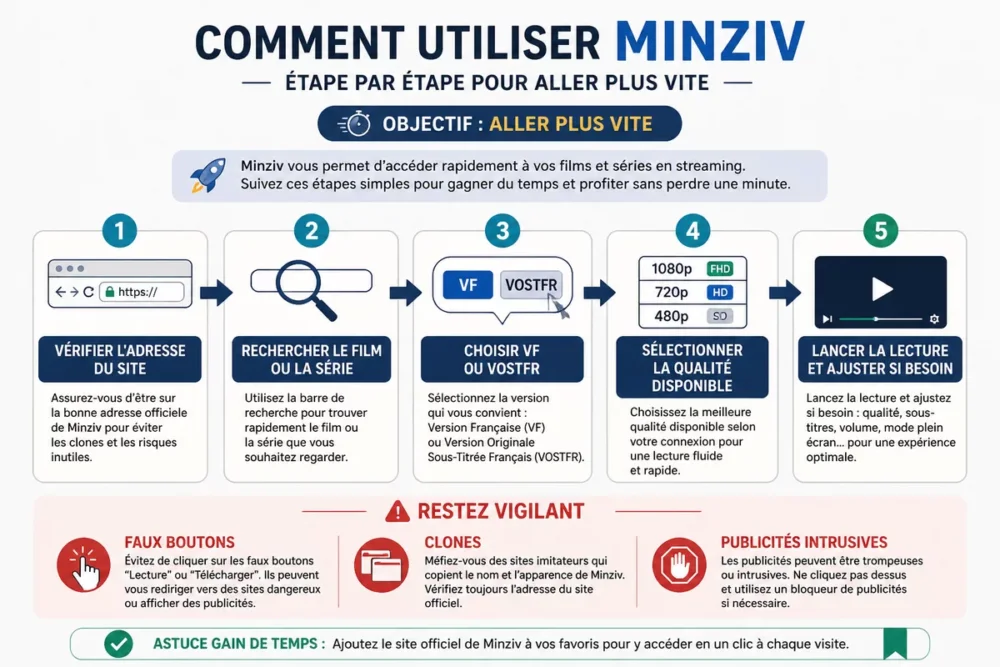
- Check the address before opening the site. Sites of this type may change address or be copied by clones; starting by verifying the domain prevents landing on the wrong page.
- Search for the title directly. The search bar remains the fastest tool for a film or series already identified.
- Choose the right version. If several streams exist, compare VF, VOSTFR, and displayed quality before starting playback.
- Test the player once. A simple launch lets you see if the page loads correctly or if you need to change the link.
- Adapt the screen to the use. Mobile for a short session, computer for searching, TV for comfort: the right device saves time in its own way.
If you are a beginner, the tutorial install Minziv step by step can also help you avoid early fumbling. This is often where most time is lost, whereas a simple framework is enough to smooth the experience.
What concrete uses according to your profile?
The short answer is simple: Minziv’s uses are not the same if you are looking for a specific movie, following a series episode by episode, or mostly browsing on mobile. The right reflex is therefore to adapt the use to your profile, rather than using the same method for everything.
| Profile | Most useful use | What it avoids |
|---|---|---|
| Film lover | Quick search for a specific movie | Browsing too many categories at random |
| Series fan | Find the next episode | Losing continuity between several pages |
| Mobile user | Quick launch on smartphone | Going through too heavy a setup for a short session |
| Comfort use | Watching on TV or big screen | Forcing unstable playback on a small device |
For a recent movie, the most efficient use is to type the title, check the info page, and launch the best available source without going back ten times. For a series, however, the logic changes: you first look for the logical next episode, then secure the continuity of episodes.
If you hesitate between several options, the article Free vs paid Minziv helps understand which type of access best fits your way of watching. It’s useful when you want to know if saving clicks is really worth it.
Top 7 most practical daily uses of Minziv
Here is the heart of the matter: Minziv uses that really save time daily. We are not talking about decorative options here, but very concrete actions that reduce friction, shorten searching, and limit unnecessary handling.
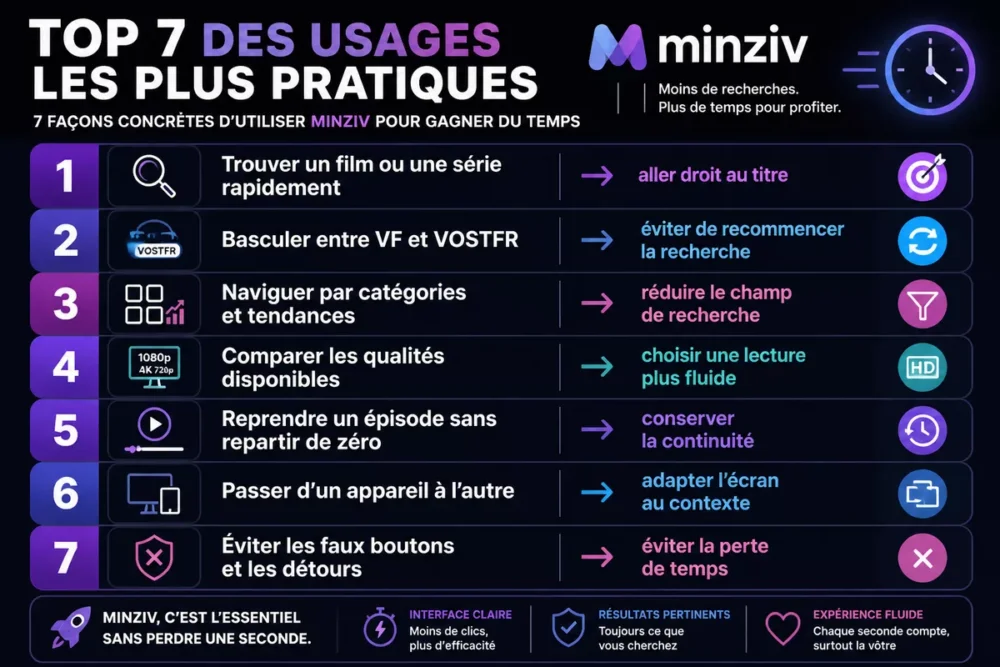
- Find a movie or series quickly. Direct search remains the number one use when you already know what you want to watch.
- Switch between dubbed (VF) and original with subtitles (VOSTFR). This choice avoids having to redo the selection on another platform or another page later.
- Browse by categories and trends. When you don’t have a precise idea, categories save time by narrowing the search field.
- Compare available qualities. A more stable or sharper playback can sometimes make the difference between smooth viewing and a frustrating session.
- Resume an episode without starting over. For series, true comfort comes from continuity of use from one session to another.
- Switch from one device to another. Starting on mobile, continuing on computer, or finishing on TV avoids being stuck with just one screen.
- Avoid fake buttons and detours. It’s not the most glamorous use, but it’s often the one that wastes the most time when ignored.
On a streaming service, the best shortcut isn’t always technical: it’s often a clearer search method.
How to verify the address and limit risks?
If you use a streaming service of this type, caution remains a real time saver. Checking the active address, spotting clones, and avoiding misleading buttons saves you from poorly loading pages, unnecessary redirects, and unpleasant navigation surprises.
- Compare the domain name carefully, especially if an address seems “almost identical.”
- Be wary of pages that imitate the interface without offering the same navigation.
- Avoid download or play buttons that are too visually aggressive.
- Limit clicks on banners that open multiple tabs at once.
- Keep an ad blocker and antivirus up to date if you already use one.
If you want to dig deeper into this point, the article checking Minziv’s security details the reflexes to keep before launching a player or entering anything. It’s the kind of step that seems secondary but quickly changes the smoothness of the experience.
| Signal | Risk | Useful reflex |
|---|---|---|
| Address very close to another domain | Clone or suspicious redirect | Recheck the domain name before clicking |
| Play button too flashy | Fake click or disguised advertisement | Hover over the page and test the actual play area |
| Multiple tabs opening at once | Cluttered navigation | Go back and close the unwanted pages |
| Link that doesn’t load | Unnecessary time loss | Try another link or return to the title’s page |
Minziv versus alternatives: what to choose according to your needs?
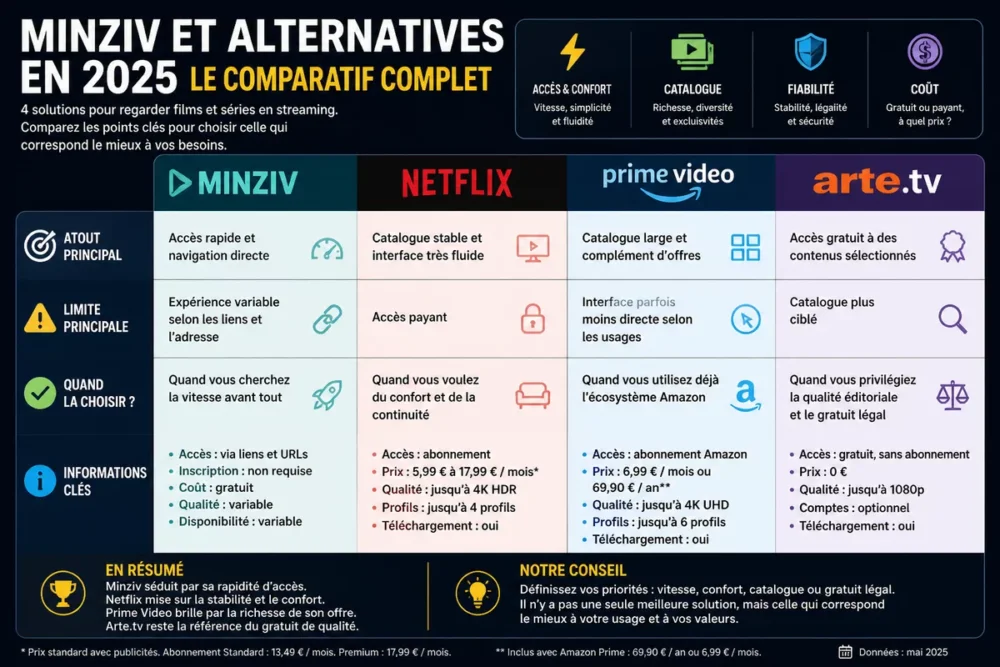
The useful comparison is not “better or worse,” but “which service corresponds to which use.” If your priority is stability, legality, and the simplicity of a well-maintained catalog, a known alternative may be more relevant than Minziv.
If you mainly watch to relax without hassle, a subscription service like Netflix or Prime Video often remains more comfortable. If you are looking for free and legal access to certain content, Arte.tv may be more suitable. And if you want to reconsider the logic of a more or less flexible access, the article Free or paid Minziv helps to decide according to your actual use.
| Solution | Main advantage | Limit | When to choose it |
|---|---|---|---|
| Minziv | Fast access and direct navigation | Experience varies depending on links and address | When you prioritize speed above all |
| Netflix | Stable catalog and very smooth interface | Paid access | When you want comfort and continuity |
| Prime Video | Large catalog and complementary offers | Interface sometimes less direct depending on usage | When you already use the Amazon ecosystem |
| Arte.tv | Free access to selected content | More targeted catalog | When you prioritize editorial quality and legal free content |
In other words, Minziv can be practical for quick uses, but not necessarily for all profiles or contexts. The right choice mainly depends on what you put first: speed, comfort, free access, or stability.
What mistakes waste time on Minziv?
The most frequent mistakes are not spectacular, but they spoil the experience. Most of the time, time is lost because of a bad start: wrong address, wrong click, wrong version, or wrong expectations about playback quality.
- Opening the wrong address. A dubious clone or mirror can make you go in circles before even finding the content page.
- Clicking too quickly on the first button. This is the perfect recipe to open an advertisement or a parasitic page.
- Not checking the language. If you are looking for the French version and start the wrong track, you have to start all over again.
- Confusing displayed quality with actual stability. An “HD” option does not necessarily guarantee smooth playback on your device.
- Changing pages without method. Jumping from one page to another without logic often ends up making more noise than progress.
To avoid these pitfalls, keep a simple rule: address, title, language, quality, then playback. It’s simple as can be, but it works better than improvisation when you really want to enjoy Minziv’s uses without scattering yourself.
Frequently Asked Questions
Do you need an account to watch on Minziv?
Depending on versions or access pages, the experience can be presented as direct, without registration. The most important thing is to check what is actually required before going further. If a form appears, read it carefully before entering any information.
Does Minziv work on mobile and TV?
Yes, usage can vary depending on the screen, and this is precisely one of the practical interests of the service. On mobile, speed is mainly sought; on TV, comfort is prioritized. The right reflex is to adapt navigation to the device rather than the other way around.
Why does Minziv’s address sometimes change?
On this type of service, an address can evolve, be redirected, or copied by clones. That’s why you should always verify the domain before clicking. An address that looks almost identical can be enough to send you to the wrong place.
What to do if the playback does not start?
Start by reloading the page, then try another link or another player if the sheet allows it. If nothing works, go back to searching for the title rather than clicking randomly. You will often save more time by starting cleanly.
Is Minziv really the fastest?
It can be fast for certain uses, especially if you know exactly what to look for. However, a more stable service can become faster on a daily basis if you value continuity and simplicity. The “fastest” therefore depends on your scenario, not on a universal verdict.
Key Takeaways
- 🎯 Minziv saves time when the search is precise and methodical.
- 🧭 The correct sequence remains: address, title, language, quality, playback.
- 🛡️ Clones and fake buttons are the real time thieves.
- 📺 The chosen screen completely changes the usage: mobile, computer, or TV.
- 🔁 Legal alternatives become more interesting if you seek stability.









