Site not ranking on Google: understanding the causes and correcting the course
When a site does not rank on Google, the problem rarely comes from a single cause. It may be indexed but invisible, well written but poorly aligned with the search intent, or hindered by a technical blockage, lack of authority, or simply stronger competition. The right reflex is to diagnose before acting, not the other way around.
In other words, you first need to answer three simple questions: Does Google see the page? Does it understand the correct search intent? Does the page deserve, in substance and form, to rise in the SERP? Once this sorting is done, the corrections become much clearer. And, frankly, you avoid manually undertaking an unnecessary redesign.
In brief
🔎 A site can be indexed without generating traffic or visible positions.
🧰 The first reflex is to check Google Search Console, URL inspection, and the XML sitemap.
🧠 If the content does not match the search intent, Google may index it without boosting it.
🚦 When competition is strong, you also need to work on backlinks, internal linking, and trust signals.
Why is my site not ranking on Google?
In most cases, the page is not blocked by a single factor but by a combination of obstacles: incomplete indexing, content too similar to what already exists, weak internal linking, or lack of authority signals. In short, Google does not find enough reasons to push it to the top of the results.
You also need to keep one idea in mind: 75% of clicks concentrate on the first page of Google. If your page remains beyond that, visibility drops mechanically. That’s why the problem is not just “being present,” but rather being found, understood, and preferred.
75% of clicks from users come from the first page of Google results. Without positioning, there is almost no traffic.
Understanding what it means not to rank
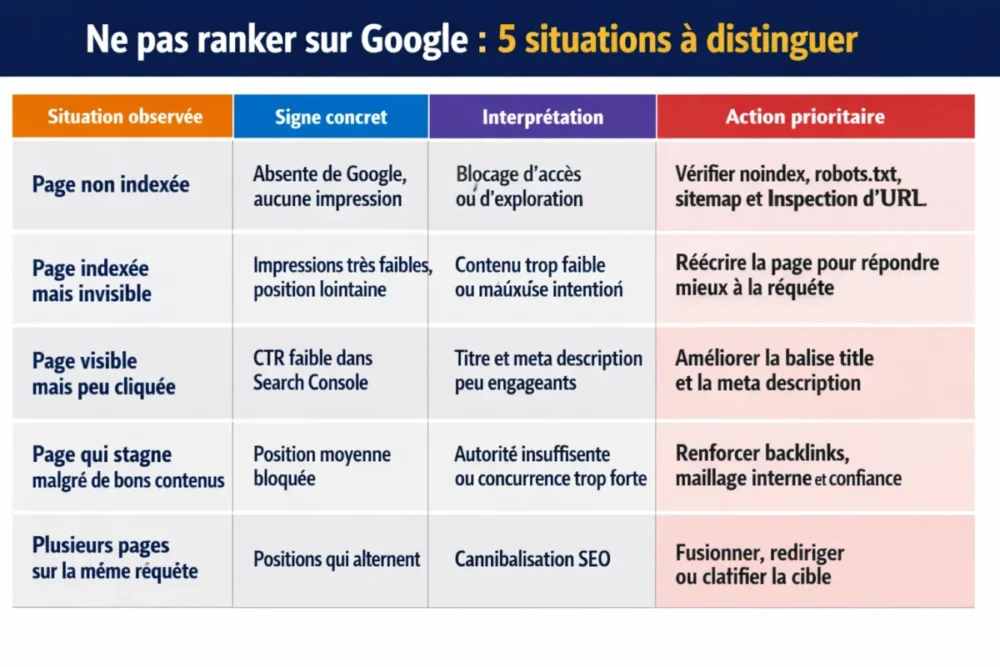
The word “rank” often mixes three different realities. A page can be indexed by Google without being visible, visible without being clicked, or clicked without converting. The diagnosis must therefore separate the technical observation from the editorial observation, otherwise you treat the wrong problem.
| Observed situation | Concrete sign | Interpretation | Priority action |
|---|---|---|---|
| Page not indexed | Absent from Google, no impressions | Access or crawling blockage | Check noindex, robots.txt, sitemap, and URL Inspection |
| Page indexed but invisible | Very low impressions, distant position | Content too weak or wrong intent | Rewrite the page to better meet the query |
| Page visible but rarely clicked | Low CTR in Search Console | Unengaging title and meta description | Improve the title tag and meta description |
| Page stagnates despite good content | Blocked average position | Insufficient authority or too strong competition | Strengthen backlinks, internal linking, and trust |
| Multiple pages on the same query | Alternating positions | SEO cannibalization | Merge, redirect, or clarify the target |
Indexed content is not performing content: it still needs to respond better than others to the targeted query.
How to check if the problem comes from indexing?
If a page does not appear at all on Google, the first suspect remains indexing. This check is quickly done with Google Search Console, URL inspection, the robots.txt file, and the XML sitemap. In practice, you first look for an access blockage, not a vague hypothesis.
Basic checks in Google Search Console
Start with the simplest signals. In Search Console, you can check if Google has crawled the page, if it is indexed, if a noindex tag is present, or if a canonical URL points elsewhere. This is often where the problem lies, well before the content itself.
- URL Inspection: check the exact status of the page in the index.
- Coverage: spot excluded pages, discovered but not indexed, or blocked pages.
- XML Sitemap: ensure the concerned URL is indeed listed there.
- robots.txt: verify that no blocking prevents crawling.
- Canonical tag: check that it does not mistakenly point to another page.
The most common technical errors
Technical blockages are not always spectacular. A page can be well published, visible to the user, but invisible to Google due to a misconfiguration. Joking aside, this is exactly the kind of detail that costs weeks of visibility.
- Orphan pages: no internal page points to them, so Google poorly discovers them.
- Chain redirects: they dilute the signal and slow access to the correct URL.
- Misconfigured canonical: Google indexes a different version than the one you wanted to promote.
- Poor mobile version: mobile compatibility remains a real performance filter.
- Too long loading time: poor Core Web Vitals can hinder experience and visibility.
Does the content really match the search intent?
A site can be technically clean and remain stuck if its content does not meet what the user is actually looking for. Google even reformulates queries internally and breaks them down into sub-queries. This means that a text that is too narrow, too vague, or too commercial often misses the mark.
Content that is too weak or too generic
The classic trap is a page that looks correct on paper but is poor in real value: no examples, little context, zero proof, and an angle seen a hundred times before. In this case, Google may index the page without granting it a credible position because it does not provide enough useful material.
For an honest diagnosis, ask yourself the following question: does your content explain the topic better than the pages already present on the SERP? If the answer is no, you need to enrich, specify, illustrate, and sometimes even change the editorial angle. Positioning is often won on concrete quality, not on word volume.
Poor alignment between keyword and intent
Another common case: an informational query treated as a commercial page, or vice versa. If the title promises a practical answer and the content only sells a service, Google understands the mismatch. The user does too. And there, both the click and the ranking take a hit.
Here are some signs of poor alignment:
- The title announces a solution, but the body of the page remains too general.
- The meta description promises a quick answer but does not deliver on that promise.
- The H1 does not clearly restate the main subject.
- The subtitles scatter instead of covering the user’s real question.
- The page targets several intents at once and loses clarity.
When the search intent is poorly understood, the content becomes “clean” but not useful. And useless content, even well presented, does not take off.
Can the site’s authority block ranking?
Yes, clearly. Good content is not always enough if the domain lacks trust signals, if the topic is very competitive, or if the link profile is too weak. In SEO, editorial quality opens the door, but authority helps to cross the visibility threshold.
Why good content is not always enough
For competitive queries, Google compares your page to dozens of others already well established. The engine then looks at the site’s strength, the coherence of the internal linking, backlinks, and the overall ability to satisfy the user. A young or little-cited site may need more signals to emerge.
With a tool like Semrush, you can audit a site to detect problems, track position changes, analyze a domain’s backlinks, and spot new keyword opportunities. This is useful to compare your actual level to that of competitors, instead of navigating blindly.
Strengthening the page’s popularity
Popularity is not just about “getting links.” Above all, you need to get the right links, in the right place, to the right pages. A single link on a secondary page sometimes counts less than a well-thought-out internal linking that clearly boosts your strategic content.
- Quality backlinks: prioritize sites consistent with your theme.
- Internal linking: elevate important pages from already visible pages.
- Pillar pages: group strong topics around central content.
- Trust signals: work on editorial clarity, sources, and site stability.
What should be corrected on the page to revive SEO?
If indexing is correct but the page remains stuck, you need to revisit on-page fundamentals. The winning trio remains simple: a clear title, a unique H1, and content that structures the topic in a readable way. Only then do you refine performance.
On-page fundamentals to correct
The title tag must announce the main subject straightforwardly while giving a reason to click. The meta description does not directly improve ranking but influences the click-through rate. It is often the first small SEO victory: being better understood, therefore better chosen.
- Title tag: clear, short, benefit-oriented.
- H1: unique, aligned with the topic and target query.
- H2/H3: structured to cover sub-intents.
- Internal linking: link the page to content that semantically supports it.
- SEO content: enriched, precise, useful, without filler.
UX signals that can hinder performance
User experience matters more than you might think. A page hard to read on mobile, too slow loading, or with a confusing structure reduces time spent and engagement. Over time, the page sends weak signals, so it struggles to maintain its place in the results.
It should be noted that Core Web Vitals, mobile readability, and clarity of the user journey are not “bonuses.” They are quality filters. If your page tires the reader, it also tires its ranking potential.
How to build a prioritized action plan?
The real trap is wanting to fix everything at once. It’s better to proceed in order: what blocks access first, what blocks understanding next, then what blocks climbing in the SERP. This logic avoids scattering efforts and delivers clearer results.
Urgent corrections
Start with the most blocking obstacles. If there is an indexing problem, nothing else matters before it is resolved. If multiple pages compete on the same query, SEO cannibalization can prevent the most relevant page from rising. In this case, the target must be clarified.
- Unblock indexing if a page is missing or poorly crawled.
- Fix robots.txt, noindex, or canonical errors.
- Remove or merge duplicates and cannibalizing pages.
- Review strategic pages before secondary pages.
Medium-term optimizations
Once blockages are lifted, you need to enrich what is missing: editorial depth, examples, proofs, answers to sub-questions, and better internal flow between pages. This is where SEO truly becomes cumulative: each improvement builds on the previous one.
- Expand content that is too weak or too generic.
- Work on backlinks and domain reputation.
- Strengthen the internal linking towards key pages.
- Optimize titles, meta tags, and structural tags.
- Improve speed, readability, and mobile experience.
Indicators to monitor after optimization
Monitoring is essential, otherwise one confuses impressions with real progress. On Search Console, look at impressions, average position, click-through rate, and indexing errors. With an audit tool like Semrush, you can also track visibility changes and untapped opportunities.
| Indicator | What it tells you | When to worry |
|---|---|---|
| Impressions | Google displays the page in the SERP | No impressions after publication or update |
| Average position | The average ranking level | Prolonged stagnation beyond the first page |
| Click-through rate | The snippet’s ability to attract clicks | Low CTR despite good impressions |
| Indexed pages | The actual coverage status | Exclusions, errors, or incomplete indexing |
Conclusion
A site that doesn’t rank on Google doesn’t need a magic fix. It needs a proper diagnosis: check indexing, align content with intent, strengthen authority, then fix on-page and UX fundamentals. In this order, decisions become clearer and results more credible.
Key takeaways
- 🔧 A site can be indexed without being visible: indexing is not ranking.
- 🧭 Search Console remains the best starting point to detect a concrete blockage.
- 📝 Content must match search intent, otherwise Google won’t rank it higher.
- 🔗 Backlinks and internal linking weigh heavily when competition is strong.
- 📱 Speed, mobile, and UX clarity can hinder a page that is otherwise fine.
FAQ
How long does it take to see SEO results?
There is no universal timeframe. A technical fix can have a quick effect, whereas work on content or authority often takes several weeks, sometimes several months. The most important thing is to track impressions, average position, and CTR to measure a real trend.
Should the page be completely redone if it doesn’t rank?
Not necessarily. If the blockage comes from an indexing problem or a poorly designed title, a targeted fix is often enough. However, if the content is too weak, too generic, or poorly aligned with intent, a deeper rewrite may be necessary.
Are backlinks essential to rank?
For a low-competition query, good content and a healthy site may suffice. But as the SERP gets tougher, backlinks become an important lever to strengthen domain credibility. They don’t do everything, but they clearly help to reach the next level.
How to know if Google understands the page’s topic?
Check if impressions appear on the right queries and if the subtitles cover the expected questions. If the page ranks for terms too far from your target, it is often a sign of poor semantic framing or misread intent.
Why can an indexed page remain invisible?
Because indexing is only the starting point. A page can be known to Google without being judged relevant enough, strong enough, or useful enough compared to competing pages. This is where content, links, and user experience become crucial.