Installing OSM on Ubuntu 22.04: Complete Guide to Deploy Your Own OpenStreetMap Server
Installing OSM on Ubuntu 22.04 is a solid solution to host your own OpenStreetMap server, serve map tiles, and keep control over your data. OpenStreetMap is a free, contributive, and user-editable global map, making it an ideal base for a standalone deployment.

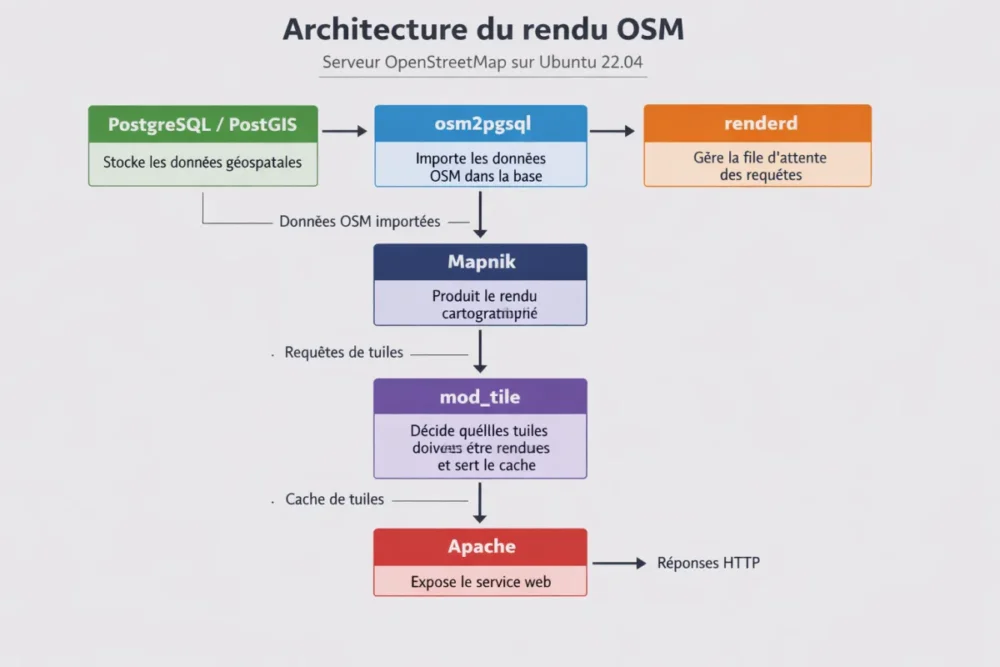
This guide follows the standard architecture of an OSM tile server: PostgreSQL/PostGIS to store geospatial data, osm2pgsql to import data, Mapnik for rendering, renderd to manage the queue, and mod_tile with Apache to serve cached tiles. The goal is simple: to help you move from a clean installation to a functional, stable, and maintainable server.
In Brief
🧭 OSM relies on a clear stack: PostgreSQL/PostGIS, osm2pgsql, Mapnik, renderd, and mod_tile.
🖥️ For a UK map, plan at least 12 GB of RAM and 100 GB; for the entire world, aim for 32 GB and 1 TB SSD.
⚙️ A clean Ubuntu 22.04 installation and up-to-date packages avoid conflicts during import and rendering.
Key Steps to Install OSM on Ubuntu 22.04
- Prepare a clean Ubuntu 22.04 server sized according to the area to host.
- Install PostgreSQL and PostGIS, then create the dedicated geospatial database.
- Import OSM data with osm2pgsql into the gis database.
- Configure Apache, mod_tile, and renderd for rendering.
- Test the tiles, then plan maintenance and updates.
How to Prepare Ubuntu 22.04 Before Installing OSM?
The best base for an OSM server is a clean and freshly installed Ubuntu 22.04, with system packages up to date and disk space adapted to your scope. If you aim for a serious installation, also anticipate RAM and SSD from the start: import, indexing, and rendering run much smoother on a well-sized machine.
Hardware Prerequisites to Check Before Starting
- UK map: at least 12 GB RAM and 100 GB disk space.
- Whole world map: at least 32 GB RAM and 1 TB SSD.
- SSD storage: highly recommended, especially for large imports.
- Clean system: a fresh Ubuntu 22.04 installation limits incompatibilities.
| Scope | Recommended RAM | Recommended Storage | Point of Attention |
|---|---|---|---|
| United Kingdom map | 12 GB minimum | 100 GB minimum | Suitable for a more reasonable import and local testing. |
| Whole world map | 32 GB minimum | 1 TB SSD minimum | Rendering and pre-rendering greatly increase the required space. |
| Tile pre-rendering | Variable depending on volume | +460 GB for zoom levels 0 to 15 on the world | The pre-generated cache grows quickly. |
“To host the entire world map, it is recommended to have at least 32 GB of RAM and 1 TB of SSD.”
Note: to install OSM on Ubuntu 22.04, start with a clean system, with an SSD and RAM adapted to the targeted area.
Which dependencies should be installed for an OpenStreetMap Ubuntu server?
The standard OSM tile server relies on five main components: mod_tile, renderd, Mapnik, osm2pgsql, and PostgreSQL/PostGIS. The starting point is to update Ubuntu 22.04, add the official PostgreSQL repository, then install the packages postgresql-14-postgis-3 and postgresql-14-postgis-3-scripts.

Recommended installation order
- Update the Ubuntu 22.04 system packages.
- Add the official PostgreSQL repository.
- Install postgresql-14-postgis-3 and postgresql-14-postgis-3-scripts.
- Create the postgres and _renderd accounts.
- Create the gis database and assign ownership to _renderd.
Role of each component
| Component | Role in the OSM server | Why it matters |
|---|---|---|
| PostgreSQL/PostGIS | Stores geospatial data | Working base for map rendering. |
| osm2pgsql | Imports OSM data into the database | Essential step to feed the server. |
| Mapnik | Performs map rendering | Generates tiles from imported data. |
| renderd | Manages the rendering queue | Orchestrates tile requests. |
| mod_tile + Apache | Serves cached tiles | Exposes the map to visitors. |
“The standard OSM tile server includes five main components: mod_tile, renderd, mapnik, osm2pgsql, and a postgresql/postgis database.”
Note: without properly prepared PostgreSQL/PostGIS, the rest of the OSM stack cannot function correctly.
How to import OpenStreetMap data with osm2pgsql?
The initial import is done with osm2pgsql, which loads OpenStreetMap data into PostgreSQL/PostGIS. This step can be lengthy, especially for large areas such as a whole region or the entire planet, and clearly benefits from a large amount of RAM and a fast SSD.
Practical import steps
- Prepare the gis database and verify that _renderd is its owner.
- Import OSM data into PostgreSQL using osm2pgsql.
- Allow indexing to complete fully before starting rendering tests.
- Monitor import duration, disk space, and available memory.
“Importing OSM data into PostgreSQL can be lengthy, especially for large areas like the entire planet, and benefits from high RAM and a fast SSD.”
To remember: the osm2pgsql import is often the longest step; patience and good hardware make the difference.
How to configure Apache, mod_tile, and renderd to serve tiles?
Once the database is filled, you need to connect the rendering engine to the web server. Apache serves the tiles via mod_tile, renderd manages the request queue, and Mapnik produces the images on demand. This chain transforms raw data into maps visible in a browser.
Rendering architecture
| Element | Function | Expected output |
|---|---|---|
| renderd | Manages the request queue | Ordered rendering requests |
| Mapnik | Produces the map rendering | Generated tiles |
| mod_tile | Decides which tiles must be rendered and serves the cache | Fast responses on the browser side |
| Apache | Exposes the web service | HTTP access to the OSM server |
In common installations, the openstreetmap-carto style is generated from an OSM.xml file produced by the carto tool from CartoCSS and mml files. This style layer determines the final appearance of the map, from the background to the labels.
To remember: mod_tile serves the cache, renderd orchestrates the rendering, and Mapnik draws the map.
How to test the rendering and verify that the OSM server responds?
The right approach is to validate the operation step by step: check that Apache responds, that mod_tile receives tile requests, and that renderd correctly feeds the cache. Testing on a limited area is often faster and clearer than a global check at first startup.
Validation checklist
- The web server responds without visible errors on the browser side.
- Tiles load and the cache is populated.
- Rendering starts properly from the imported data.
- The gis database remains consistent with the _renderd user.
To remember: first test the full path on a small area, then gradually increase the load.
How to secure and optimize your OSM server on Ubuntu 22.04?
For a stable OSM server, security and performance must be considered from the start. The most important point remains sizing: SSD mandatory for large volumes, sufficient RAM for import, and caution with very large areas. On the organizational side, keep dedicated accounts, notably postgres and _renderd, to limit unnecessary access.
Best practices to apply immediately
- Use a clean and up-to-date Ubuntu 22.04.
- Plan for an SSD to avoid read/write bottlenecks.
- Keep dedicated accounts for the database and rendering.
- Size the machine according to the area to serve, not just the minimal installation.
“Using an SSD disk is highly recommended for storing OSM data, especially for the world map, as a traditional hard drive is insufficient.”
To remember: the performance of an OSM server depends as much on the disk and RAM as on the software.
How to keep OpenStreetMap data up to date?
This topic is often forgotten, although it is essential: after the initial import, you must plan for continuous updating of OpenStreetMap data. Without this, your server quickly becomes less useful than an up-to-date online source. The right approach is to integrate the update into your maintenance routine, just like system packages.
Recommended maintenance routine
- Regularly check for updates to Ubuntu 22.04 packages.
- Monitor available disk space, especially if prerendering is enabled.
- Plan a procedure to refresh OSM data.
- Monitor cache and rendering behavior.
Key takeaway: a useful OSM server is not only installed; it is also maintained and refreshed over time.
What common mistakes should be avoided during OSM installation?
The most frequent problems do not come from an exotic detail, but from a poorly prepared foundation: unclean system, disk too slow, insufficient RAM, poorly created database, or dependencies installed in the wrong order. In practice, most blockages are resolved by returning to the standard architecture and checking each component one by one.
Common mistakes and fixes
| Common mistake | Probable cause | Practical fix |
|---|---|---|
| Very slow import | Low RAM or disk too slow | Switch to an SSD and properly size the machine. |
| Incomplete rendering | Misaligned renderd / mod_tile / Apache chain | Check the order of components and the service configuration. |
| Database problems | Poorly prepared GIS database | Properly recreate the database and verify _renderd permissions. |
| Package conflicts | Unclean or outdated system | Start fresh with a newly installed Ubuntu 22.04. |
Key takeaway: in case of blockage, first check the hardware, the database, and the installation order before looking further.
What extensions can be added to an OpenStreetMap server?
Once your tile server is operational, you can enrich it with complementary services. The most useful, for most projects, is Nominatim, which adds geographic search and geocoding. If you need the OpenStreetMap site itself, an installation via Docker and docker-compose also exists, but that serves a different technical purpose.
For an advanced project, the goal is to build a coherent ecosystem: tiles for display, geocoding for search, and, if necessary, an additional application layer around your data. The key is to maintain the same operational logic: clean system, separated components, and regular maintenance.
Key takeaway: an OSM server can become a true mapping platform if you add services like Nominatim.
Conclusion
Installing OSM on Ubuntu 22.04 requires serious preparation, but the logic remains accessible: start with a clean system, properly size the machine, import data into PostgreSQL/PostGIS, then delegate rendering to renderd, Mapnik, mod_tile, and Apache. By respecting this order, you get a clear, stable base that is easier to maintain.
The real benefit then comes from operational discipline: updates, storage monitoring, render tracking, and data refresh strategy. If you keep this discipline, your OpenStreetMap server will remain useful, performant, and easy to evolve.
Key takeaways
- 🗺️ OSM relies on a clear and proven technical stack on Ubuntu 22.04.
- 💾 A SSD and sufficient RAM are decisive for import and rendering.
- 🧩 osm2pgsql, PostGIS, renderd, and mod_tile each play a specific role.
- 🔒 A clean server, dedicated accounts, and up-to-date packages limit incidents.
- 🔄 Maintenance and data updates are essential to stay relevant.
FAQ
Can OSM be installed on Ubuntu 22.04 without an SSD?
Technically, yes, but it is not recommended. Observed facts show that an SSD is strongly advised, especially for a large or global map. A traditional hard drive quickly becomes a bottleneck during import, rendering, and tile pre-rendering.

How much RAM is needed for a full world map?
To host the entire world map, at least 32 GB of RAM is required. This amount mainly helps during the initial import and tile rendering, which are much heavier than a simple local test on a small area.
What are the essential components of an OSM server?
The standard stack includes mod_tile, renderd, Mapnik, osm2pgsql, and PostgreSQL/PostGIS. Apache serves the tiles, renderd manages the queue, and Mapnik produces the map rendering.
Why start from a clean Ubuntu 22.04 installation?
A fresh installation limits package conflicts, simplifies troubleshooting, and reduces surprises during import or configuration. It is the most reliable approach for a stable and reproducible OSM server.
How to keep OSM data up to date after the initial import?
A dedicated maintenance strategy must be planned, with regular data updates after the initial import. This is one of the most often neglected points, yet it is essential to maintain a truly useful server.