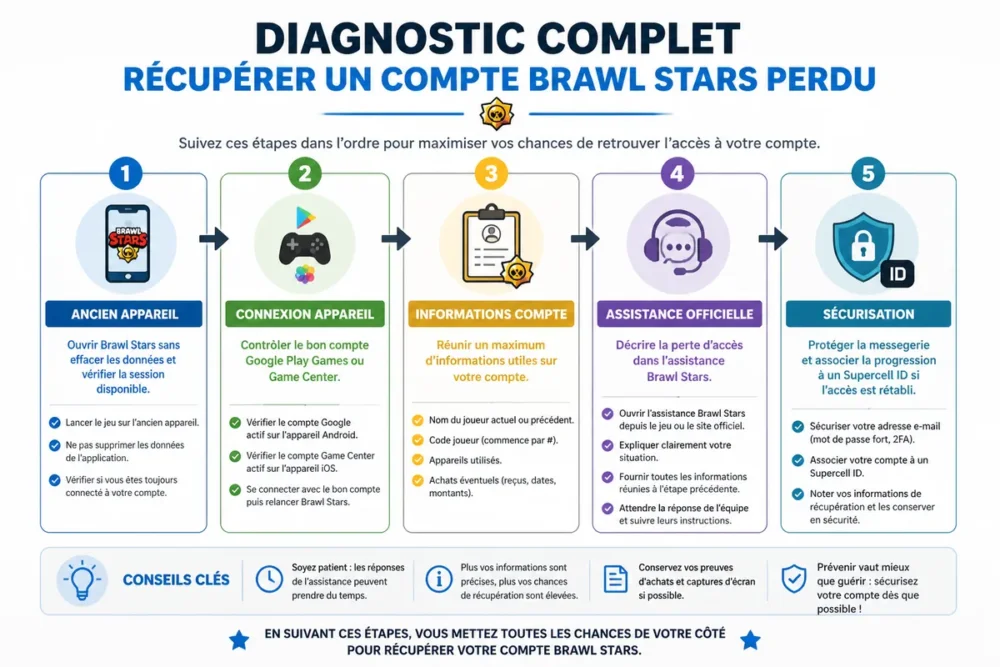
Recovering a lost Brawl Stars account without a Supercell ID remains possible in some cases, but no reliable method guarantees the result. The priority is to find an old session, verify the correct Google Play Games or Game Center account, then contact Brawl Stars official support.
Do not create a new account and never share your password, a code received by email, or a full receipt with a supposed recovery agent. The decision will depend on the support’s ability to confirm that you are indeed the owner of the progress sought.
In brief
- 🔎 Start with an old phone: the session or local link may still be active there.
- 🧾 Prepare the player name, player code if you find it, old devices, and any available proof of purchase.
- 🛡️ Use only Brawl Stars or Supercell support: Google Play and Game Center manage device login, not full account recovery.
- ⚠️ A suspended, deleted, or hacked account is not handled exactly like a simple forgotten ID.
Start by identifying the cause of the loss of access
The correct approach depends on what changed: phone, login account, email address, game access, or account security. A Google Play Games or Game Center issue does not prove that Brawl Stars progress has disappeared. These situations must be separated before submitting a request.
| Situation | First action | Preferred channel |
|---|---|---|
| Old phone still available | Open Brawl Stars without deleting its data | Game, then link to a Supercell ID |
| New phone or wrong Google account | Check the accounts connected to the device | Google Play Games, Game Center, or Brawl Stars support |
| Inaccessible email address | Do not multiply code attempts | Official game support |
| Account possibly hacked | Secure messaging and linked accounts first | Brawl Stars support |
| Account suspended or deleted | Read the displayed reason and keep messages | Official dispute or support channel |
Checks to perform before contacting support
These checks eliminate the most common connection errors without modifying progress. Do not uninstall the game or delete its data on an old device until you have checked what it contains.
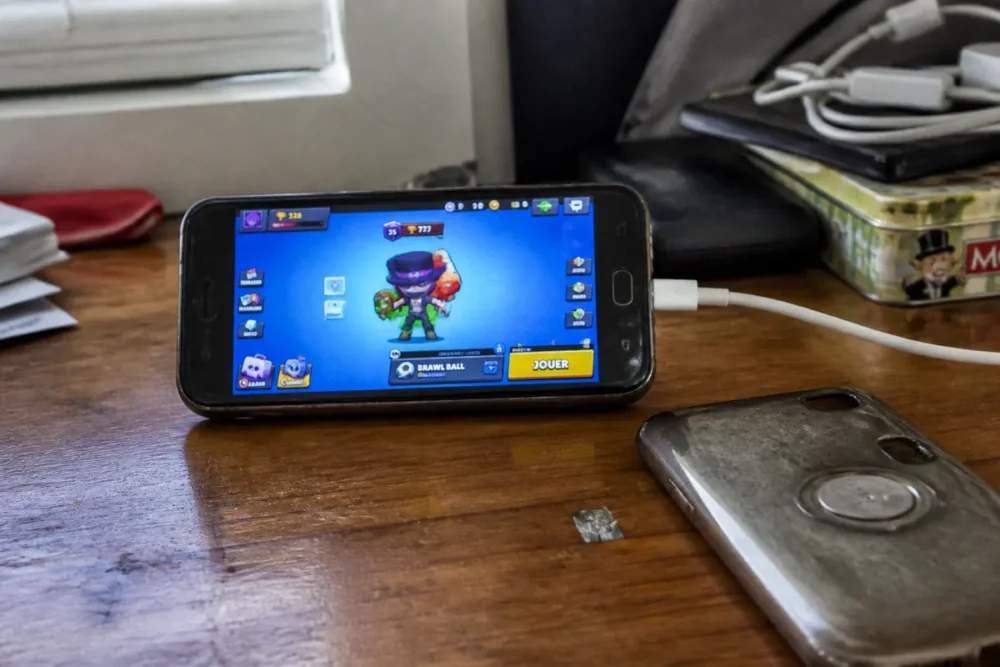
Open Brawl Stars on an old device
Find every phone or tablet used at the time, then launch Brawl Stars with the account on the device that was used then. Note the player name, approximate number of trophies, any club, and any visible element on the profile.
If the progress still appears, do not log out immediately. Open the game settings and look for the option related to Supercell ID or account backup, as labels may change with versions.
Check Google Play Games or Game Center
On Android, check the currently selected Google Play Games account. On iPhone or iPad, verify the Game Center account and the Apple account used on the old device.
Google Play or Game Center can restore a session linked to the device, but these services do not replace Brawl Stars support for every case of lost access. If the correct account does not restore progress, proceed with the Supercell procedure rather than trying solutions found on forums.
What information should be gathered to prove account ownership?
Support must be able to distinguish your account from another progression with a similar name. The more consistent your information is, the more usable the request will be, although this does not guarantee acceptance.
- Player name and previous name variations.
- Player code, if it appears in a screenshot or in a friend’s profile.
- Old device, system used, and approximate creation period.
- Club joined, known friends in the game, or saved progression elements.
- Email addresses that may have been associated with the account.
- Purchase proofs available in the official Google Play or App Store history.
Do not fabricate any information to complete the form. A false detail can complicate verification, while an uncertain indication should be presented as such. For a purchase, support may request elements allowing the transaction to be found; never post this data in a comment or on a forum.
How to contact the official Brawl Stars support?
The recommended starting point is the official Brawl Stars support portal, in the section dedicated to account and access loss: official Brawl Stars support. If the game remains accessible on a device, also use its help menu to open the request.
- Open the official portal from the Brawl Stars page or the in-game help.
- Choose the account section corresponding to access loss, compromised account, or Supercell ID issue.
- Describe the sought account with the gathered information, without guessing elements you are not sure about.
- Explain the recent change: new phone, lost email address, wrong Google account, stolen device, or suspicious activity.
- Keep the request number or history and respond in the same thread if support asks for clarification.
Menus and channels may change. If a button no longer appears in the game, return to the official Supercell portal rather than using an address published by a third party or an unverified form.
Writing a clear recovery request
A short, chronological, and verifiable request is more useful than a long story. Indicate what worked before, what changed, and the precise elements you have.
Example wording: “I can no longer access my Brawl Stars progression since changing phones. The account was used on an Android device, the player name was [name], and I can provide the player code or purchase information if necessary.” Replace the brackets with your own data and do not post this example in a public space with your real information.
Errors to avoid
- Sending multiple identical requests: this can scatter exchanges and make tracking less clear.
- Giving a verification code received by email to a person who contacts you outside the official channel.
- Confusing the Google or Apple account address with the internal Brawl Stars progression identifier.
- Erasing data from an old phone before verifying the local session.
- Paying for a service that promises guaranteed recovery or asks for the account password.
What procedure depending on your situation?
An old phone account, a lost email address, and hacking do not present the same evidence. Adapt the message to the cause instead of using a generic procedure.
The account is still logged in on an old device
Keep the device out of reach of a reset and check the game settings. The goal is to link the progression to a recognized login method before changing phones, if the interface allows it.
The email address is no longer accessible
Start by attempting to recover the mailbox with its provider. If this fails, inform Brawl Stars support and provide any available ownership information; do not replace the address with another in hopes of bypassing verification.
The account appears to have been hacked
First secure the email address, the Google or Apple account, and the associated devices. Mention any observed changes, such as a modified name or an unexpected login, without accusing any specific person without proof.
The account is suspended or deleted
A suspension is not simply a loss of identifier. Support must handle the displayed reason according to its own rules; do not use a new account or a third-party service to bypass the sanction.
Official recovery or login solutions: which to choose?
These options do not serve the same purpose. Logging into the device can resolve a wrong account selection, while support remains necessary when the progress is inaccessible or ownership must be verified.
| Option | Useful when | Limit |
|---|---|---|
| Supercell ID | The progress was linked to an accessible address | You must recover the address or request official help in case of loss |
| Google Play Games | The Android progress was linked to the correct Google account | Does not automatically fix an unlinked or hacked Brawl Stars account |
| Game Center | The iOS progress was linked to the correct Apple account | Does not replace Supercell’s ownership verification |
The safest choice is therefore to first verify the connection of the old device, then contact Brawl Stars support if the progress does not return. Response times are not fixed: they depend on the channel used, the volume of requests, and the complexity of the verification.
After recovery: securely preserving progress
As soon as access is restored, link the progress to a Supercell ID from the official game settings, then use an email address you actually control. Also keep useful information in a private location.
- Enable the protection offered by Supercell when the option is available.
- Use a unique password for the associated email.
- Do not share any login codes, even with someone claiming to work for Supercell.
- Keep purchase confirmations in your Google or Apple account, without publishing them.
- Note the player code in a private document or ask a friend who can see your profile.
The verdict is simple: to recover a Brawl Stars account, first check old logins, prepare consistent proof, then use exclusively the official support. Without a Supercell ID, recovery depends on ownership confirmation and cannot be guaranteed.
Frequently Asked Questions
Can you recover a Brawl Stars account without a Supercell ID?
Yes, a request can be made to official support even without a known Supercell ID. However, recovery depends on information that can confirm account ownership.
Can you find an account with only the player name?
The name alone may not be sufficient, especially if it is common or has been changed. Add the player code, old devices, login accounts, and any available purchase proofs.
How long does it take to get a response?
No fixed time can be guaranteed. Keep a record of the request, avoid creating multiple identical tickets, and respond quickly if support asks for clarification.
What to do if the request is denied?
Reread the official response and check if any information is missing or if the issue actually concerns a suspension. Do not buy recovery services or try to bypass verification.
How to avoid losing progress in the future?
Link the progress to a Supercell ID, protect the email address used, and keep the player code in a private space. Never share login codes with a third party.
Official sources to consult
Brawl Stars Support Portal: sections related to the account, Supercell ID, and loss of access. Menus may change, so always check the official page at the time of your process.
Supercell Help on Player ID: a useful guide to understand where to find or request the player code, even if the support article concerns another Supercell application.









