Google Translate: Tips and Lesser-Known Features to Really Use It Better Every Day
Google Translate is often opened in a hurry: an unknown word, a menu to decipher, a message received in another language, and voilà, you paste the text. However, reducing the tool to a simple input box would be truly a shame. The best Google Translate tips are mainly found in mobile uses, the camera, conversation mode, offline translation, voice, and favorites. In other words, it’s not just a translator: it’s a small linguistic toolbox, very practical provided you know when to trust it… and when to be cautious.
In brief
📱 Google Translate mobile is often more useful than the web version: camera, voice input, conversation mode, favorites, and offline languages are all gathered in one place.
📷 The camera translation really changes the game for reading a menu, a poster, instructions, or a sign, but it remains less reliable on fancy fonts, reflections, and poorly framed texts.
🗣️ The conversation mode and voice translation help in simple exchanges, especially when traveling, but they do not replace human interpretation for nuances, humor, or sensitive topics.
🧠 The right method is to simplify your sentences, check important terms, and keep in mind that quality varies depending on the language, context, and complexity of the text.
Why is Google Translate more powerful than it seems?
Google Translate is not just for translating a word or a sentence. Its most useful functions appear in real-life situations: reading with the camera, speaking with conversation mode, translating without a network, or retrieving favorite expressions. Its real strength comes from this combination of quick uses.
The Google Translate interface gives an almost deceptively simple impression: two languages, a text field, an immediate translation. Behind the scenes, however, the tool has evolved a lot. According to Google, which marks the 20th anniversary of Google Translate in April 2026, the service has relied on artificial intelligence and machine learning since its inception, with a major transition to neural networks starting in 2016.
This change partly explains why translations are now smoother than before, especially for common phrases. But beware: smoother does not mean infallible. An idiomatic phrase, an ironic tone, or a legal document can still challenge the machine. Joking aside, this is often where the user makes the difference: by choosing the right function and proofreading with a minimum of perspective.
In practice, it is mainly observed that users underutilize the application. Many type a word, read the first answer, and stop there. Yet the tool can also pronounce a term, save an expression as a favorite, automatically detect the source language, translate a text in another app, or display a translation via the camera. That’s why talking about Google Translate tips makes sense: these are not hidden gadgets, but habits that truly change the usage.
The best machine translation is not the one you accept without thinking, but the one you know how to question at the right moment.
A tool that has become much more than a simple text translator
The core of Google Translate remains text translation, of course. But the tool’s logic has shifted towards more contextual uses: an image, a voice, a conversation, a web page, a word saved for later. In other words, the app no longer just answers the question “what does this word mean?”, but rather “how can I quickly understand what I have before my eyes or in my ears?”.
This difference is important. Translating a sentence copied from a website does not involve the same constraints as understanding an announcement in a train station or asking for information in a taxi. The proper use is therefore to select the appropriate mode: text for a message, camera for printed material, voice for a spoken sentence, conversation for a two-way exchange.
Which Google Translate tips should you know first?
The most useful Google Translate tips are camera translation, conversation mode, offline language downloads, voice input, favorites, and translation within other apps. These are the ones that save time daily, especially on mobile.
To use Google Translate really better, you have to prioritize. Some functions are fun for five minutes, others quickly become essential. Camera, offline, voice, and favorites belong to the second group because they respond to real situations: reading, speaking, understanding, remembering. This is also where the mobile app takes the lead over a simple tab opened in a browser.
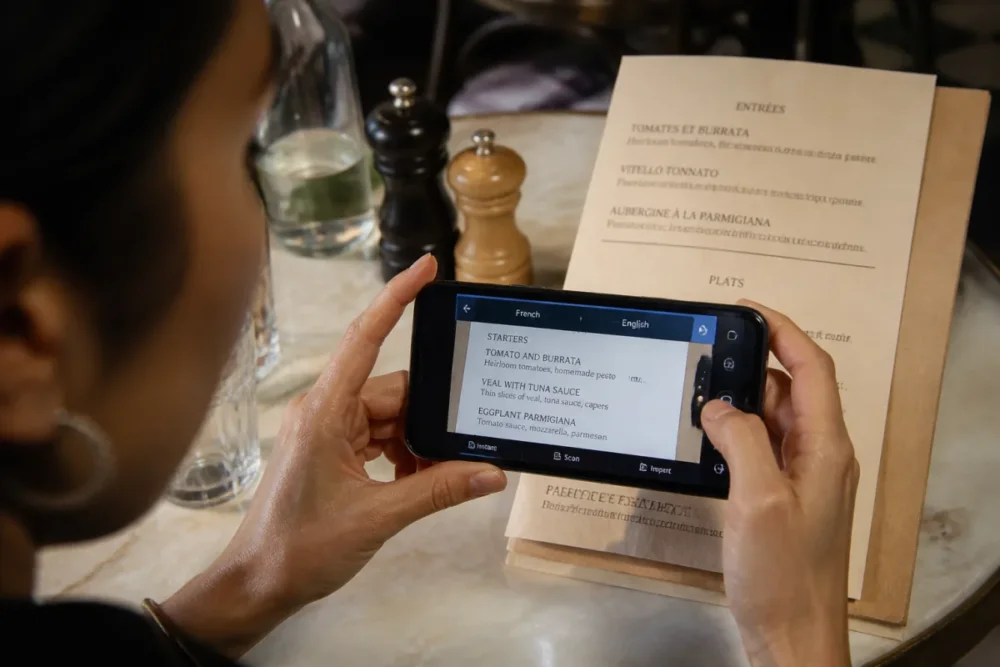
Camera translation to instantly read printed text
Camera translation is probably one of the most impressive functions for daily use. According to the official Google Translate help, the app allows you to translate text using the phone’s camera. Concretely, you point your smartphone at a menu, a label, a poster, or an instruction sheet, and the translation appears directly on the image or after selecting the text.
On a trip, this is very practical to avoid manually typing a list of ingredients or a transport instruction. However, the function becomes less reliable if the text is distorted, poorly lit, written in a decorative font, or partially obscured. Cherry on top: framing matters a lot. The flatter, clearer, and more contrasted the text, the better the recognition works.
A family who went to Lisbon said the camera was mostly useful in restaurants and transportation, much more than classic keyboard translation. However, they had to double-check twice dishes that were poorly translated due to abbreviations on the menus.
Conversation mode to communicate without juggling two phones
Conversation mode is designed for simple bilingual exchanges. According to Google’s documentation, the app can translate a conversation almost instantly in real time. The interest is not only speed: it is mainly the fact of maintaining a more natural exchange rhythm, without writing each sentence, having it translated, then holding out your phone like a receipt.
In practice, this mode is useful to ask for directions, confirm a reservation, explain a food allergy, or ask a short question. It becomes more fragile as soon as several people speak at the same time, there is noise, or the sentences are long. It is therefore preferable to speak clearly, pause, and stick to simple formulations.
Offline translation to stay independent
Offline translation deserves to be set up before you need it. Google indicates that it is possible to download languages in the app to use them without a connection. This is typically the reflex to adopt before a trip, an international train journey, or an area where the mobile network becomes unreliable. Good to know: this preparation is done language by language, from within the app.
The key point to remember is simple: offline helps out, but it can be less comfortable than connected use depending on the language and the desired function. It’s better to download the main languages before departure, test a phrase or two, then keep in mind that complex translations can remain approximate.
Voice input, transcription, and pronunciation
Voice translation allows you to speak into the microphone instead of typing. It’s simple as pie, but incredibly useful when the spelling of a word is unknown or when you want to translate a quickly heard phrase. Google Translate also offers phonetic transcription to help with pronunciation, which makes the tool interesting for learning to say a word correctly, not just for understanding it.
Google has also announced a pronunciation assistance feature using AI, available on Android in the United States and India for English, Spanish, and Hindi, according to its official April 2026 post. It is important to specify: not all new features are necessarily available everywhere, in all languages, or on all devices. That’s why you need to check the actual interface of your app before relying on a specific function.
Favorites, history, and “Tap to Translate”
History and favorites are less spectacular than the camera, but very effective. According to Google, the app allows you to save your favorite words or expressions to find them easily. For studies, a trip, or recurring work with a foreign language, it’s a small personal dictionary that builds itself effortlessly.
Another option to know: Tap to Translate. This feature allows you to translate text in other apps without switching apps. It can be handy in messaging, social networks, or email. Provided, of course, that the feature is available and activated on your version of the app.
| Concrete need | Function to prioritize | Point of caution |
|---|---|---|
| Read a menu or a sign | Camera translation | Lighting, framing, and text font |
| Ask for information | Conversation mode | Background noise and overly long sentences |
| Travel without reliable network | Offline translation | Languages to download before departure |
| Retain vocabulary | Favorites and history | Clean up unnecessary translations |
| Understand a web page | Website or Chrome translation | Sometimes imperfect layout |
How to Use Google Translate According to Context?
Google Translate becomes truly effective when you stop using it the same way everywhere. When traveling, it is mainly used to read and speak quickly. For studies, it helps to understand and memorize. At work, it is useful for short texts but requires more caution with sensitive data and professional wording.
The same sentence translated in two different contexts does not pose the same challenges. Understanding the general idea of a tourist sign is one thing; sending a commercial email to a foreign client is another. The tool can help in both cases, but not with the same level of demand.
When Traveling: Read, Ask, Verify
When traveling, the most useful Google Translate tips are often the quickest: camera for menus, conversation mode for simple exchanges, offline languages to maintain a safety margin. In practice, locals or travelers who use it best do not seek a perfect translation; they seek sufficient understanding to act without stress.
- Before departure: download useful languages and test offline translation.
- On site: use the camera for short, clearly visible printed texts.
- In oral exchanges: favor simple sentences, one idea at a time.
- In case of doubt: rephrase rather than repeat the exact same sentence.
It is observed in the field that the camera function is often adopted first by travelers because it requires no technical knowledge. Conversation mode comes next, usually when a practical situation needs to be resolved: transport, accommodation, ordering, or appointment.
For Studies: Understand Without Becoming Dependent
For students, Google Translate is useful as a clarification tool, not as a machine to do the work for them. It can help to understand an article, verify a term, listen to pronunciation, or compare several formulations. History and favorites then become interesting because they avoid searching for the same word ten times.
The right reflex is to translate short segments, then return to the original text. If you paste an entire complex paragraph, the translation may seem smooth while crushing nuances. In other words, Google Translate can open the door to a text, but it does not replace the effort of understanding.
For Work: Save Time Without Taking Unnecessary Risks
At work, the tool is helpful for proofreading a simple message, understanding a short document, or preparing a first-level response. But one must keep one point in mind: any professional text may contain confidential, commercial, or personal information. Before pasting sensitive content into an online tool, it is better to apply good data protection practices, as reminded by the CNIL in its recommendations on personal data protection.
The reasonable rule is simple: Google Translate is very practical for understanding, drafting, checking a general tone. For a contract, an HR document, a binding commercial proposal, or client data, human validation remains essential. The cherry on top: reading the translation aloud often helps spot an awkward phrasing.
The higher the stakes of the text, the less automatic translation should be used alone.
What Limits Should You Keep in Mind Before Trusting a Translation?
The accuracy of Google Translate varies depending on the language, context, sentence length, and type of vocabulary. The tool is very effective for understanding the general idea of a common text, but it can be wrong on idiomatic expressions, tone, implications, and specialized terms.
It is true that AI advances have made translations more natural. Google also states that it uses Gemini models and recent tensor processing units to improve Translation performance. But even a nicely phrased sentence can be wrong on a detail. The danger, precisely, comes from this fluidity: an elegant translation inspires confidence, even when it misses a nuance.
Accuracy varies depending on the language and context
A translation between two well-documented and widely used languages will often be more reliable than a pair of less represented languages. Short, concrete, and well-punctuated sentences also yield better results. Conversely, metaphors, jokes, administrative formulas, and cultural references can produce strange translations.
Therefore, one should not ask the tool for what it cannot guarantee: understanding the deep intention of an author, choosing the perfect tone for a delicate situation, or arbitrating between several possible meanings without context. In summary, Google Translate helps to overcome a language barrier, but it does not read minds.
Common mistakes to avoid
Many errors come less from the tool itself than from the way it is fed. A sentence that is too long, ambiguous, or poorly punctuated mechanically gives the model more work. By simplifying the input, the output is often improved. It’s basic, but very effective.
- Avoid multi-line sentences with three different ideas.
- Replace ambiguous pronouns with actual names when possible.
- Check technical words in a specialized dictionary or a reliable source.
- Compare the reverse translation to spot an obvious mistranslation.
- Do not paste sensitive data without considering the context of use.
How to get better translations without being a translator?
To improve Google Translate, write short sentences, add context, avoid ambiguous expressions, and always proofread important terms. A good automatic translation often starts with a clear source text, well punctuated and broken down into simple ideas.
The best tip is not hidden in a menu: it consists of better formulating what you give to translate. A clean, clear, and short source text almost always produces a more usable translation. This applies to an email, a question while traveling, or a sentence to learn. The tool is powerful, but it does not like to guess.
A simple method is to first write a “neutral” version of the sentence, then translate. For example, instead of a very familiar or elliptical sentence, it is better to write a complete formulation. Then, you can adjust the tone. It is less spontaneous, certainly, but much more reliable.
- Break down the text into short sentences, with a single main idea.
- Add the missing context: subject, recipient, field, intention.
- Translate then proofread proper names, units, dates, and technical terms.
- Compare with a reformulation if the result seems too vague.
- Validate important texts manually before sending or publishing.
The built-in dictionary, audio pronunciation, and phonetic transcription are also good safeguards. They help distinguish a single word from a complete expression, and not confuse written comprehension with actual usage. This is particularly useful for learning vocabulary without memorizing a shaky translation.
What these features really change in daily life
Ultimately, Google Translate becomes really interesting when you stop seeing it as a magic button. Its little-known features mainly create three benefits: speed, autonomy, and comfort. Speed, because the camera or voice avoid having to type everything. Autonomy, because offline mode reduces dependence on the network. Comfort, because favorites, history, and pronunciation turn the tool into a recurring companion.
The nuance is essential: the goal is not to replace language mastery, but to have a reliable support in moments when you need to understand quickly. For a trip, occasional reading, a simple exchange, or vocabulary checking, the Google Translate tips make a real difference. For a sensitive or highly nuanced text, they should remain a starting point, not a final answer.
Key takeaways
- 📷 The camera is ideal for menus, signs, posters, and short instructions.
- 🗣️ Conversation mode is especially helpful with simple sentences and a quiet environment.
- 📶 Offline translation should be prepared before a trip or journey.
- ⭐ Favorites turn the app into a mini personal vocabulary notebook.
- 🔒 Sensitive professional texts deserve real caution before online translation.
FAQ
Does Google Translate really work without Internet?
Yes, provided you have downloaded the necessary languages in the app before losing the connection. Offline translation is very useful when traveling, but some features may be less complete than in connected mode.
Is camera translation reliable for all texts?
It works better on short, clear, well-lit, and clearly printed texts. On a blurry photo, decorative font, damaged sign, or very technical text, the result may require verification.
How to improve a Google Translate translation?
The most effective way is to simplify the source text: short sentences, clear punctuation, precise vocabulary. For important passages, try rephrasing and check sensitive terms with a dictionary or a specialized source.
Can Google Translate be used for work?
Yes, to understand a message, prepare a simple response, or proofread a short text. However, for a confidential, contractual, or commercially sensitive document, it is better to avoid automatic copy-pasting and plan for human validation.
Can Google Translate translate an entire web page?
Yes, web page translation can be done via Google Translate or directly in Chrome with integrated translation options. The rendering is generally sufficient for understanding, but the layout and some terms may vary depending on the site.









