.en-bref { max-width: 640px; margin: 2em auto; padding: 1.5em 1.8em; color: #3a2d0d; font-family: “Inter”, “Segoe UI”, sans-serif; text-align: left; position: relative; box-sizing: border-box; background: #f7f9f9; border: 1px solid #10b58b; border-left: 6px solid #10b58b; border-radius: 12px; box-shadow: 0 8px 24px rgba(251, 191, 36, 0.15); }
.en-bref h2, .en-bref .en-bref-header { font-size: 1.15em; font-weight: 700; margin-bottom: 0.6em; color: #d97706; }
.en-bref p, .en-bref li { font-size: 1em; line-height: 1.65; margin: 10px; }
.en-bref strong { color: #1c1917; }
.key-takeaways { max-width: 640px; margin: 2em auto; padding: 1.5em 1.8em; color: #3a2d0d; font-family: “Inter”, “Segoe UI”, sans-serif; text-align: left; position: relative; box-sizing: border-box; background: #f7f9f9; border: 1px solid #10b58b; border-left: 6px solid #10b58b; border-radius: 12px; box-shadow: 0 8px 24px rgba(251, 191, 36, 0.15); }
.key-takeaways h2, .key-takeaways .key-takeaways-header { font-size: 1.15em; font-weight: 700; margin-bottom: 0.6em; color: #d97706; }
.key-takeaways p, .key-takeaways li { font-size: 1em; line-height: 1.65; margin: 10px; }
.key-takeaways strong { color: #1c1917; }
.key-takeaways ul { list-style: none; padding-left: 0; }
.key-takeaways li { margin: 0.45em 0; padding-left: 0.2em; }
.magic-pdf-download{margin:2em 0;padding:1.25em 1.5em;border:1px solid #e3e6ea;border-left:4px solid #0ea5e9;border-radius:10px;background:#f8fafc;display:flex;align-items:center;gap:1.2em;flex-wrap:wrap}.magic-pdf-download .mpd-txt{flex:1;min-width:220px}.magic-pdf-download .mpd-txt strong{display:block;font-size:1.05em;color:#0f172a;margin-bottom:.15em}.magic-pdf-download .mpd-txt span{color:#64748b;font-size:.92em}.magic-pdf-download a.mpd-btn{display:inline-block;background:#0ea5e9;color:#fff;text-decoration:none;padding:.7em 1.5em;border-radius:8px;font-weight:600;white-space:nowrap}.magic-pdf-download a.mpd-btn:hover{background:#0284c7}
.magic-lb-overlay{position:fixed;inset:0;background:rgba(15,23,42,.92);display:none;align-items:center;justify-content:center;z-index:99999;cursor:zoom-out;padding:20px}
.magic-lb-overlay.open{display:flex}
.magic-lb-overlay img{max-width:95vw;max-height:95vh;object-fit:contain;border-radius:8px;box-shadow:0 8px 32px rgba(0,0,0,.5)}
.magic-lb-close{position:absolute;top:16px;right:20px;color:#fff;background:rgba(0,0,0,.5);border:none;width:40px;height:40px;border-radius:50%;font-size:24px;cursor:pointer;display:flex;align-items:center;justify-content:center}
.magic-lb-close:hover{background:rgba(0,0,0,.8)}
.wp-block-image img{cursor:zoom-in;transition:transform .15s ease}
.wp-block-image img:hover{transform:scale(1.01)}
.magic-img-link{display:inline-block;text-decoration:none}
(function(){
var ov=document.getElementById(‘magic-lb’);if(!ov)return;
var img=ov.querySelector(‘img’),btn=ov.querySelector(‘.magic-lb-close’);
function open(src){img.src=src;ov.classList.add(‘open’);document.body.style.overflow=’hidden’}
function close(){ov.classList.remove(‘open’);img.src=”;document.body.style.overflow=”}
document.addEventListener(‘click’,function(e){
var a=e.target.closest(‘a.magic-img-link’);
if(a){e.preventDefault();open(a.getAttribute(‘href’));return}
var i=e.target.closest(‘.wp-block-image img’);
if(i&&!e.target.closest(‘a’)){e.preventDefault();open(i.currentSrc||i.src)}
});
ov.addEventListener(‘click’,function(e){if(e.target===ov||e.target===btn)close()});
document.addEventListener(‘keydown’,function(e){if(e.key===’Escape’)close()});
})();
Manjaro Linux: understanding, installing, and choosing the right edition
Manjaro Linux is a GNU/Linux distribution based on Arch that maintains recent packages and continuous updates, but with a more guided installation and more accessible choices. For a beginner or intermediate user, the benefit is simple: a modern system to get started with without immediately diving into the mechanics of pure Arch.
This guide explains what Manjaro really offers, where its limits begin, how to choose between Xfce, KDE Plasma, and GNOME, then how to install Manjaro Linux without missing dual boot, partitioning, or graphics drivers. Everything is updated as of July 2026.
In brief
🧭 Manjaro Linux follows Arch’s logic but reduces the initial workload.
🔄 The rolling release provides recent packages; the trade-off is a real update discipline.
🖥️ Xfce, KDE Plasma, and GNOME cover three different uses, from lightweight PC to more complete desktop.
🛠️ To install Manjaro Linux, the useful sequence remains the same: backup, USB key, boot, Calamares, then initial settings.
What is Manjaro Linux?
Manjaro Linux is a GNU/Linux distribution that serves as a more accessible layer on top of Arch Linux. It retains the spirit of Arch — recent packages, continuous updates, fine control — while reducing the initial friction for installation and configuration.
The official slogan “The Linux for People and Organizations” sums up the target well: a system aimed at daily use without locking the user into heavy maintenance.
Practically, Manjaro is for those who want a modern Linux without spending their evenings assembling the system piece by piece. The distribution is officially offered with Xfce, KDE, and GNOME, three well-known environments to serve as a stable working base.
Historically, the first mentioned stable version is 0.8.0, dated August 20, 2012. The Manjaro versions page also shows a stable version 26.0 dated January 5, 2026, confirming an active and maintained project.
Why choose Manjaro Linux?
Manjaro Linux is mainly interesting for three reasons: a more accessible Arch base, a guided installation, and continuous updates without major version migrations. Overall, it suits someone who wants a modern system but does not want to start with the complexity of pure Arch.
The real value of Manjaro is seen when you want a ready-to-use system, with reasonable maintenance and already coherent desktop choices.
A rolling release distribution is judged by update discipline, not marketing promises.
- Recent packages without periodic reinstallation.
- Ready-to-use editions to start faster.
- Useful Arch base if you want to gain skills later.
- Often comfortable hardware management on recent machines.
This logic has a downside: a rolling release requires keeping up with updates. If you let the system sleep too long, you risk more friction when upgrading everything.
Which Manjaro Linux editions to choose?
Manjaro Linux mainly exists in three official editions: Xfce, KDE Plasma, and GNOME. The right choice depends less on the prestige of the environment than on visual load, available memory, and the reader’s habits.

The Xfce edition targets modest machines or users who want a sober interface. KDE Plasma suits those who like to finely tune appearance and behaviors. GNOME is for those who prefer a more streamlined interface, with fewer visible options at first glance.
| Edition | What it offers | Main limitation | For whom? |
|---|---|---|---|
| Xfce | Lightweight, simple, fast to learn interface | Less visually modern | Old PC, lightweight machine, simple use |
| KDE Plasma | Very good level of customization and full desktop | May seem more feature-rich than necessary | User who wants to adjust every detail |
| GNOME | Clean interface, coherent logic, clear readability | Fewer visible options without extensions | Simple daily use, readable desktop |
- Choose Xfce if priority is lightness.
- Choose KDE Plasma if you like to customize the desktop.
- Choose GNOME if you want a simple-to-read interface.
- Avoid choosing the heaviest edition just out of habit.
For an old computer, Xfce remains the safest bet. For a main workstation with a wide screen, KDE Plasma often offers the best margin for adjustment. For simple and regular use, GNOME remains consistent if you accept fewer visible settings.
How to install Manjaro Linux without mistakes?
Installing Manjaro Linux involves a bootable USB key, booting from the media, then the Calamares installer. The real mistake is not an extra click, but lack of preparation: no backup, improvised partitioning, or poorly anticipated dual boot.
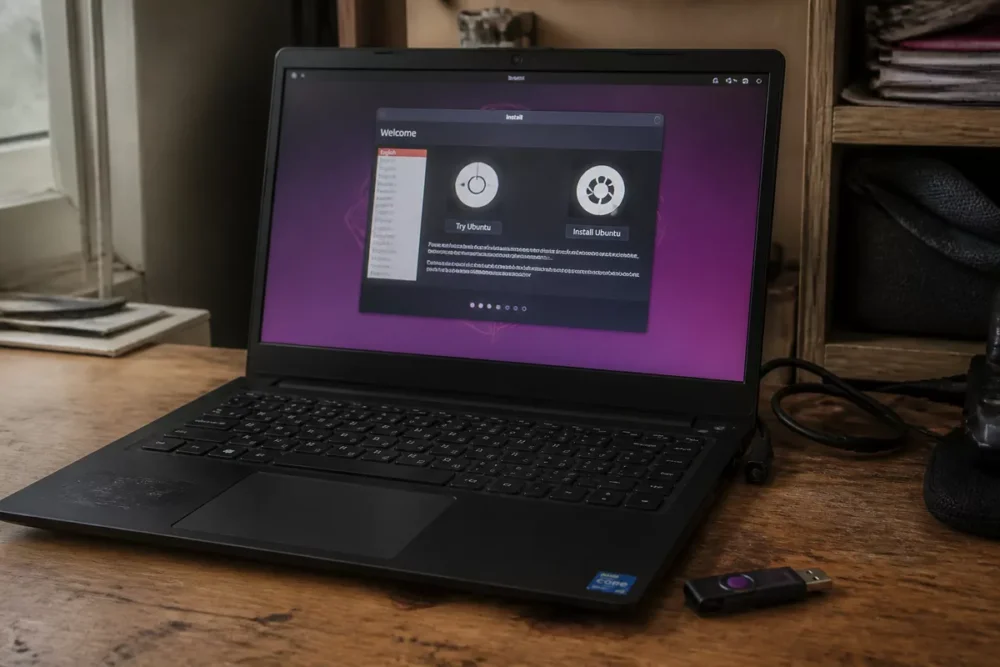
Before starting the installation, prepare a USB media of at least 8 GB, back up important files, and check if the computer uses UEFI, Windows, or another system already installed. A clean boot avoids many more problems than a repair afterward.
If your machine depends on uncertain power supply, a well-chosen UPS limits the risk of sudden shutdown during media creation or initial updates.
- Download the official Manjaro Linux ISO image.
- Create the bootable USB key with a reliable tool and verify it boots.
- Start the computer from the key, then open the Calamares installer.
- Choose the disk, partitioning, time zone, and user account.
Step 1: prepare the installation media
First download the official ISO corresponding to the chosen edition, then create a bootable USB key. The point of caution is simple: a badly written key or corrupted image wastes time at first boot.
On a PC intended for dual boot, also keep free space before installation. The expected result is media that boots cleanly and lets you enter the live environment without error messages.
Step 2: boot from the USB key
Restart the PC, open the motherboard boot menu, and choose the USB key. On many recent machines, the UEFI entry is the most common path; the important thing is to launch the live session, not to force an exotic setting.
The expected result is a test session that allows you to check the keyboard, screen, Wi-Fi, and sound before installing anything on the internal disk.
Step 3: launch Calamares and choose the disk
Open Calamares, then choose whether Manjaro Linux should occupy the entire disk or coexist with Windows or another system. Partitioning requires rigor: a targeting error can erase data on the wrong disk.
For dual boot, the safest approach is to prepare a free zone in advance, then let the installer create the necessary partitions in this space. The expected result is a disk structured without surprises at reboot.
Step 4: finalize the installation and make the first adjustments
Confirm the time zone, username, password, and startup options, then reboot into the installed system. At the first login, check for updates and graphics drivers before adding a lot of software.
The expected result is a clean base, ready for daily work and less exposed to hardware conflicts from the start.
Manjaro Linux in daily use: software, updates, and drivers
Manjaro Linux remains simple on a daily basis when you keep three habits: install from official repositories, update regularly, and check hardware after every major change. The package manager Pacman serves as the foundation for this maintenance.
This distribution does not impose a complicated routine, but it rewards systems maintained regularly. A clean Manjaro system is above all a system updated without delay and without unnecessary stacking of third-party sources.
- Check for updates every week if the PC is used daily.
- Check graphics drivers after an installation or a card change.
- Install first the software you actually use.
- Avoid adding multiple package sources without a clear reason.
| Task | Good habit | Common mistake | Concrete effect |
|---|---|---|---|
| Update | Follow a regular rhythm | Wait too long | Less friction and fewer conflicts |
| Install software | Start with reliable repositories | Multiply sources | More readable and more stable system |
| Graphics drivers | Check at first startup | Postpone diagnosis | Fewer display bugs or slowdowns |
On a PC with a hybrid GPU or a finicky Wi-Fi card, checking graphics drivers and hardware matters more than the choice of desktop theme. Manjaro Linux helps you start quickly, but real stability then depends on maintenance discipline.
Manjaro Linux compared to Ubuntu, Arch, and Fedora: what are the differences?
Manjaro Linux positions itself between the simplicity of Ubuntu and the control of Arch Linux. The right comparison does not just pit distributions on speed; you have to look at maintenance, package freshness, learning curve, and the level of control required.
If you come from Ubuntu, Manjaro Linux will seem more recent and more flexible; if you come from Arch, it will seem more assisted. Fedora often lies between the two in technical modernity, with a stricter framework than Arch and less visual guidance than Manjaro.
| Distribution | Strength | Main limitation | Suitable profile |
|---|---|---|---|
| Manjaro Linux | More accessible Arch, ready-to-use editions | Rolling release that requires keeping up with updates | Curious beginner, intermediate user |
| Ubuntu | Large ecosystem, abundant support | Often less recent packages | Beginner, general use, professional environment |
| Arch Linux | Total control, very flexible base | More demanding installation and maintenance | Advanced user |
| Fedora | Modern system, clean technical base | Shorter cycle and stricter framework | User who wants recent software without too much tinkering |
- Manjaro is suitable if you want a compromise between comfort and freshness.
- Ubuntu reassures more when compatibility and ecosystem remain the priority.
- Arch is for those who want to choose everything themselves.
- Fedora interests those who want a modern system without going to Arch.
The right choice therefore depends less on the logo than on the time you are willing to devote to maintenance. If you want a lively, recent, and already ready Linux desktop, Manjaro Linux remains truly interesting. If you want a base frozen for longer, Ubuntu remains more comfortable. If you want full control, Arch keeps the advantage.
What are the daily pitfalls to avoid?
Manjaro Linux remains easy to live with when you avoid some common mistakes. Problems rarely come from the system alone; they more often stem from a mismatch between what a rolling release entails and how it is used daily.
Most serious troubles come from forgotten updates, poor partitioning choices, or hardware not properly checked after installation.
- Postponing updates for months: catching up becomes more fragile and longer.
- Choosing an edition that is too heavy for a weak machine: the desktop becomes unnecessarily loaded.
- Installing too many external packages without clear logic: the system loses clarity.
- Ignoring dual boot at partitioning time: the risk of conflict increases.
- Not checking graphic drivers: some PCs boot, but poorly use the screen or GPU.
The way to avoid these pitfalls remains simple: install cleanly, update often, and do not confuse technical curiosity with piling up software. Manjaro Linux handles serious daily use well; it handles prolonged neglect less well.
Useful sources to consult
Official sources remain the best base to verify an edition, a version, or an installation procedure. For Manjaro Linux, the good reflex is to start from the official site, then complement with technical documentation when a step involves packages or hardware.
- Official Manjaro site: project presentation, general orientation, and basic information.
- Manjaro download page: choice of edition and access to ISO images.
- Pacman documentation: understanding the package manager of the Arch base.
Manjaro Linux: who is this choice suitable for?
Manjaro Linux is suitable for a beginner to intermediate user who wants to learn Linux without starting from a bare setup. The distribution fits well for a personal machine, a family workstation, a test PC, or a work environment that accepts regular updates.
The verdict remains clear: Manjaro Linux is a good compromise if you want Arch without the brutal setup, but it becomes less relevant if you seek a system frozen for a long time without maintenance. For this second case, Ubuntu LTS or Linux Mint often make more sense.
Key takeaways
- 🧩 Manjaro Linux simplifies Arch without erasing its logic.
- 🔁 The rolling release requires regular updates.
- 🖥️ Xfce, KDE Plasma, and GNOME cover different needs.
- 💾 Backup, USB key, and partitioning are priorities before installation.
- 🛠️ Hardware and drivers matter as much as the choice of edition.
Frequently asked questions
Is Manjaro Linux suitable for beginners?
Yes, Manjaro Linux remains suitable for beginners who want to discover a system close to Arch without having to build everything by hand. The learning curve exists, but it remains gentler than with pure Arch.
Which edition to choose between Xfce, KDE Plasma, and GNOME?
Xfce is the cautious choice for a lightweight machine, KDE Plasma suits if you like to customize, and GNOME works well for a streamlined interface. The best choice mainly depends on the PC’s power and your desktop habits.
Can Manjaro Linux be installed in dual boot with Windows?
Yes, dual boot remains possible, but it requires preparing disk space before installation and verifying the correct disk in Calamares. A complete backup remains the most useful precaution before starting.
Is Manjaro Linux stable?
Manjaro Linux can be stable in use if updates are done regularly and if the system remains clean. The rolling release simply demands more attention than a distribution frozen over a long period.
Is frequent intervention on the system necessary?
No, not if the system is installed correctly and maintained regularly. Interventions remain limited as long as you follow updates, monitor graphic drivers, and avoid piling unnecessary packages.









