Slow WiFi Connection: Understanding the Causes and Regaining a Fast Connection
A slow WiFi connection does not always mean your Internet access is bad. Very often, the issue comes from the signal, the location of the box, a saturated network, or an outdated device dragging everything down. The right approach is therefore to diagnose in the correct order, without tinkering randomly.
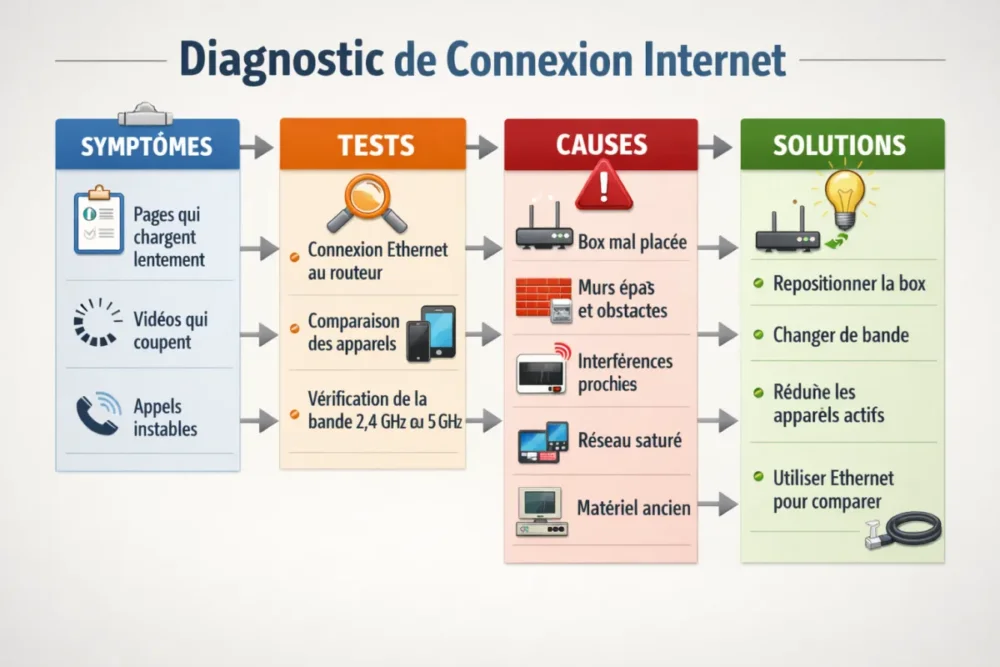
In real life, the problem is quickly noticeable: pages loading sluggishly, videos pausing, video calls dropping, or very different speeds from one room to another. Good news: in many cases, the situation can already be significantly improved with a few simple tests and very concrete adjustments.
In brief
📶 A slow WiFi connection often comes from a weak signal, interference, or network saturation.
🧪 The Ethernet test quickly determines if the problem comes from the WiFi or the Internet connection.
🏠 The position of the internet box matters a lot: walls, furniture, and floors can break the signal.
⚡ The 5 GHz band is often more comfortable, while the 2.4 GHz band is more easily disturbed.
Why your WiFi can become slow
A slow WiFi connection is not just a matter of “network bars.” On one side, there is the radio signal linking your devices to the box, and on the other, the actual speed of your line. In other words, you can have a good signal but limited speed, or the opposite. When multiple devices consume at the same time, the home network quickly starts to struggle.
- Weak signal: distance and obstacles weaken the wireless connection.
- Saturated network: too many devices or too many demanding uses at the same time.
- Interference: some devices disrupt WiFi, especially on 2.4 GHz.
- Aging equipment: an old box or router handles modern uses less well.
- Limited Internet connection: if the line itself is slow, WiFi is not the only suspect.
The real question is not “Is my WiFi turned on?”, but “Where is the speed lost, between the line, the box, and the devices?”
How to know if the problem comes from the WiFi or the Internet connection?
The most reliable test is to connect a PC via Ethernet directly to the router or box, then run a speed test. If the speed significantly improves, the problem mainly comes from the WiFi. If the result remains low, you should rather look at the line, the box, or the service provider.
- Connect a computer via Ethernet to the box, without using WiFi.
- Run a speed test on the same site or app as usual.
- Compare with WiFi in the room where you usually work or stream.
- Note the difference: a large gap points to a signal or radio environment issue.
- Repeat the test on another device to rule out a problem specific to one terminal.
If the speed improves on Ethernet, the culprit is often the WiFi itself, not the Internet connection.
What are the most common causes of a slow WiFi connection?
The causes of a slow WiFi connection generally fall into four main categories: the location of the box, physical obstacles, radio interference, and network saturation. Add to that an old router or low-performance devices, and you quickly get a home network that struggles, especially during peak hours.
| WiFi Band | What it offers | Most suitable situation |
|---|---|---|
| 2.4 GHz | More exposed to interference | When range matters more than pure speed |
| 5 GHz | Less exposed to interference | For regular use near the box |
| 6 GHz | Less saturated frequency, dedicated to the fastest devices | For compatible equipment, especially with a Livebox 6 |
1. A poorly placed box
A box placed on the floor, enclosed in furniture, or stuck in a corner broadcasts much less effectively. The signal passes less easily through obstacles and degrades very quickly as soon as there is distance. A central, clear, and slightly elevated placement often gives a much cleaner result.
2. Very penalizing physical obstacles
Load-bearing reinforced concrete walls, brick partitions, floors between levels, and even some UV-treated glass can slow down the WiFi signal. In a multi-story house, an unstable connection upstairs does not necessarily mean the box is broken: the dwelling itself can block the waves.
3. Interference in the environment
Microwaves, cordless phones, baby monitors, or Bluetooth speakers near the router can disrupt the network, especially on the 2.4 GHz band. This frequency is more sensitive to interference than the 5 GHz band, which explains why a device may perform better simply by switching bands.
4. A network saturated by too many devices
When several people watch videos, download files, or participate in video calls simultaneously, the connection is shared. The perceived speed drops and the internet speed becomes irregular. This phenomenon is even more noticeable in heavily equipped homes with many connected objects.
5. Old or less efficient equipment
Older or low-end routers often have weaker internal antennas and handle simultaneous connections less well. Conversely, recent routers with MIMO, MU-MIMO, and beamforming better distribute exchanges and limit signal loss. On the box side, newer models also include Intelligent WiFi capable of choosing the best frequency for the connected device.
6. A sometimes overlooked software cause
Spyware, viruses, or other malicious programs can consume resources and slow down network usage. It is not the most visible cause, but it deserves to be checked if only one device starts to lag while all others work properly.
WiFi does not always slow down “because of the box”: sometimes, it’s just the room, the frequency, or the device that causes everything to fail.
How to fix a slow WiFi connection step by step?
To fix a slow WiFi connection, go from the simplest to the most useful. No need to mess with all the settings right away: restarting, repositioning, choosing the band, and reducing usage are often enough to get things back on track.
- Restart the box and your devices: it’s basic, but it regularly fixes temporary slowdowns.
- Place the box in the right spot: in the center of the home, elevated, away from closed furniture and electrical devices.
- Switch to 5 GHz if the device supports it: this band is often more stable and less disturbed.
- Reduce simultaneous usage: pause large downloads during video calls or streaming.
- Test multiple devices: if only one terminal is slow, the problem may be with it.
- Check for possible malware if the slowdown is isolated to one computer.
- Run an Ethernet test to confirm if the slowness comes from WiFi or the Internet access itself.
In some cases, it is also useful to look at the advanced options of the box. If your interface offers it, changing the channel can help limit interference, especially in a dense building. However, you must proceed with caution: note your settings before any modification, so you can revert without hassle.
What sustainable solutions if the problem persists?
If the slow WiFi connection returns every day despite tests, the problem is probably structural. In this case, you need to think about coverage, equipment, and the architecture of the home. A temporary solution can help, but a multi-story or very large home often needs a more solid response.
- WiFi repeater: useful for extending coverage to a distant room.
- Mesh system: interesting when several areas of the home need to be properly covered.
- Newer router: relevant if your current equipment struggles with multiple devices simultaneously.
- WiFi 6 or 6E: useful with compatible devices, especially to more easily exceed 1 Gbps on WiFi under good conditions.
- Fiber optic: if the current line is limited, it can offer up to 2 Gb/s theoretical download speed, compared to about 20 Mb/s on ADSL.
You should also keep in mind that not all devices are equal. Older terminals can slow down the entire network, as the connection often aligns with the least performing equipment. A recent box like a Livebox 4 or newer, with Intelligent WiFi, can already improve device management. And with a Livebox 6, WiFi 6 and WiFi 6E open the door to better performance on compatible devices.
How to diagnose in a few minutes?
If you want to go fast, keep this method in mind: test near the box, then in the room where it’s slow, compare another device, then redo the measurement via Ethernet. In a few minutes, you will know if your problem is related to the signal, home coverage, or the Internet line.
- Test next to the box to check the basic performance.
- Test in the problematic room to measure the impact of distance and obstacles.
- Compare another device to know if the issue is global or localized.
- Temporarily disconnect some uses to see if the network is saturated.
- Do an Ethernet test to decide between WiFi and Internet connection.
A quick diagnosis is better than three blind adjustments.
What to do if the connection remains slow after all tests?
If the slow WiFi connection persists despite a good box location, a reassuring Ethernet test, and a better-chosen band, you need to look at the provider or the equipment. An ADSL line caps around 20 Mb/s theoretical download speed, whereas fiber can go up to 2 Gb/s. In other words, sometimes the bottleneck is not inside the house.
In this case, contact technical support with precise details: Ethernet test, observed speed, concerned room, number of active devices, and time of slowdowns. The more concrete you are, the faster the diagnosis will progress. And if your home is hard to cover, a solution like a WiFi repeater or mesh can become more cost-effective than a series of random trials.
Key takeaways
- 📌 An Ethernet test helps distinguish a WiFi problem from a line problem.
- 📌 The internet box should be placed centrally, high up, and without nearby obstacles.
- 📌 The 5 GHz band is often more stable than the 2.4 GHz band.
- 📌 Too many connected devices can cause an unstable connection.
- 📌 A recent router, a repeater, or a mesh system can improve coverage sustainably.
FAQ
Why is WiFi slow only in one room?
Most often, this room is too far from the box or separated by thick obstacles. Concrete walls, brick partitions, and floors between levels weaken the signal. In this case, the issue comes more from coverage than from the Internet connection itself.
Why is the internet fast on one device and slow on another?
An old device may receive the signal less well, manage WiFi bands less effectively, or simply be slowed down by its own software. If only one terminal is causing problems, the network is not necessarily at fault. You should then check the device, its updates, and its network compatibility.
Should you change your box to improve your WiFi?
Not always. If your box is recent and well placed, better positioning, switching to 5 GHz, or adding a repeater may be enough. However, an old box can become a real limitation, especially if several people use the Internet at the same time.
Why does the connection slow down in the evening?
In the evening, the home network is often more heavily used: streaming, gaming, video calls, downloads… everyone connects at the same time. If your speed drops mainly at these times, network congestion is a very serious possibility.
When should you contact your internet service provider?
If the Ethernet test remains slow, if disconnections are frequent, or if you are well below the theoretical speed expected from your plan, contact support. Be sure to provide precise measurements: this helps speed up the diagnosis without going in circles.