To find orphan pages, compare the known URLs from the sitemap, Google Search Console, and traffic data with the pages reachable through internal links. Then manually check each discrepancy, and link, update, redirect, or delete the page according to its actual value.
A page can remain indexed, receive visits, or appear in a sitemap without being linked to the rest of the site. A simple free audit should therefore distinguish the absence of internal links, non-indexing, inaccessibility, and low traffic before any correction.
In brief
🔎 An orphan page receives no incoming internal links from accessible pages of the site.
📄 The sitemap is not enough: you must cross-check its URLs with navigation, content, Search Console, and available audience data.
🧭 A detected URL is a candidate, not proof: confirmation requires manual verification of internal access paths.
🛠️ The right correction depends on the page’s value: link a useful page, redirect an equivalent page, or delete content without interest.
Orphan page: recognizing it without false diagnosis
An orphan page is an existing URL that receives no incoming internal links from other accessible pages of the site. However, it can be known by its direct address, an external link, an XML sitemap, or a search engine. The diagnosis therefore concerns internal linking, not traffic or indexing.
An orphan page is a published page without a relevant internal path to it. On a small site, this isolation complicates navigation, content maintenance, and discovery of pages by users as well as by crawling robots. The impact on SEO is not automatic: it notably depends on indexing, external links, and the overall architecture.
A non-indexed page does not necessarily appear in Google results, but it can receive internal links. A rarely visited page sometimes has correct linking. An inaccessible page returns an error, requires a login, or blocks access. A deliberately isolated page, such as a campaign landing page, can fulfill its role without classic navigation links.
What an internal link should allow to verify
A properly integrated page must be reachable from at least one editorial or functional path of the site: article, category page, menu, breadcrumb, footer, or associated content block. A contextual link placed on a page close to the subject is preferable to an artificial accumulation in the main menu.
The anchor text must clearly describe the targeted page. A link titled “learn more” provides less information than an anchor like “check unlinked pages,” provided the destination page actually addresses that topic.
Prepare the free inventory of URLs to compare
A spreadsheet centralizes known URLs and allows documenting each decision. Gather addresses visible in navigation, categories, archives, the XML sitemap, Google Search Console, and the audience tool used by the site. This list is a working inventory, not an automatic truth.

Before comparison, clean the data. Group duplicates, note redirects, exclude deleted pages, and separate files, URL parameters, and technical variants from real content pages. A redirected URL is not an active page to link like the others.
Useful columns in the spreadsheet
Each row must allow understanding why a URL was retained, what was checked, and what action was decided. Add a control date to distinguish a current observation from an old finding.
| Column | Purpose | Decision or caution |
|---|---|---|
| URL | Precisely identify the checked page | Keep the canonical URL |
| Discovery source | Indicate navigation, sitemap, Search Console or audience | Cross-check multiple sources |
| HTTP status | Verify that the address actually responds | Exclude errors and redirects before classification |
| Internal link found | Note the page pointing to the URL | Indicate “none identified” only after checking |
| Recent visits | Measure known usage of the page | Traffic does not prove an internal link |
| Decision and date | Keep a treatment history | Link, update, redirect, delete or do nothing |
Sources to cross-check on a small site
Start with menus, categories, archives, pillar pages and related content. Add URLs from the sitemap.xml file when it exists, then consult the reports available in Google Search Console. An audience measurement tool may reveal pages still visited, but none of these sources alone provides an exhaustive list of orphan pages.
Detect candidates with three free sources
The free method relies on a gap: a URL is known by one source, but no internal path allows reaching it. Treat this gap as a candidate to verify. A crawl limited to internal links cannot discover a page that is precisely not linked to any other.
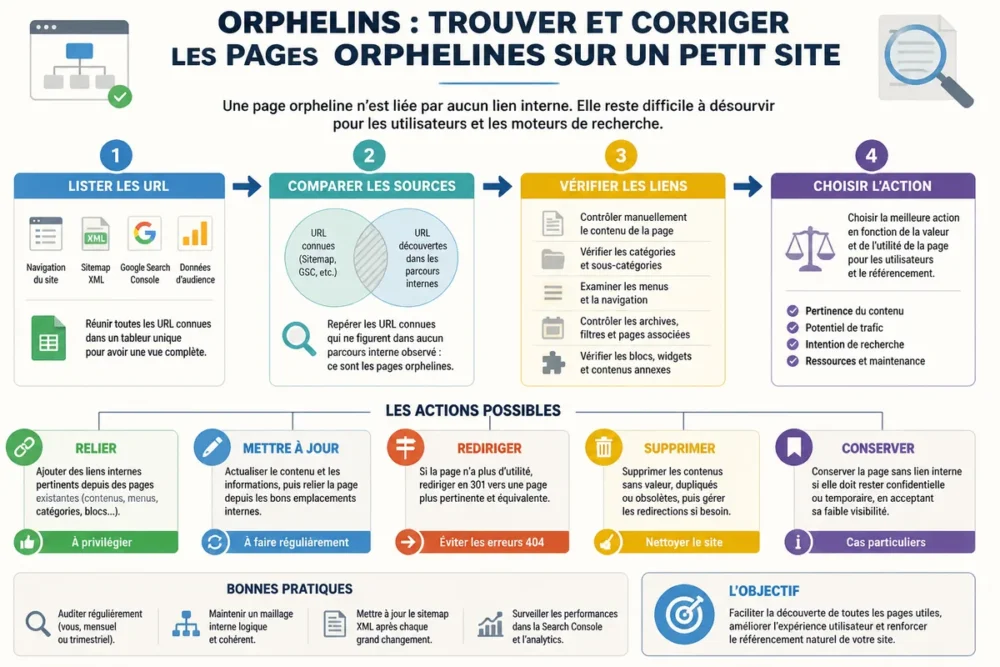
Step 1: Collect the sitemap and known URLs
Copy the XML sitemap addresses into the spreadsheet. Complete them with URLs found in menus, categories, content pages, and reports accessible from Google Search Console. Add old visited pages identified in the audience tool.
A URL present in the sitemap but absent from visible paths deserves a check. It is not automatically orphaned: the link may be found in an archive, a footer, or a page you have not yet examined.
Step 2: Compare navigation and content
Browse the site’s structuring pages. Note in the “internal link found” column each page that links to a URL in the inventory. Pages close to the subject are a priority: a service page can point to an explanatory page, and an article can link to a pillar page.
For each candidate URL, write in the “Internal link found” column the checked source URLs and the result. Only write “none identified” after verifying related content, categories, archives, menus, breadcrumb trails, footer, and recommendation blocks applicable to this URL.
For a small volume, work in coherent batches, for example pages from the same directory or category. This organization limits omissions and makes the proof of control readable in the spreadsheet.
Step 3: Check Search Console and domain search
Consult Google Search Console reports to identify known URLs, indexed or excluded. An indexed URL without a known internal link is an interesting candidate, but indexing only proves that Google knows the address, not that an internal linking exists.
A search limited to the domain can provide additional leads. It does not constitute a complete inventory: results depend on indexing and the engine’s display. Therefore, check each address directly on the site and in the spreadsheet.
Step 4: Use page views and their traffic sources
Identify old pages still visited even though they no longer appear in the current navigation. Examine the origin of visits: search engine, bookmark, external link, or internal link. A visit from a bookmark or a backlink confirms that the page is used but does not create any internal link.
Manually confirm that a page receives no internal link
Manual confirmation starts with the actual status of the URL, then examines all plausible internal paths. Open the page, check its response, look for incoming links in the content, and record the evidence. This method suits small volumes but is less automated than a specialized crawl.
A URL absent from the menu is not necessarily orphaned. A related article, a useful archive, a breadcrumb trail, or a recommendation block can still provide an incoming link. Classification is reliable only after examining these locations.
Check the actual status of the URL
Open each candidate and exclude addresses that redirect, return an error, require authentication, or no longer correspond to an active page. Also verify that the checked address is the canonical version used by the site and not a technical variant.
A page protected by a login, a confirmation page, or a URL reserved for internal use is not treated like public editorial content. Note its function in the spreadsheet before deciding.
Search for forgotten internal access paths
Examine related articles, category pages, archives, useful tag pages, secondary menus, footer, and associated content blocks. The site’s internal search can also find mentions of the subject or URL.
Classify the page as orphaned only when no relevant and functional internal access is identified. An external link, a direct URL, or presence in the sitemap does not replace this verification.
Correct each orphan page according to its real value
The correction depends on current usefulness, content quality, visits, backlinks, ongoing campaigns, and the existence of an equivalent page. A useful page must be reintegrated into the linking structure. A page without identifiable value can be deleted, but only after checking its dependencies.
In this case, do not delete the page before checking its visits and external links.
| Observed situation | Priority action | Necessary check |
|---|---|---|
| Useful and up-to-date content | Add a contextual link | Descriptive anchor and relevant source page |
| Useful but outdated content | Update then link | Recent information, links, and references |
| Weak duplicated content | Merge if a coherent destination exists | Keep useful information and handle the old URL |
| Obsolete page with equivalent | Permanent redirection | Truly equivalent destination |
| Test page without value | Delete | Visits, backlinks, and internal links to fix |
| Active campaign landing page | Do nothing as a principle | Check the campaign and its objective |
Link and update a page that remains useful
Add a link from a nearby page, a category, or a pillar page. The link must meet a real reading need and use an anchor coherent with the destination content. A contextual addition is better than an artificial link placed in all navigations.
Update outdated information, outgoing links, and references to recent content. An internal link does not fix a page that has become inaccurate or useless for the reader.
Redirect or delete a page that has become useless
A permanent redirection is appropriate when a truly equivalent or more useful page exists. The redirection must not automatically send to the homepage or to an unrelated page. If no relevant destination exists and the content has no identifiable user value, deletion can be considered.
Before any deletion, check visits, possible backlinks, still active campaigns, and internal links pointing to the URL. Fix these dependencies after the intervention.
Check corrections and install a light routine
The final check consists of reopening the retained pages, testing the added links, following the redirections, and removing deleted URLs from internal links. Update the sitemap when its management requires it. Keep the spreadsheet: it becomes the history of decisions and checks.
The frequency depends on the publication pace and structural changes. An audit after a redesign, migration, or significant modification of the tree structure is a priority; no universal threshold suits all small sites.
Final page-by-page check
- Open each retained page and test at least one relevant internal path.
- Check that the added link leads to the correct canonical URL and uses a descriptive anchor.
- Test each redirection and confirm that its destination responds correctly.
- Remove internal links that led to deleted or redirected pages.
- Add new pages to a category, a pillar page, or suitable related content.
- Note the date, result, and next check in the spreadsheet.
If a major correction has just been made, Google Search Console can be used to request a new URL check. This action neither guarantees indexing nor a ranking change; it simply closes the technical verification loop.
Frequently asked questions about orphan pages
Orphan pages do not all produce the same diagnosis. A URL can be indexed, visited, or deliberately isolated while remaining devoid of internal links. The following answers serve to interpret the results before modifying the tree structure.
Can an orphan page be indexed by Google?
Yes. An orphan page can remain indexed if Google knows it through a sitemap, an external link, or another source. The absence of an internal link makes its discovery and integration into the site more difficult, without absolutely preventing indexing.
Is the sitemap enough to find all orphan pages?
No. The sitemap indicates declared URLs but does not show incoming internal links. Compare it with navigation, content, Search Console, and audience data, then manually check each candidate.
Is a page without traffic necessarily orphaned?
No. A page can receive internal links while having little or no measured visits. Traffic informs about the known usage of the URL, whereas the orphan status concerns only the absence of incoming internal links.
Should all orphan pages be deleted?
No. Link a useful page, update old content, and redirect an obsolete URL to a truly equivalent destination. Only delete a page without identifiable value after verifying visits, backlinks, campaigns, and dependencies.
How long does it take to audit a small site?
No standard time can be announced without knowing the number of URLs, the quality of the sitemap, and the complexity of navigation. However, a well-maintained small inventory allows processing the audit in limited batches rather than checking the entire site at once.
The reliable method consists of listing URLs, cross-referencing multiple sources, manually confirming the absence of internal links, then choosing a correction proportional to the value of each page. To start, create the spreadsheet, export the sitemap, and check the first candidates one by one.
Useful sources to consult
- Google Search Central documentation on sitemaps: check the role of a sitemap in declaring URLs and its limits for crawling and indexing.
- Google Search Central documentation on crawlable links: check the characteristics of links that Google can crawl and use to discover pages.
- Google Search Console: indexed or excluded URLs and individual inspection; check the data in the current interface.
- Audience measurement tool: viewed pages and traffic sources; traffic does not prove the existence of an internal link.









