.en-bref { max-width: 640px; margin: 2em auto; padding: 1.5em 1.8em; color: #3a2d0d; font-family: “Inter”, “Segoe UI”, sans-serif; text-align: left; position: relative; box-sizing: border-box; background: #f7f9f9; border: 1px solid #10b58b; border-left: 6px solid #10b58b; border-radius: 12px; box-shadow: 0 8px 24px rgba(251, 191, 36, 0.15); }
.en-bref h2, .en-bref .en-bref-header { font-size: 1.15em; font-weight: 700; margin-bottom: 0.6em; color: #d97706; }
.en-bref p, .en-bref li { font-size: 1em; line-height: 1.65; margin: 10px; }
.en-bref strong { color: #1c1917; }
.key-takeaways { max-width: 640px; margin: 2em auto; padding: 1.5em 1.8em; color: #3a2d0d; font-family: “Inter”, “Segoe UI”, sans-serif; text-align: left; position: relative; box-sizing: border-box; background: #f7f9f9; border: 1px solid #10b58b; border-left: 6px solid #10b58b; border-radius: 12px; box-shadow: 0 8px 24px rgba(251, 191, 36, 0.15); }
.key-takeaways h2, .key-takeaways .key-takeaways-header { font-size: 1.15em; font-weight: 700; margin-bottom: 0.6em; color: #d97706; }
.key-takeaways p, .key-takeaways li { font-size: 1em; line-height: 1.65; margin: 10px; }
.key-takeaways strong { color: #1c1917; }
.key-takeaways ul { list-style: none; padding-left: 0; }
.key-takeaways li { margin: 0.45em 0; padding-left: 0.2em; }
.magic-pdf-download{margin:2em 0;padding:1.25em 1.5em;border:1px solid #e3e6ea;border-left:4px solid #0ea5e9;border-radius:10px;background:#f8fafc;display:flex;align-items:center;gap:1.2em;flex-wrap:wrap}.magic-pdf-download .mpd-txt{flex:1;min-width:220px}.magic-pdf-download .mpd-txt strong{display:block;font-size:1.05em;color:#0f172a;margin-bottom:.15em}.magic-pdf-download .mpd-txt span{color:#64748b;font-size:.92em}.magic-pdf-download a.mpd-btn{display:inline-block;background:#0ea5e9;color:#fff;text-decoration:none;padding:.7em 1.5em;border-radius:8px;font-weight:600;white-space:nowrap}.magic-pdf-download a.mpd-btn:hover{background:#0284c7}
.magic-lb-overlay{position:fixed;inset:0;background:rgba(15,23,42,.92);display:none;align-items:center;justify-content:center;z-index:99999;cursor:zoom-out;padding:20px}
.magic-lb-overlay.open{display:flex}
.magic-lb-overlay img{max-width:95vw;max-height:95vh;object-fit:contain;border-radius:8px;box-shadow:0 8px 32px rgba(0,0,0,.5)}
.magic-lb-close{position:absolute;top:16px;right:20px;color:#fff;background:rgba(0,0,0,.5);border:none;width:40px;height:40px;border-radius:50%;font-size:24px;cursor:pointer;display:flex;align-items:center;justify-content:center}
.magic-lb-close:hover{background:rgba(0,0,0,.8)}
.wp-block-image img{cursor:zoom-in;transition:transform .15s ease}
.wp-block-image img:hover{transform:scale(1.01)}
.magic-img-link{display:inline-block;text-decoration:none}
(function(){
var ov=document.getElementById(‘magic-lb’);if(!ov)return;
var img=ov.querySelector(‘img’),btn=ov.querySelector(‘.magic-lb-close’);
function open(src){img.src=src;ov.classList.add(‘open’);document.body.style.overflow=’hidden’}
function close(){ov.classList.remove(‘open’);img.src=”;document.body.style.overflow=”}
document.addEventListener(‘click’,function(e){
var a=e.target.closest(‘a.magic-img-link’);
if(a){e.preventDefault();open(a.getAttribute(‘href’));return}
var i=e.target.closest(‘.wp-block-image img’);
if(i&&!e.target.closest(‘a’)){e.preventDefault();open(i.currentSrc||i.src)}
});
ov.addEventListener(‘click’,function(e){if(e.target===ov||e.target===btn)close()});
document.addEventListener(‘keydown’,function(e){if(e.key===’Escape’)close()});
})();
Cyclades login: access your account and unlock access
To successfully perform a Cyclades login, open the official page, choose the correct profile, then enter the expected identifier: email for an individual candidate, firstname.lastname for a school candidate, along with the associated password. In case of an error, the blockage often comes from an incorrect profile, a typing mistake, or a browser that retains an old session.
Cyclades is the portal for managing exams and competitions of the National Education. The candidate space is mainly used to consult useful documents such as convocations, grade reports, and, depending on the case, exam scripts. The goal here is simple: to get you quickly into the correct account, then fix the problem without wasting time.
In brief
🔎 The correct identifier depends on the profile: individual candidate or school candidate, the logic is not the same.
🧭 The first useful check remains the official login address, then the password case sensitivity and the browser.
🛠️ An account that refuses access is often unlocked with a clean reset or a change of browser.
📄 Once logged in, the Cyclades space centralizes convocations, grades, and sometimes exam scripts.
How to log in to your Cyclades account?
Logging into Cyclades goes through the official candidate portal page, then by properly entering the identifier and password. The key point is to choose the correct access mode from the start, because an individual candidate and a school candidate do not log in with the same information.
The official entry page is the Cyclades candidate portal. The SIEC help page, Logging into Cyclades, was published on October 1, 2024, and recalls the role of the space: convocations, grade reports, and exam scripts depending on the exam.
- Open the official Cyclades login page in a recent browser.
- Check the displayed profile before entering anything.
- Enter the identifier requested by the portal.
- Type the password without extra spaces or case errors.
- Validate and then wait for the personal space to appear.
A successful access normally displays the candidate’s personal area, with documents related to registration or file tracking. If the screen remains blank, the problem does not necessarily come from the account: an outdated session, an overloaded cache, or a wrong starting page often suffice to block navigation.
The right reflex on Cyclades is not to retype the password ten times. The first useful sorting is to check the profile, the expected identifier, and the page used to enter the account.
Which identifiers to use according to your profile?
The Cyclades portal mainly distinguishes two cases: individual candidate and school candidate. This distinction explains most login failures, because a valid identifier for one profile may be wrong for the other. The table below summarizes the logic to check before retrying access.
| Profile | Cyclades Identifier | Password | Where to find it | Point of caution |
|---|---|---|---|---|
| Individual candidate | Email address used when creating the account | Password chosen at creation | Confirmation email or account creation record | Verify the exact address and the mailbox used initially |
| School candidate | firstname.lastname, without uppercase letters or accents | Password provided by the institution | Institution, registration service, or document given to the student | A duplicate may result in an identifier like firstname.lastname2 |
| Uncertain access | Identifier to confirm before any other action | To be reset if needed | Confirmation message, institution, or Cyclades help page | Avoid multiple attempts without verifying the profile |
The case of the school candidate is the most sensitive, as the identifier does not use a personal email address. For a school or institution account, the logic is similar to other access portals like in our guide on the iProf Créteil space: the correct identifier depends first on the registration framework, not just the user.
A poorly chosen identifier creates a false password problem. In Cyclades, the most common error remains the confusion between individual and school profiles.
What to do if the Cyclades identifier or password is lost?
Losing access does not necessarily mean a blocked account. The cleanest solution is to recover the original identifier, then initiate password recovery from the official page. This sequence avoids creating a second account or piling up unnecessary attempts.
- Reread the emails received during registration or first login.
- Check the institution’s folder if the account is school-based.
- Locate the recovery link offered by the portal.
- Create a new strong, unique password and enter it without error.
- Test the login again in a clean browser.
Accounts managed by institutions sometimes require returning to the registration structure, especially if the password was provided internally. The same sorting reflex applies to other personal spaces, as in our tutorial myArkevia login: finding the correct source of identifiers saves more time than a series of random attempts.
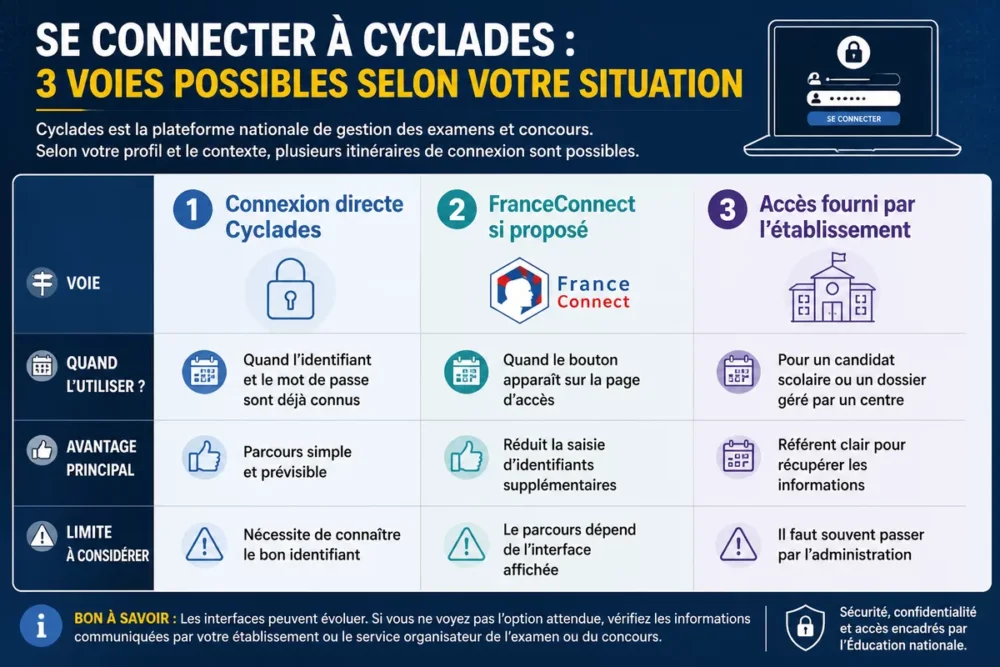
Cyclades login, FranceConnect, or institution access: which path to choose?
The safest route remains the one indicated by the portal at the time of login. If the FranceConnect button appears, you should follow the displayed path; otherwise, direct access with the Cyclades identifier remains the most reliable reference. For a school candidate, access provided by the institution often remains the most useful option.
| Access method | When to use it | Advantage | Limitation |
|---|---|---|---|
| Direct Cyclades login | When the identifier and password are already known | Simple and predictable process | Requires knowing the correct identifier |
| FranceConnect if offered | When the button appears on the access page | Reduces the need to enter additional identifiers | The path depends on the displayed interface |
| Access provided by the institution | For a school candidate or a file managed by a center | Clear reference to recover information | Often requires going through administration |
This table is not meant to multiply options, but to avoid the wrong entry point. If the portal offers a specific method, follow it without detour; if nothing appears, return to direct login and profile verification.
How to solve a Cyclades connection problem?
A Cyclades blockage most often comes from a typing error, a wrong profile, a browser cache, or a forgotten password. The most effective method is to isolate the cause one by one instead of mixing everything in the same attempt.
- Check the exact spelling of the username and password.
- Try another browser if the page does not load correctly.
- Clear the cache or open a private browsing window.
- Return to the official login page rather than an old tab.
- Wait and try again later if the account seems temporarily blocked.
A screen that refuses to load is not necessarily a faulty account. The browser may keep an old session, especially if multiple spaces are used on the same machine. Repeated logins then look like an account failure, whereas it is often just a simple session problem.
A persistent blockage after checking the profile and browser deserves a request for help via the official page or through the concerned institution. In a connection environment, sobriety pays off: one change at a time, then a test, gives a clearer diagnosis than a series of simultaneous attempts.
What do you find after logging into Cyclades?
After a successful Cyclades login, the personal space is mainly used to track the exam or competition file. The most common documents are summons, transcripts, and, depending on the service concerned, copies. The exact details depend on the exam and the candidate’s status.
- Summons: useful for the time, place, and instructions for the session.
- Transcripts: viewable when the service makes them available.
- Copies: accessible in certain pathways, depending on the exam or competition.
- File information: registrations, tracking status, or documents related to the test.
This logic of centralization explains why a reliable connection is better than an improvised access. Once the account is open, the candidate no longer has to chase scattered documents: everything goes through a single space, when the service allows it.
Common mistakes to avoid when logging in
The same mistakes often come back, and they take time if dealt with too late. Time savings come from a simple and methodical check, not a series of random clicks.
- Confusing profiles: a school username is not a personal email.
- Re-entering the password multiple times: this can worsen a temporary blockage.
- Forgetting accents or capital letters: the format firstname.lastname must be copied exactly as expected.
- Using an old bookmark: the old login page may redirect to an obsolete session.
- Neglecting the original support: institution or official help page remain the best entry points.
A good routine avoids most errors: check the profile, verify the username, test the browser, then only retry access recovery. This small order of verification is often enough to make a false blockage disappear.
Useful sources to consult
Official sources remain the basis on this subject because they provide the access logic and the correct documents without approximation. For Cyclades, the primary reference is always the candidate portal page and the associated official help page.
- Cyclades Candidate Portal: official entry point for account access.
- SIEC Page “Logging into Cyclades”: reminder of identifiers and available documents.
- Institution or registration center: useful for a school account or a password provided internally.
The SIEC page published on October 1, 2024 remains a good guide to understand the login logic and the type of information stored in the candidate space. In case of doubt, it is better to start from this base rather than attempt risky shortcuts.
Key Takeaways
- 🔐 The Cyclades identifier depends on the profile: email or firstname.lastname.
- 📌 The password comes from the created account or the institution depending on the case.
- 🧹 A clean browser often solves a false login problem.
- 📬 Useful documents include convocations, grades, and sometimes exam scripts.
- 🧭 The official page and the SIEC help page remain the two references to keep.
Frequently Asked Questions
Is my Cyclades identifier my email address?
Yes, for an individual candidate: the identifier corresponds to the email address used when creating the account. For a school candidate, the logic changes and the identifier takes the form firstname.lastname, without accents or capital letters.
Why does my Cyclades password not work?
The most common cause remains a typing error, different case, or a recently changed password. If the account is school-based, the password may also have been provided by the institution and not chosen by the user.
What to do if the login page does not open?
The first reflex is to change the browser or open a private browsing window. If the page remains unstable, you should return to the official portal and avoid old tabs or outdated bookmarks.
Why does my identifier look like firstname.lastname2?
This format can appear when the first identifier firstname.lastname is already used by another candidate. The additional number then serves to distinguish two similar accounts.
Can I find my convocations after logging in?
Yes, the Cyclades space is used notably to display convocations, grade reports, and, depending on the pathway, exam scripts. Exact access depends on the type of exam or competition concerned.









