.en-bref { max-width: 640px; margin: 2em auto; padding: 1.5em 1.8em; color: #3a2d0d; font-family: “Inter”, “Segoe UI”, sans-serif; text-align: left; position: relative; box-sizing: border-box; background: #f7f9f9; border: 1px solid #10b58b; border-left: 6px solid #10b58b; border-radius: 12px; box-shadow: 0 8px 24px rgba(251, 191, 36, 0.15); }
.en-bref h2, .en-bref .en-bref-header { font-size: 1.15em; font-weight: 700; margin-bottom: 0.6em; color: #d97706; }
.en-bref p, .en-bref li { font-size: 1em; line-height: 1.65; margin: 10px; }
.en-bref strong { color: #1c1917; }
.key-takeaways { max-width: 640px; margin: 2em auto; padding: 1.5em 1.8em; color: #3a2d0d; font-family: “Inter”, “Segoe UI”, sans-serif; text-align: left; position: relative; box-sizing: border-box; background: #f7f9f9; border: 1px solid #10b58b; border-left: 6px solid #10b58b; border-radius: 12px; box-shadow: 0 8px 24px rgba(251, 191, 36, 0.15); }
.key-takeaways h2, .key-takeaways .key-takeaways-header { font-size: 1.15em; font-weight: 700; margin-bottom: 0.6em; color: #d97706; }
.key-takeaways p, .key-takeaways li { font-size: 1em; line-height: 1.65; margin: 10px; }
.key-takeaways strong { color: #1c1917; }
.key-takeaways ul { list-style: none; padding-left: 0; }
.key-takeaways li { margin: 0.45em 0; padding-left: 0.2em; }
.magic-pdf-download{margin:2em 0;padding:1.25em 1.5em;border:1px solid #e3e6ea;border-left:4px solid #0ea5e9;border-radius:10px;background:#f8fafc;display:flex;align-items:center;gap:1.2em;flex-wrap:wrap}.magic-pdf-download .mpd-txt{flex:1;min-width:220px}.magic-pdf-download .mpd-txt strong{display:block;font-size:1.05em;color:#0f172a;margin-bottom:.15em}.magic-pdf-download .mpd-txt span{color:#64748b;font-size:.92em}.magic-pdf-download a.mpd-btn{display:inline-block;background:#0ea5e9;color:#fff;text-decoration:none;padding:.7em 1.5em;border-radius:8px;font-weight:600;white-space:nowrap}.magic-pdf-download a.mpd-btn:hover{background:#0284c7}
.magic-lb-overlay{position:fixed;inset:0;background:rgba(15,23,42,.92);display:none;align-items:center;justify-content:center;z-index:99999;cursor:zoom-out;padding:20px}
.magic-lb-overlay.open{display:flex}
.magic-lb-overlay img{max-width:95vw;max-height:95vh;object-fit:contain;border-radius:8px;box-shadow:0 8px 32px rgba(0,0,0,.5)}
.magic-lb-close{position:absolute;top:16px;right:20px;color:#fff;background:rgba(0,0,0,.5);border:none;width:40px;height:40px;border-radius:50%;font-size:24px;cursor:pointer;display:flex;align-items:center;justify-content:center}
.magic-lb-close:hover{background:rgba(0,0,0,.8)}
.wp-block-image img{cursor:zoom-in;transition:transform .15s ease}
.wp-block-image img:hover{transform:scale(1.01)}
.magic-img-link{display:inline-block;text-decoration:none}
(function(){
var ov=document.getElementById(‘magic-lb’);if(!ov)return;
var img=ov.querySelector(‘img’),btn=ov.querySelector(‘.magic-lb-close’);
function open(src){img.src=src;ov.classList.add(‘open’);document.body.style.overflow=’hidden’}
function close(){ov.classList.remove(‘open’);img.src=”;document.body.style.overflow=”}
document.addEventListener(‘click’,function(e){
var a=e.target.closest(‘a.magic-img-link’);
if(a){e.preventDefault();open(a.getAttribute(‘href’));return}
var i=e.target.closest(‘.wp-block-image img’);
if(i&&!e.target.closest(‘a’)){e.preventDefault();open(i.currentSrc||i.src)}
});
ov.addEventListener(‘click’,function(e){if(e.target===ov||e.target===btn)close()});
document.addEventListener(‘keydown’,function(e){if(e.key===’Escape’)close()});
})();
Rabbit Finder: Understanding the Tool, Using It Effectively, and Making the Right Choice in 2026
Rabbit Finder does not correspond, at this stage, to a single clearly documented service. In 2026, the publicly visible pages refer at least to a community portal on one side and a real-time management Android application on the other. Before judging the tool, it is therefore necessary to identify the correct version and verify what it really promises.
This Rabbit Finder review guide helps you sort out the essentials without overinterpreting partial pages. You will see what is confirmed, what remains unclear, how to test reliability, which limits to watch for, and in which cases it is better to compare with a clearer solution.
In Brief
🧭 Rabbit Finder is an ambiguous name: the publicly visible pages do not describe a single, homogeneous product.
📱 The clearest lead on the application side is an Android listing focused on real-time management of vehicles, employees, and assets.
🌐 The web lead looks more like a community portal with login, registration, contact, and contributor pages.
⚠️ The decisive point is not the marketing promise, but transparency: publisher, privacy, terms, and pricing must be verified before any registration.
What is Rabbit Finder?
Rabbit Finder is a name that covers, according to publicly accessible pages in 2026, at least two different realities: a community portal and an Android tracking/management application. This ambiguity completely changes the usage verdict, as one does not judge a platform the same way as a mobile management tool.
Simple definition of the tool
The visible web version looks like a community space with navigation sections, content published by contributors, a contact page, and highlight elements such as “member of the month.” The Android version presents itself as a real-time management tool, which implies a more operational and professional use.
Who is it for?
Rabbit Finder can therefore target very different audiences depending on the version consulted. On one side, visitors and contributors to a community portal; on the other, users looking for tracking of objects, vehicles, or assets from a mobile device.
- Visitors who want to understand the real nature of the service before registering.
- Contributors looking for a community portal with login and publishing capabilities.
- Android users who want to verify if the app meets a management need.
What can be expected in 2026
In 2026, the reasonable expectation is not to find a unified and exhaustive presentation, but a series of fragmented pages that need to be cross-checked. The right reflex is to start from the official source, then confirm the version, purpose, terms, and data policy.
Rabbit Finder deserves first an identity check, not a hasty judgment.
How does Rabbit Finder work?
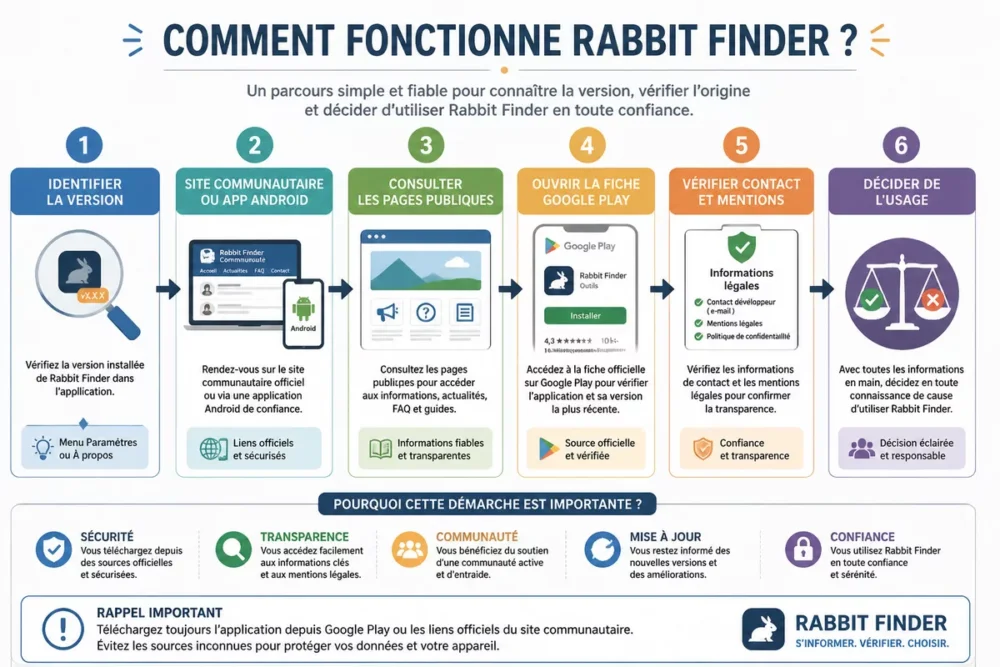
The operation depends on the branch you consult. The web part works like a portal with access, sections, and contact; the Android part resembles a real-time management application. In both cases, the first step is not to install, but to identify the correct version.
Major Steps for Use
The safest approach follows a simple logic: identify, verify, then only use. An ambiguous service is first tested on its transparency, not on an initial promise.
- Locate the exact source: official website or Google Play listing.
- Read the public description to understand the purpose of the service.
- Check the contact, privacy, and terms pages.
- Verify the publisher, version, and requested permissions if an app is involved.
- Then decide if the use really matches your need.
What the User Sees on Screen
On the visible portal, the interface seems organized around content sections, login pages, registration, and contributor space. On the Android listing, the user mainly sees a product positioning oriented towards real-time management, which requires checking the functional scope before going further.
Key Handling Points to Know
- The web version and the Android version do not tell the same story.
- The level of public detail remains limited on the visible documentation.
- iOS compatibility is not confirmed by the elements provided here.
- Support or a contact form exists on the portal side, but its effectiveness remains to be confirmed.
Features You Absolutely Need to Know
The visible features are not the same depending on the version. The portal highlights community and contribution sections; the Android app emphasizes real-time management. The real question is therefore not “which functions in theory?”, but “which functions are actually confirmed by the public pages?”.
What the Web Part Highlights
The visible public pages mainly suggest a portal operation: internal navigation, login, registration, publications, contact, and contributor space. This is not a complete functional dossier, but it gives an idea of the main expected use on the web side.
- Content sections accessible from the homepage.
- Contribution and member spotlight space.
- Contact form for support or administrative exchanges.
- Promotion or partnership elements via banners.
What the Android App Highlights
The Google Play listing available in the results points to an application for real-time management of vehicles, employees, and assets. This describes a much clearer business use, but the visible listing is not yet enough to validate functional depth, security, or the business model.
What Is Missing to Judge the Whole
The visible public documentation does not yet provide a satisfactory overview of search, advanced filtering, data portability, or fine settings. For a digital tool, this lack of detail weighs on the final opinion, especially if you need to decide quickly.
Advantages and Limits of Rabbit Finder
Rabbit Finder has a simple asset: it exists in the form of identifiable public pages, with at least one web entry point and an Android presence. The problem is that overall coherence remains unclear. A fragmented tool can be usable, but it requires more checks than a better-explained service.
Trust is read in the legal notices, privacy policy, and publisher’s name, not in a well-designed banner.
Strong Points for Daily Use
- A web presence that allows quickly understanding the community orientation.
- An Android app that announces a concrete operational use.
- A visible contact form to get in touch with the service.
- Pages dedicated to contributors, useful if you have an active role on the platform.
Limits to Know Before Starting
- The name Rabbit Finder is not enough to identify a unique product.
- Pricing is not clearly established in the elements provided here.
- The privacy policy and permissions should be reviewed before registration or installation.
- Multi-platform compatibility is not properly confirmed.
For which needs the tool is most relevant
Rabbit Finder becomes relevant only if your need exactly matches the version consulted. The web portal may interest a community audience; the Android app may be suitable for mobile management use. If your need is standardized, documented, and sensitive regarding data, a more transparent solution may be safer.
Price, access, and terms of use
No clearly confirmed public price appears in the elements provided here. This does not mean that access is free; it mainly means that you should verify the official source before committing. For an ambiguous service, the absence of a clear price is already useful information.
Free or paid version
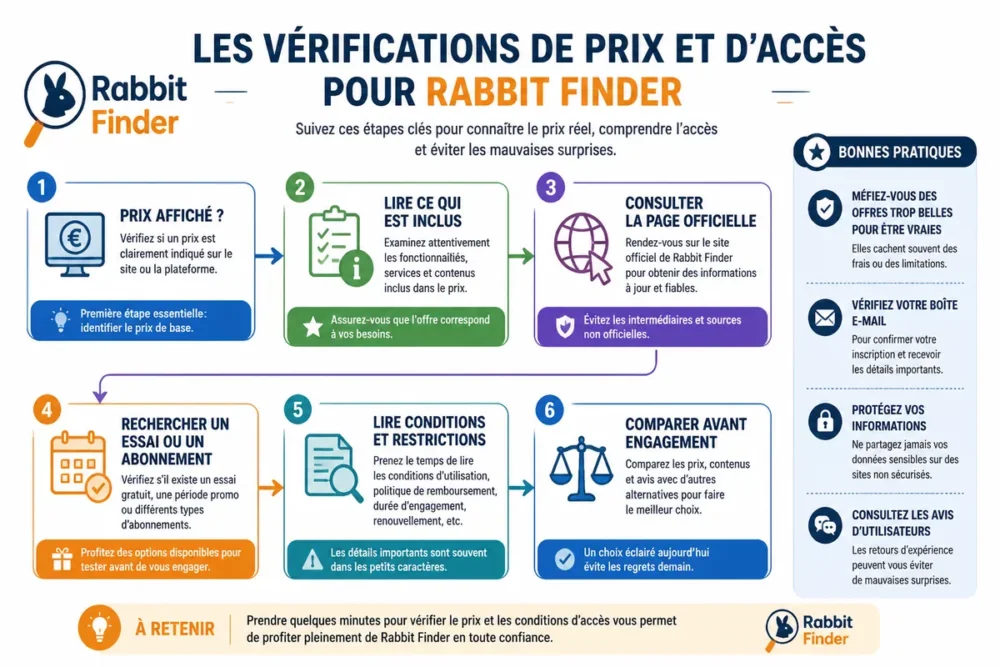
The visible documentation does not allow us to affirm that a free version, trial, or subscription exists in a standardized way. Best practice is to look for the displayed price, the included scope, then the cancellation conditions if a subscription exists.
Trial, subscription, or possible restrictions
- Check if a price is displayed on the official page or in the app listing.
- Identify what is included in the basic access.
- Check for any restrictions on features, number of users, or devices.
- Read the cancellation conditions before creating an account or confirming a subscription.
What to check before committing
- The exact price, if it exists, and the date of the last update.
- The details of the offer, not just a marketing tagline.
- Access modes: web, Android, or both.
- Any additional fees, such as premium support or paid options.
Is Rabbit Finder reliable and secure?
The cautious answer is simple: not enough consolidated public elements to give a clean bill of health. Reliability here depends on the publisher’s transparency, the consistency of legal pages, and the clarity of requested permissions. If you want to verify an unknown site, the method to verify a site helps spot weak signals without overinterpreting a homepage.

Data management and privacy
For the Android app, the official listing and privacy policy must be read before any installation. For the web portal, the legal notices, privacy policy, and moderation rules are the first documents to open.
Best usage practices
- Verify the exact name of the publisher or operator.
- Check the permissions requested by the app before accepting them.
- Use a unique password if an account is required.
- Keep a record of the legal pages and conditions at the time of registration.
Trust signals to verify
- An active and consistent contact with the official page.
- A readable and dated privacy policy.
- A clearly named publisher on the app listing.
- A description that matches the product actually presented.
Useful sources to consult
- RabbitFinder Contact Page — useful for testing responsiveness and verifying the identity of the service.
- Contributor banners space — useful for understanding the logic of broadcasting and partnership.
- Rabbit Finder Google Play listing — useful for reading the Android version, the publisher, and privacy information.
Common mistakes to avoid with Rabbit Finder
The most common mistakes are not technical. They mostly come from reading the name too quickly and a lack of verification before registration. When a brand is ambiguous, the wrong reflex is to assume that all pages talk about the same service.
- Confusing the versions: the web portal and the Android app do not serve the same purpose.
- Clicking before reading: registering without checking the legal notices can expose you to surprises.
- Assuming it’s free: no confirmed public pricing should be interpreted as implicit free usage.
- Neglecting privacy: permissions, data collection, and support must be understood before use.
- Comparing with the wrong competitor: a tracking app does not have the same alternatives as a community portal.
Comparison with alternatives
The useful comparison depends on the version of Rabbit Finder you are dealing with. If you are talking about the Android app, it should be compared to well-known tracking or fleet management solutions. If you are talking about the web portal, the real comparison mainly concerns transparency, moderation, and quality of support.
| Solution | Use case | Strength | Limitation to keep in mind |
|---|---|---|---|
| Rabbit Finder | To be clarified depending on the version: web portal or Android app | Visible public presence and existing entry point | Fragmented documentation and still ambiguous positioning |
| Geotab | Fleet management and operational tracking | Known solution for structured tracking needs | Heavier to deploy than a simple lightweight tool |
| Verizon Connect | Vehicle tracking and operational management | Clear positioning on fleet management | Cost and integration must be evaluated depending on context |
| Webfleet | Vehicle and mobile resource management | Frequent reference for road management needs | Less relevant if your need is a community portal |
When Rabbit Finder is a good choice
Rabbit Finder can be a good choice only if the version you found exactly matches your need and if the documentation is sufficient to reassure you. For simple use, the presence of a contact form and an official listing may be enough to start, provided you read the terms.
When another solution may be preferable
Another solution becomes preferable as soon as you need clarity on price, more readable privacy guarantees, or a well-defined business use. Established fleet tracking solutions are often clearer on scope, support, and account administration.
Our opinion on Rabbit Finder
Rabbit Finder review: the verdict remains cautious because the name covers too many different realities to inspire a quick decision. If you are looking for a clear answer, the best response at this stage is this: first check the version, then the documentation, then only the real interest.
A useful tool is understood quickly; a vague tool always requires a verification detour.
Quick verdict
The service should not be dismissed outright, but it is also not clear enough to be recommended without reservation. The right level of caution is to wait for a clear confirmation of the price, the publisher, the scope, and the data policy.
The profiles for which the tool is worth it
- Users who want to first understand the exact version before signing up.
- People who agree to check the legal pages and the app listing.
- Simple, occasional needs that do not depend on heavy integration.
Cases where caution is needed
- If the price is not clear and you need to commit a budget.
- If the privacy conditions are not explicit.
- If you are looking for a unique, stable, and perfectly documented product.
Key takeaways
- 🧩 Rabbit Finder refers to at least two different public realities in 2026.
- 📲 The Android track seems linked to real-time management use.
- 🌐 The web track resembles a community portal with contribution and contact.
- 🔎 Price, privacy, and the publisher must be verified before any decision.
- ⚖️ Useful comparison depends on the exact version you found.
Frequently Asked Questions
Is Rabbit Finder easy to use?
The usage seems simple at first glance, but real ease depends on the version consulted. The web portal appears organized around classic sections, while the Android app mainly requires understanding its management purpose.
Is the tool free?
The elements provided here do not confirm a free model. Before signing up or installing the app, check if a price, trial, or subscription is displayed on the official source.
Can it be used on mobile or computer?
The visible pages show a web presence and an Android listing. iOS compatibility is not confirmed in the elements consulted here, so you should check the official documentation directly if you use an iPhone or iPad.
Is Rabbit Finder reliable?
Reliability cannot be fully validated with only the visible public pages. The good indicator remains transparency: legal notices, privacy policy, clearly named publisher, and accessible support.
What alternatives should be considered before signing up?
If you are looking for a fleet tracking or management tool, compare Rabbit Finder to recognized solutions like Geotab, Verizon Connect, or Webfleet. If you mean the web portal, mainly compare the clarity of support and terms of use.









