.en-bref { max-width: 640px; margin: 2em auto; padding: 1.5em 1.8em; color: #3a2d0d; font-family: “Inter”, “Segoe UI”, sans-serif; text-align: left; position: relative; box-sizing: border-box; background: #f7f9f9; border: 1px solid #10b58b; border-left: 6px solid #10b58b; border-radius: 12px; box-shadow: 0 8px 24px rgba(251, 191, 36, 0.15); }
.en-bref h2, .en-bref .en-bref-header { font-size: 1.15em; font-weight: 700; margin-bottom: 0.6em; color: #d97706; }
.en-bref p, .en-bref li { font-size: 1em; line-height: 1.65; margin: 10px; }
.en-bref strong { color: #1c1917; }
.key-takeaways { max-width: 640px; margin: 2em auto; padding: 1.5em 1.8em; color: #3a2d0d; font-family: “Inter”, “Segoe UI”, sans-serif; text-align: left; position: relative; box-sizing: border-box; background: #f7f9f9; border: 1px solid #10b58b; border-left: 6px solid #10b58b; border-radius: 12px; box-shadow: 0 8px 24px rgba(251, 191, 36, 0.15); }
.key-takeaways h2, .key-takeaways .key-takeaways-header { font-size: 1.15em; font-weight: 700; margin-bottom: 0.6em; color: #d97706; }
.key-takeaways p, .key-takeaways li { font-size: 1em; line-height: 1.65; margin: 10px; }
.key-takeaways strong { color: #1c1917; }
.key-takeaways ul { list-style: none; padding-left: 0; }
.key-takeaways li { margin: 0.45em 0; padding-left: 0.2em; }
.magic-pdf-download{margin:2em 0;padding:1.25em 1.5em;border:1px solid #e3e6ea;border-left:4px solid #0ea5e9;border-radius:10px;background:#f8fafc;display:flex;align-items:center;gap:1.2em;flex-wrap:wrap}.magic-pdf-download .mpd-txt{flex:1;min-width:220px}.magic-pdf-download .mpd-txt strong{display:block;font-size:1.05em;color:#0f172a;margin-bottom:.15em}.magic-pdf-download .mpd-txt span{color:#64748b;font-size:.92em}.magic-pdf-download a.mpd-btn{display:inline-block;background:#0ea5e9;color:#fff;text-decoration:none;padding:.7em 1.5em;border-radius:8px;font-weight:600;white-space:nowrap}.magic-pdf-download a.mpd-btn:hover{background:#0284c7}
.magic-lb-overlay{position:fixed;inset:0;background:rgba(15,23,42,.92);display:none;align-items:center;justify-content:center;z-index:99999;cursor:zoom-out;padding:20px}
.magic-lb-overlay.open{display:flex}
.magic-lb-overlay img{max-width:95vw;max-height:95vh;object-fit:contain;border-radius:8px;box-shadow:0 8px 32px rgba(0,0,0,.5)}
.magic-lb-close{position:absolute;top:16px;right:20px;color:#fff;background:rgba(0,0,0,.5);border:none;width:40px;height:40px;border-radius:50%;font-size:24px;cursor:pointer;display:flex;align-items:center;justify-content:center}
.magic-lb-close:hover{background:rgba(0,0,0,.8)}
.wp-block-image img{cursor:zoom-in;transition:transform .15s ease}
.wp-block-image img:hover{transform:scale(1.01)}
.magic-img-link{display:inline-block;text-decoration:none}
(function(){
var ov=document.getElementById(‘magic-lb’);if(!ov)return;
var img=ov.querySelector(‘img’),btn=ov.querySelector(‘.magic-lb-close’);
function open(src){img.src=src;ov.classList.add(‘open’);document.body.style.overflow=’hidden’}
function close(){ov.classList.remove(‘open’);img.src=”;document.body.style.overflow=”}
document.addEventListener(‘click’,function(e){
var a=e.target.closest(‘a.magic-img-link’);
if(a){e.preventDefault();open(a.getAttribute(‘href’));return}
var i=e.target.closest(‘.wp-block-image img’);
if(i&&!e.target.closest(‘a’)){e.preventDefault();open(i.currentSrc||i.src)}
});
ov.addEventListener(‘click’,function(e){if(e.target===ov||e.target===btn)close()});
document.addEventListener(‘keydown’,function(e){if(e.key===’Escape’)close()});
})();
Which retro console to choose in 2026 to start well in retrogaming?
To start retrogaming in 2026, the simplest solution is an official mini console or a ready-to-use HDMI retro machine if you play on a TV; to play anywhere, get a portable retro console; for the widest catalog, choose a better-configured emulation machine.
The real issue is not raw power, but ease of installation, compatibility with a recent TV, image quality, and enjoyment after a few hours. This guide compares machine families, plausible budgets, and pitfalls to avoid before buying a retro console to start.
In brief
🎮 To start without friction, an official mini console or a ready-to-play HDMI machine remains the safest choice. The handling is quick and the risk of technical error remains low.
📺 If your main use is the living room, first look at the HDMI output, saves, and menu quality. A well-thought-out console on a recent TV is better than a more powerful but annoying model.
💶 Entry-level models spotted at specialized retailers start around €54.90 to €99 in 2026. Above €200, you mostly pay for versatility, not extra magic.
🧭 The classic trap is to buy something too technical for a first try. A beginner gains more with a stable machine than with an impressive product sheet.
Understanding what you really expect from a retro console
A retro console to start with is a machine that allows you to replay old games with few settings and minimal friction. The difference between a pleasant purchase and a disappointing one mainly lies in the video output, controller ergonomics, and interface clarity.
A simple experience above all
The right first purchase is one that plugs in quickly, turns on without a tutorial, and lets the game take precedence over the technical side. For a beginner, the ideal console avoids obscure downloads, complicated settings, and shaky compatibility with recent screens.
- a direct connection to the modern television;
- a menu readable within seconds;
- easy-to-find saves;
- a comfortable controller for short or long sessions.
The current 2026 retrogaming scene oscillates between a memory object and a ready-to-consume product. This is exactly why the simplest machines still sell well: they reduce installation burden, which matters more than the number of systems announced on the product sheet.
The main families of machines
For a first purchase, you need to distinguish four families: original console, official mini console, portable retro console, and ready-to-use emulation machine. Each family meets a different use, and the wrong choice often comes from a mix of nostalgia, budget, and real comfort.
- Original console: authentic, but more restrictive to connect and maintain.
- Official mini console: simple, compact, and designed for a few specific classics.
- Portable retro console: practical if you want to play somewhere other than on the TV.
- HDMI emulation machine: interesting to explore several systems on a modern screen.
If you want to understand why mini retro consoles still appeal, you have to look at their promise of simplicity. They do not seek absolute versatility; they mainly want to get you playing quickly, without tinkering and with an object easy to live with in the living room.
Which retro console to choose according to your profile?
The best retro console depends first on your main use: living room, mobility, pure nostalgia, or broad catalog exploration. To start, the clearest trio remains official mini console for simplicity, portable retro console for flexibility, and ready-to-play HDMI machine for the living room.
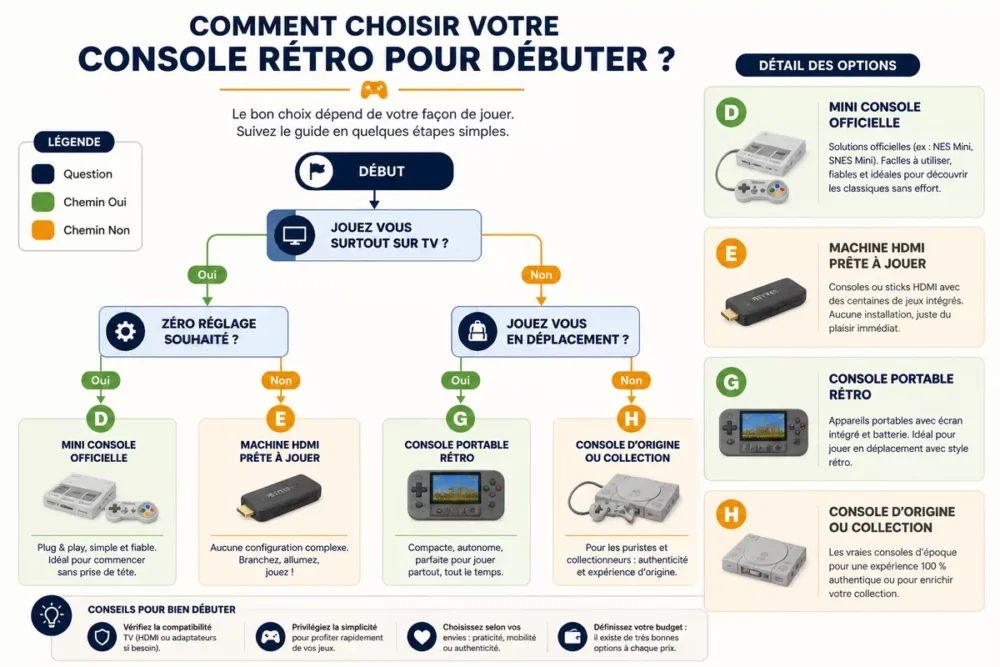
Here is the simplest logic: if you mostly play on TV and want zero setup, get a mini console or an HDMI machine; if you want to play everywhere, get a retro handheld; if you are looking for the widest playground, consider a more ambitious emulation machine. This hierarchy avoids spectacular purchases that are poorly suited for everyday use.
The right purchase is not the most powerful machine, but the one that starts without friction on your screen.
In a specialized store, some entry-level models are priced very close to each other, which shows that the choice is less about price and more about format and simplicity. For example, the Launchbox Retro Console for PC is offered from €54.90, the RGD10 Pro Retro Console at €57.90, the Miyoo Mini Plus at €74.90, the RGB20S at €79.90, and the Trimui Brick Hammer at €99 from retailers cited in 2026.
Comparison of options for starting out
The useful comparison does not only oppose prices, but uses: living room, mobility, nostalgia, and acceptable amount of settings. For a first purchase, the key question is simple: do you want to plug and play, or accept a bit of configuration to gain freedom?
| Option | Indicative price 2026 | Simplicity | Catalog | Best use |
|---|---|---|---|---|
| Official mini console | Variable depending on reissue | Very high | Limited to a specific selection | Start without setup and play in the living room |
| Ready-to-play HDMI retro console | About €54.90 to €99 | High | Often multi-system | Simple first purchase on modern TV |
| Retro portable console | About €74.90 to €239.90 | High to medium | Wide depending on the model | Play everywhere and explore multiple systems |
| Original console | Variable and often more expensive to restore | Low | Authentic but restrictive | Purists and collectors |
The prices mentioned show a simple thing: under €100, you can already buy a decent machine to discover retrogaming. Above €200, like with an AYN Odin 2 priced at €239.90, you mostly gain versatility and technical comfort, not necessarily simplicity.
The official mini console
The official mini console remains the most reassuring for a first contact with retrogaming. Reissues like the NES Mini, SNES Mini, PlayStation Classic, or Mega Drive Mini have a clear advantage: they plug in quickly, offer a closed framework, and limit unpleasant surprises.
Its main strength is simplicity, not abundance. The catalog is deliberately reduced, the interface is clear, and the machine aims for immediate use rather than tinkering.
Its limitation is being locked into a specific selection of games and eras. If you want to explore several consoles at once, the mini console often ends up feeling too narrow.
This option is mainly suitable for those who want to replay a few classics without any hassle. For a first purchase, it is the cleanest choice if your priority is peace of mind.
The Retro Handheld Console
The retro handheld console is better suited if you want to play on the train, in bed, or away from the television. Models like the Miyoo Mini Plus at €74.90, the RG556 at €239.90, or the RGB20S at €79.90 show that there are several levels of comfort and budget.
Its main advantage is flexibility. You gain mobility, usage autonomy, and often a wider variety of compatible systems.
The downside is a smaller screen and ergonomics that vary greatly from one model to another. A cheap handheld can be pleasant to carry but less comfortable for long sessions.
This category suits those who want a compact and versatile device, without depending on the living room TV. For beginners, it is often the right compromise if mobility matters as much as the catalog.
The Retro HDMI Console for the Living Room
The retro HDMI console is often the best option for a beginner who wants to play on a modern TV without hassle. The Retro Console for PC Launchbox starting at €54.90 or the RGD10 Pro at €57.90 show that a living room machine can remain affordable.
Its concrete advantage is immediate playback on a large screen and quick resumption of games. For family or occasional use, this setup is often more comfortable than a handheld device.
Its limitation lies in the quality of the interface and the reliability of the provided firmware. If the menu is confusing or the controller responds poorly, the price advantage quickly disappears.
This option is especially suitable for those who want a retro console for the living room and an almost plug-and-play experience. It is often the best starting point when the modern TV is the main screen.
If a console requires three settings, two tutorials, and an exotic memory card, it is not designed for a first purchase.
What Criteria Really Matter for a Beginner?
For a beginner, the four most important criteria are total budget, ease of use, gaming comfort, and catalog quality. Announced power comes after, as it does not compensate for a poor interface or average video output on a recent TV.
- Total budget: look at the console, but also the controllers, cables, and any accessories.
- Ease of use: check the menus, saves, and clarity of startup.
- Gaming comfort: test the grip, responsiveness, and image readability.
- Catalog: prioritize a selection that makes you want to turn on the machine often.
- TV compatibility: a clean HDMI output avoids many disappointments on a modern screen.
If you want to go further on software installation, compare Batocera, RetroPie, and Recalbox before buying a machine to configure. The right system reduces time spent in menus and increases the time actually spent playing.
The specialized market also shows that retrogaming is largely divided by format and system, not just by price. Dockandplay, for example, lists 16 products in its collection, including 14 in Neo Retro Linux, 13 in 4:3 format, and only one in 16:9; for a beginner, this sorting reminds that a suitable screen and a simple system matter as much as the technical sheet.
The Croc Informatique guide places the 2026 retrogaming market from about €65 for an R36S to €400 for an Ayaneo Pocket DMG. This range shows that there is a real jump between an introductory purchase and a high-end machine, with comfort that does not have the same appeal for all profiles.
Mistakes to Avoid Before Buying
Most disappointments come from a purchase that is too technical, too nostalgic, or poorly adapted to the living room screen. A retro console does not disappoint because it is retro; it disappoints because it does not match your actual use.
- Buying too complicated: a rich but confusing system turns pleasure into maintenance.
- Choosing only out of nostalgia: the memory of a machine does not guarantee good current use.
- Neglecting TV compatibility: the image or the controller can degrade the entire experience.
- Ignoring comfort of handling: a portable that is too narrow quickly tires the hands.
- Confusing power with pleasure: a more expensive model is not necessarily more enjoyable to use.
The most useful feedback for a hesitant buyer often comes from warranties and support, not from a shiny product sheet. Retrozone, for example, announces 2 years of warranty, 30 days of 100% refunded trial, free and tracked delivery, as well as 24/7 assistance; this type of safety net counts a lot for the first purchase.
How to get started well after purchase
Once the console is received, the first settings should aim at one thing only: playing quickly and without friction. You need to properly connect the machine, check the sound, adjust the display, and test several games before touching unnecessary options.
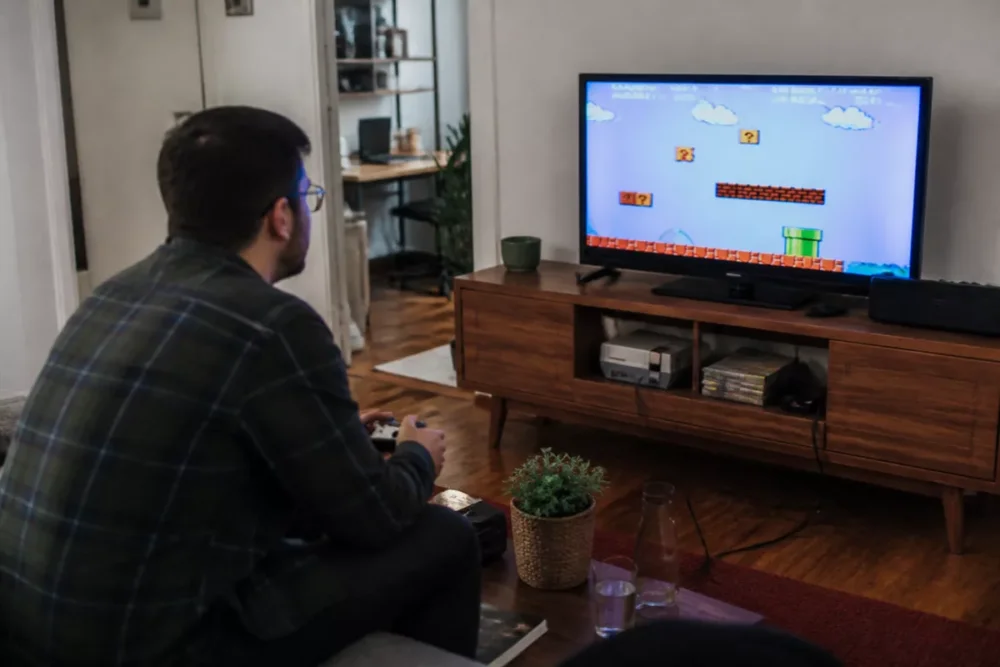
- Connect the console to the television and check the image. The priority is to confirm that HDMI, sound, and display format are correct.
- Set the language, brightness, and controls. A clear interface avoids repeated manipulations at each session.
- Test saves and game resumption. A useful retro console is one where you quickly resume an interrupted session.
- Try three games from different generations. This simple test quickly reveals the limits of the catalog or emulation.
- Keep essential accessories within reach. A good controller, the right cable, and tidy storage often suffice to stabilize the experience.
A well-chosen console requires little maintenance, but it still deserves a minimum of care on cables, updates, and storage. If you buy from a seller who offers a clear warranty, a refundable trial, and responsive support, you greatly reduce the risk of regret after a few days.
Frequently Asked Questions
Should you choose a home console or a retro portable console?
The home console is simpler if you mainly play in front of the television. The retro portable becomes more relevant if you want to take your games everywhere or if you share the machine between several locations.
Is an official mini console enough to start?
Yes, an official mini console is perfectly sufficient if you mainly want to replay a specific selection of classics. It becomes less suitable if you are looking for a larger catalog or greater configuration freedom.
Can you easily play on a recent television?
Yes, provided you check the video output and interface quality before purchase. A machine with clean HDMI, readable menus, and simple saves offers a much smoother experience on a modern TV.
What budget should be planned for a first setup?
For a first retro console, a budget around €55 to €100 already allows you to get started without aiming too high. Above that, you mainly pay for versatility, autonomy, or power, not necessarily simpler use.
Is it better to buy used or new?
New reassures more when starting out, especially if the warranty, trial, or support are clear. Used can be interesting for an original console or a mini console, but it requires more vigilance about the actual condition of the equipment.
Key Takeaways
- 🎯 An official mini console remains the simplest way to start without any setup.
- 📺 An HDMI retro console is very suitable if your priority is the living room.
- 🧳 A portable retro console is more relevant if mobility really matters.
- 💡 Budget doesn’t tell the whole story; ease of use matters more than power.
- 🛡️ A clear warranty and a refundable trial reduce the risk on the first purchase.
Frequently Asked Questions
Which retro console should I choose if I just want to play without complicating things?
The best option for a first hassle-free try is generally an official mini console or a ready-to-use HDMI device. These formats limit settings and allow you to focus on gaming from the very first evening.
Is a portable retro console worth it for a beginner player?
Yes, if you really plan to play outside the living room or easily carry your device. If your use remains centered on the TV, the portable might be less comfortable than a living room solution.
Are cheap retro consoles necessarily disappointing?
No, but the low price sometimes hides an average interface, modest battery life, or less pleasant ergonomics. A model around €55 to €100 can already be good, provided you check the actual comfort of use.
Should I prioritize a large game library?
Not necessarily, especially at the beginning. A shorter but well-presented catalog is often more enjoyable than a huge list where you spend more time searching than playing.
What criterion should I look at first on the product sheet?
Video output and ease of installation should come before the number of advertised systems. A device that’s easy to plug in and navigate will almost always be more satisfying for a beginner.









