Optimizing Core Web Vitals: a complete guide to speeding up a site and improving user experience
If your goal is to optimize Core Web Vitals, this guide shows you how to diagnose slowdowns, identify the real causes, and fix what blocks loading, responsiveness, or visual stability. In the end, you will know what to measure, what to prioritize, and what to change without blindly tinkering.
The aim is not to chase a decorative score. It is about having a faster mobile site, smoother usage, and stronger technical SEO — with visible gains in metrics and, ideally, in conversions.
In brief
🚀 The Core Web Vitals focus on three areas: loading, responsiveness, and visual stability. These are where the real user irritants hide.
⚡ The first useful task often involves addressing the LCP: main image, blocking CSS, slow server. This trio very often makes the difference.
🧠 The INP mainly depends on JavaScript and long tasks. Less front-end overload, more fluidity on click and tap.
🧱 The CLS decreases when each element has its place before rendering: image dimensions, placeholders, better-managed fonts and widgets.
What result should you aim for at the end of optimization?
In practice, the goal is simple: your key pages must load faster, respond faster, and stop shifting before the user’s eyes. First, we aim for the thresholds recommended by Google, then focus efforts on pages that generate traffic, leads, or sales.
The good result looks like this: main content visible quickly, interactions without perceptible latency, and a stable layout from the first to the last screen. On an e-commerce, showcase, or media site, this is often the difference between a visitor who stays and one who gets impatient.
- LCP: less than 2.5 seconds.
- INP: less than 200 milliseconds.
- CLS: less than 0.1.
- Priority: high-traffic pages, landing pages, and conversion paths.
What do you need to get started?
Before optimizing anything, gather the right tools and minimal access to your site. The idea is not to overhaul everything but to make a reliable diagnosis, then fix the points that really impact user experience and loading speed.
- Google Search Console to read field data and spot problematic URLs.
- PageSpeed Insights to cross-reference real data and lab tests.
- Lighthouse to analyze local rendering and front-end structure.
- WebPageTest to visualize loading step by step.
- Access to the CMS, theme, cache, and if possible, hosting.
- Starting time: 1 to 2 hours for a simple audit, then half a day for the first fixes.
What exactly do Core Web Vitals measure?
Core Web Vitals are three indicators defined by Google to measure the quality of the user experience on a web page. They cover the loading of main content, interface responsiveness, and visual stability. In other words, they tell if your site appears fast, reacts quickly, and remains clean on screen.
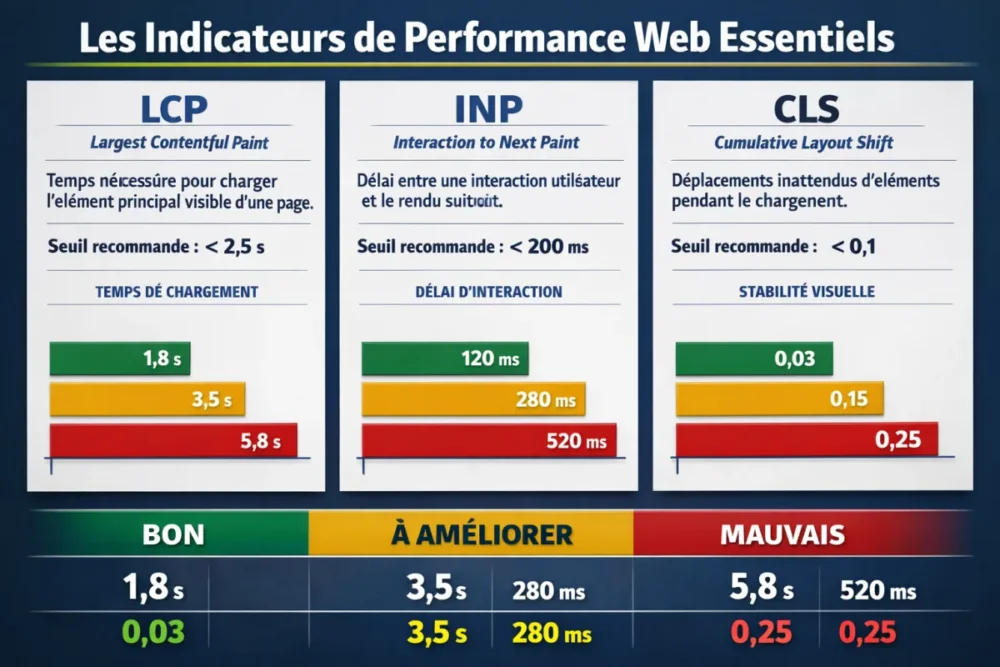
| Metric | What it measures | Recommended threshold | Common cause | Primary lever |
|---|---|---|---|---|
| LCP | Time needed to display the main visible element | < 2.5 s | Heavy hero image, slow server, blocking CSS | Image optimization, caching, reducing critical CSS |
| INP | Delay between an interaction and the next rendering | < 200 ms | Too heavy JavaScript, long tasks, third-party scripts | JavaScript reduction, deferred loading, task splitting |
| CLS | Unexpected element shifts during loading | < 0.1 | Images without dimensions, banners, injected content | Reserve space, stabilize blocks, control integrations |
A site can appear fast to the naked eye while still being frustrating to use. Core Web Vitals are precisely used to spot this gap between impression and reality.
Overall, this reading is useful because it avoids false debates. A page can show a good overall score and still be too slow on the first screen, too choppy on interaction, or too unstable during component loading. These are the metrics that reveal the true experience.
How to measure your Core Web Vitals without error?
The right reflex is to cross field data and lab tests. The former show what your visitors actually experience, via the Chrome UX Report and Search Console. The latter help reproduce a problem, isolate it, and understand which file, script, or resource is blocking the page.
Tools to prioritize
- Search Console: identify URL groups with performance issues.
- PageSpeed Insights: read field metrics and optimization advice.
- Lighthouse: check local rendering, resource weight, and blockages.
- WebPageTest: observe loading waterfall and rendering film.
Simple method to interpret a test
- First test a page that really matters: homepage, category, product page, flagship article.
- Always compare the mobile version and the desktop version.
- Note the dominant weak point: image, JS, CSS, font, server, or third-party script.
- Fix only one group of causes at a time, otherwise you lose track of the results.
A useful audit starts with the pages that carry the most traffic or value. The rest can wait, while securing the most visible gains.
How to quickly improve LCP?
LCP is mostly won on the first screen. If the main element takes too long to display, priority should be given to the image size, server response time, and CSS resources blocking rendering. This is often where the quickest gains are found.
Optimize the main visible element
- Compress heavy images and serve them in WebP or AVIF if your pipeline allows.
- Resize visuals to the actual displayed size, especially on mobile.
- Avoid loading a 2500 px image for a block displayed at 800 px. Joking aside, that’s wasted weight.
Reduce what blocks rendering
- Extract the critical CSS needed for the first display.
- Move secondary style sheets after the priority content.
- Preload essential resources above the fold.
Speed up the server and delivery
- Reduce initial response time with a clean server cache.
- Use a CDN if your visitors are spread across multiple geographic areas.
- Check the slowest pages on the hosting side before touching the front-end.
On an editorial site, a simply better compressed hero image can already noticeably move the LCP. On an e-commerce site, the issue can also come from the theme, category filters, or an overly demanding carousel. The common point remains the same: the main content must arrive earlier.
How to reduce INP without breaking the interface?
INP measures the actual responsiveness of the page. If a click, tap, or input triggers a slow response, the problem often comes from JavaScript, too many third-party scripts, or long tasks that monopolize the main thread. The work therefore consists of lightening and splitting.
Lighten JavaScript
- Remove unused scripts and bundles that are too heavy.
- Load non-essential components for the first screen lazily.
- Split functional blocks to avoid executing everything at once.
Better manage third-party scripts
- Limit marketing tags that trigger everywhere.
- Group chat, survey, or tracking widgets when possible.
- Control the impact of CMS extensions, often underestimated on WordPress sites.
Smooth key interactions
- Split long tasks that block the interface.
- Reduce work on click for buttons, menus, and filters.
- Test the most used components: internal search, add to cart, mobile navigation.
In other words, you are not just trying to “run less code.” You are trying to let the browser breathe at the right moment. This is often where INP drops sharply, especially on mobile and less powerful devices.
How to fix CLS sustainably?
CLS becomes bad when the page shifts afterward: image without dimensions, ads pushing content, banner injected too late, font that abruptly replaces text. To fix it, you must reserve space before loading, not after.
Reserve the right spots
- Always define the dimensions of images and videos.
- Provide fixed space for advertising placements.
- Avoid blocks that add above already displayed content.
Stabilize fonts and dynamic components
- Check the behavior of web fonts during loading.
- Control pop-ups, banners, and notifications that shift the layout.
- Test external integrations on multiple screen sizes.
A stable page does not surprise the user. If an element must appear, it must already have its place.
Which cross-cutting optimizations yield the most gains?
When several metrics degrade at the same time, the most profitable gains often come from cross-cutting fixes. This is where web performance improves without scattering efforts: less weight, fewer network round-trips, less unnecessary work on the browser side.
Clean up the front-end
- Remove unused or redundant CSS.
- Reduce unused scripts.
- Check the DOM size if the page becomes too heavy.
Implement an effective cache
- Enable a browser cache on stable resources.
- Combine server cache and application cache when your architecture allows.
- Avoid breaking caching logic with files that change too often.
Choose a coherent infrastructure
- Check hosting quality before piling up front-end optimizations.
- Place resources as close as possible to your audience.
- Add a CDN if geographic distribution justifies it.
Recommended Working Method
To optimize Core Web Vitals without going in circles, a strict sequence is necessary: measure, fix, re-measure. This approach avoids multiple changes that blur results and allows you to know precisely what moved the loading time, responsiveness, or stability.
1. Conduct an initial audit
Measure the priority pages, note the three metrics, and identify the main cause per page. For example: LCP too high on the homepage, poor INP on the cart, CLS on high-traffic articles. The expected result is a clear list of tasks to address.
2. Fix one problem at a time
First address the dominant factor: hero image, blocking JavaScript, or missing space for injected elements. Do not change ten parameters at once. Otherwise, you won’t know which action actually improved the page.
3. Re-measure immediately
After each fix, rerun tests on the same URLs, under the same conditions if possible. The expected result is not an isolated “nice score,” but a reproducible improvement on the pages that matter.
4. Set up continuous monitoring
Monitor Search Console, especially after a theme update, plugin update, or tag manager change. Performance rarely degrades suddenly without reason: it often slips gradually, and this is where regular monitoring avoids unpleasant surprises.
Common Mistakes to Avoid
Optimizing without a method wastes time and produces fragile gains. The most common mistakes come from a poor diagnosis, obsession with the overall score, or underestimating mobile and third-party scripts.
- Relying only on the overall score: a decent score does not guarantee stability or responsiveness.
- Optimizing desktop only: real problems often show up more on mobile.
- Ignoring external scripts: advertising, analytics, chat, and tag managers weigh more than you think.
- Changing too many things at once: results become impossible to attribute.
- Forgetting CMS extensions: on WordPress, some plugins seriously slow down loading.
Conclusion: Moving from Audit to Action
The right way to optimize Core Web Vitals is to start with the pages that matter, address the dominant problem first, then verify the effect of each fix. The trio to keep in mind remains the same: LCP for perceived speed, INP for responsiveness, CLS for stability.
If you must remember one logic, remember this: less unnecessary weight, fewer blockages, fewer visual surprises. This combination truly improves the user experience and, by extension, technical SEO.
Key Takeaways
- 🚀 LCP is primarily won on the main image, the server, and blocking CSS.
- 🧠 INP mainly depends on JavaScript and long tasks that monopolize the browser.
- 🧱 CLS decreases when each element has its place before loading.
- 📊 Field data complements Lighthouse tests; it does not replace them.
- 🎯 Prioritize strategic pages to achieve visible gains faster.
FAQ
Do Core Web Vitals really influence SEO?
Yes, they are part of the signals used by Google to evaluate page experience. Their impact does not replace content or site authority, but it counts in overall visibility. In practice, a better score helps especially when your competitors are close on other factors.
Should I start with LCP, INP, or CLS?
Start with the most degraded metric on your high-traffic pages. Very often, LCP yields the fastest gains, then INP, then CLS depending on the nature of the site. The important thing is to fix the real bottleneck, not the “prettiest” metric.
How long does it take to see results?
For a simple fix, effects can appear immediately in a lab test. For field data, more hindsight is needed because it reflects real user behavior over a longer period. The delay also depends on the CMS, hosting, and third-party scripts.
Which tools should be used first?
Start with Search Console and PageSpeed Insights, then dig deeper with Lighthouse and WebPageTest. This duo allows you to see both the real experience and the technical behavior of the page. It is the simplest way to avoid overly theoretical diagnoses.
Are images always the first problem?
No, but they often come up when the LCP is poor. On some pages, the real problem comes from the server, blocking CSS, or an overly heavy third-party script. Hence the importance of measuring before deleting or compressing at random.