Which HDMI Upscaler to Choose for Your Retro Consoles? The Comparison to Improve Image, Comfort, and Compatibility
Which HDMI upscaler should you choose when a Super Nintendo, a PlayStation 2, or a Dreamcast ends up connected to a 4K TV that was never really designed for them? That’s the real issue. The problem is not just to “put an old console on HDMI,” but to preserve the proper signal, limit latency, avoid artifacts, and get a pleasant image without spending three evenings in the menus. In short: the upscaler becomes the translator between two worlds that don’t quite speak the same language.
In Brief
🎮 The best HDMI upscaler depends primarily on your consoles: a machine with clean RGB, a console with composite, and a PS2 in 480i do not pose the same problems at all.
⚡ Video latency remains the number one criterion for retro gaming. A sharper rendering is useless if Mario jumps a fraction too late or if a fighting game becomes less responsive.
🖼️ Handling of 240p and 480i makes the real difference. Good upscalers better recognize old signals, properly deinterlace, and avoid shaky or smeared images.
🔌 A recent HDMI cable does not replace a retro gaming upscaler. HDMI 2.0 or 2.1 mainly concerns the transport of the digital signal after processing, not the intelligent conversion of an analog console.
Why Has Upscaling Become a Real Issue for Retro Gaming?
An HDMI upscaler has become essential because modern TVs often poorly handle old analog signals like 240p or 480i. The right box improves sharpness, reduces deinterlacing errors, stabilizes the image, and limits latency for playing under good conditions.
Retro consoles were not designed for current flat screens. They often output a composite, S-Video, SCART RGB, or component signal, sometimes in 240p, sometimes in 480i, with behaviors that vary depending on the games. A modern TV, on the other hand, expects a clean digital signal, often in 1080p or 4K. The result: blurry image, bleeding colors, display delay, menu flickering, or even black screen depending on the models.
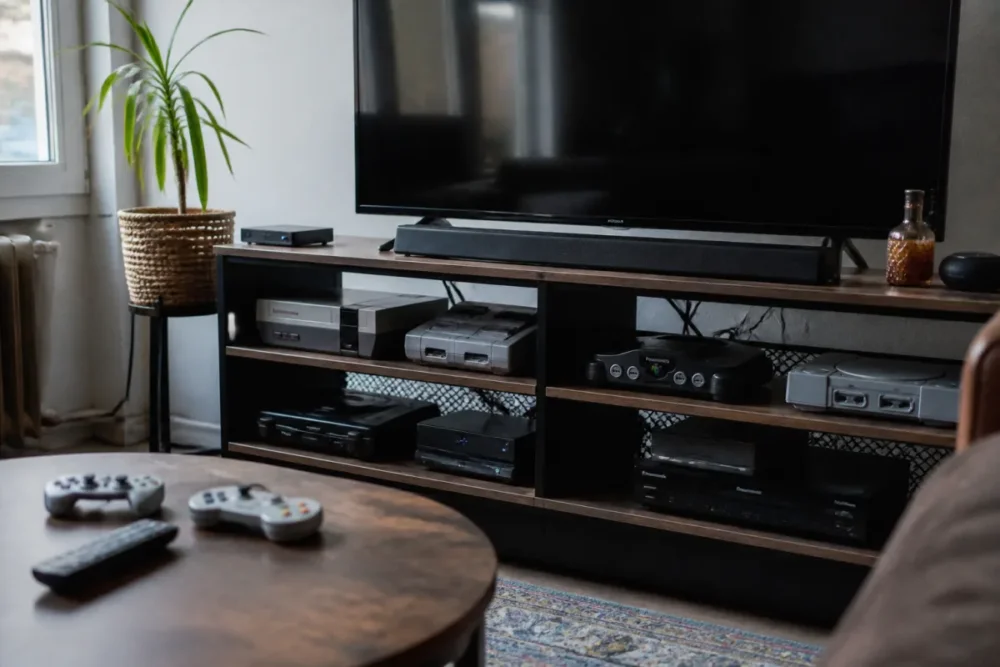
This mismatch explains why the question “which HDMI upscaler to choose” comes up so often among players who want to bring out their Saturn, GameCube, or PlayStation 2. A simple analog to HDMI converter can display an image, sure. But it often does so with harsh processing: rough deinterlacing, crushed colors, incorrect aspect ratio, amplified video noise. Joking aside, you can visually ruin an excellent console with a low-cost box.
In practice, it is observed in the field that two players with the same console can get opposite results. The first uses a tired composite output to a generic converter: the image looks soft, noisy, sometimes unstable. The second uses a clean RGB cable and a suitable upscaler: pixels are better defined, texts become readable, and perceived latency decreases. Same game, same TV, but not at all the same experience.
An HDMI upscaler does not make a retro console “modern”: it mainly allows it to be properly understood by a modern screen.
How to Compare the Best HDMI Upscalers Without Mistakes?
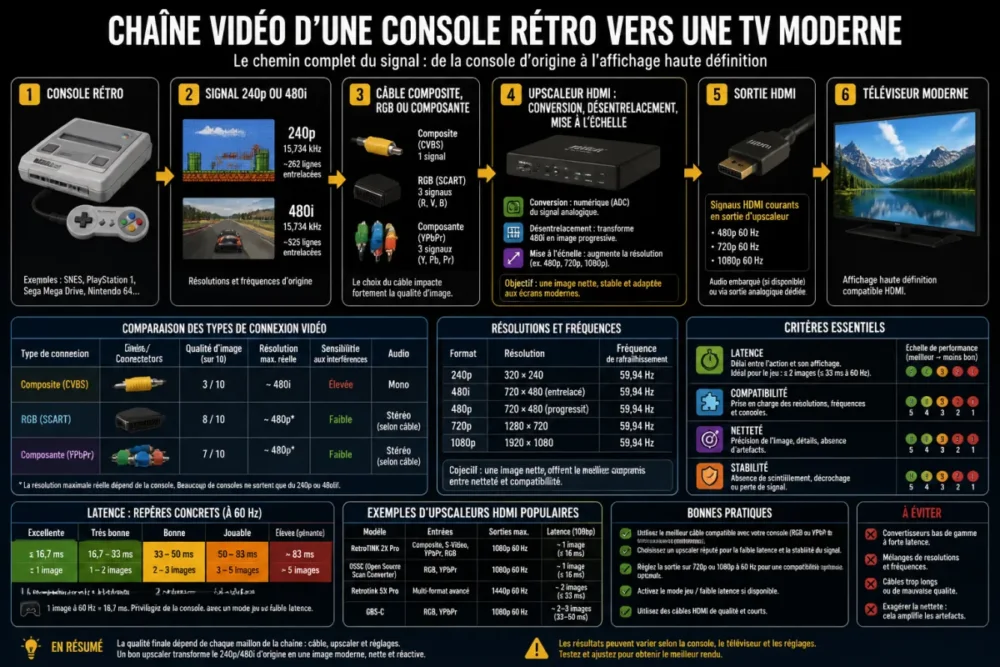
To compare the best HDMI upscalers, you need to look at three criteria before anything else: latency, compatibility with retro signals, and the quality of video processing. The announced resolution alone is not enough, because poor deinterlacing or bad handling of 240p can ruin the experience.
A serious comparison cannot be limited to “it outputs in 1080p so it’s good.” To know which HDMI upscaler to choose, you need to observe what happens between the console and the screen: signal recognition, motion processing, respect for the 4:3 format, management of 240p/480i transitions, then stable HDMI output. It’s all this little invisible world that makes the difference.
Latency, the number one criterion for comfortable gaming
Video latency corresponds to the delay added between the action on the controller and its display on the screen. In a turn-based RPG, it is hardly bothersome. In a shoot’em up, a demanding platformer, or a versus fighting game, it quickly becomes annoying. The trap is that an upscaler can produce a flattering image while adding too heavy processing. Cherry on top: the TV’s picture mode can also add delay if game mode is not activated.
On a test setup with a 16-bit console in RGB and a PS2 in component, it is observed that the feeling of responsiveness varies more with video processing than with the final HDMI cable. A player used to rhythm games quickly notices solutions that “smooth” the image too much at the cost of a perceptible delay.
Video compatibility according to consoles
Retro gaming is not a uniform block. A Mega Drive in RGB, a Nintendo 64 in composite, a Wii in component, and a PlayStation 2 alternating 240p and 480i do not stress the upscaler in the same way. That’s why a box excellent with RGB signals can be less comfortable with composite, and vice versa.
- 240p: old progressive signal, often misinterpreted as 480i by modern TVs.
- 480i: interlaced signal that requires proper deinterlacing to avoid combing, flickering, and blurring.
- SCART RGB: generally very good for compatible European consoles, provided a proper cable is used.
- Component YPbPr: useful for PS2, GameCube, Xbox, Wii, and some consoles capable of outputting 480p.
- Composite: very compatible, but often noisy and less sharp; it requires more tolerant processing.
Sharpness, filters, scanlines: faithful image or “enhanced” image?
The good retro image is not necessarily the sharpest image. An upscaler can make pixels stand out with a scalpel, add scanlines, smooth diagonals, or simulate a CRT rendering. It all depends on the player’s taste and the type of game. On a 2D RPG, strong sharpness can be superb. On PlayStation or Saturn 3D, too aggressive processing can accentuate flickering, unstable textures, and jagged edges.
| Criterion | Why it’s important | To check before purchase | Relevant profile |
|---|---|---|---|
| Latency | Determines real responsiveness in-game | Low-lag modes, disable-able processing | Platformer, fighting, arcade |
| 240p | Common signal on 8/16/32-bit consoles | Correct recognition without flicker | SNES, Mega Drive, Saturn, PS1 |
| 480i | Requires good deinterlacing | Stability of texts and menus | PS2, GameCube, Xbox |
| Video inputs | Determines compatible consoles | RGB, component, composite, HDMI | Various collections |
| Settings | Allows adapting the image to the game | Profiles, scanlines, ratio, filters | Demanding players |
For the HDMI output, it is also important to avoid the common confusion: the cable standard does not do the work of the upscaler. An HDMI 2.0 cable can carry up to 18 Gbit/s, with 4K at 60 Hz under certain conditions, while HDMI 2.1 goes up to 48 Gbit/s and targets notably 4K at 120 Hz or 8K at 60 Hz. These data, described in the Premium High Speed HDMI Cable certification and the Ultra High Speed HDMI Cable certification, concern digital transport after conversion. They do not turn a bad composite signal into a beautiful retro image.
Comparison of the main families of HDMI upscalers
The market is divided into three main families: very versatile premium solutions, mid-range boxes focused on performance/price, and more technical or economical options. To know which HDMI upscaler to choose, it is better to think in terms of usage rather than favorite brand. RetroTINK, OSSC, GBS-C, or Framemeister do not have exactly the same philosophy.
Premium solutions: comfort, versatility, and finish
Premium upscalers, typically associated with the high-end RetroTINK family or some very comprehensive devices, target players who want to connect multiple consoles without redoing all their wiring at each session. Their appeal lies in the combination of inputs, profiles, video processing, and relative simplicity. The icing on the cake: they often handle difficult cases better, such as resolution changes mid-game or less clean signals.
This type of solution is particularly suitable if your collection mixes 2D RGB consoles, 3D machines with composite or S-Video, and later consoles with component. However, you must accept a heavier investment and some setup time to exploit the options without turning each session into a calibration session.
Mid-range solutions: the right balance for many players
The OSSC remains the typical example of a device appreciated for its low latency and direct signal approach, especially with clean RGB or component. In an already well-wired setup, it can offer a sharp and responsive image. But it requires understanding at least the line multiplication modes, screen compatibilities, and limits on some interlaced signals. In other words: excellent if you like to control your video chain, less ideal if you just want to plug and play.
Economical or hackable options: relevant but not magical
GBS-C type solutions interest players willing to accept some configuration to obtain a very respectable result, notably on certain component or RGB consoles. They can be attractive for a tight budget, but quality strongly depends on assembly, firmware, casing, power supply, and cables. Good to know: a well-configured economical option can outperform a generic converter, but it does not always replace the finish of a premium box.
| Family | Strengths | Known limitations | Prefer if… |
|---|---|---|---|
| Premium type RetroTINK | Versatility, comfort, good processing | High budget, many options | You have multiple consoles and want a durable solution |
| OSSC | Very responsive, sharp with RGB/component | More technical, variable screen compatibility | Your consoles already output a clean signal |
| GBS-C | Good value for money | Quality depends on configuration | You like to optimize without blowing the budget |
| Framemeister | Historical reference, appreciated rendering | Old product, more complicated availability | You seek precise rendering and know what you are buying |
| Generic HDMI converter | Simple, easy to find | Latency, blur, frequent bad 240p | Occasional use without strong requirements |
The useful ranking is not “the most expensive wins,” but “does the box really match the signal your console sends?”
Which HDMI upscaler to choose according to your profile?
If you want the short answer: choose a premium solution if you have multiple consoles and seek comfort, an OSSC if your RGB or component signals are clean, and a GBS-C if you accept a bit of tweaking to optimize the budget. Avoid generic converters for serious use.
The right answer to “which HDMI upscaler to choose” depends less on the absolute best model than on your tolerance for adjustments, your consoles, and your visual requirements. A PS2 player does not have the same priorities as a Neo Geo fan, and someone playing on a recent OLED TV does not always face the same issues as a PC monitor user.
If you want to plug and play without hassle
Favor a versatile solution, with multiple inputs, easy-to-recall profiles, and good automatic signal management. The goal is to limit fiddling: no desire to manually adjust timing settings every time you switch consoles. In this case, premium devices make sense, as they reduce unpleasant surprises, especially when the collection mixes composite, RGB, and component.
If you are looking for the best possible image
First look at the quality of your cables and console outputs. A console capable of outputting clean RGB will often provide a better starting point than a composite console. Only then does the upscaler refine: sharpness, scanlines, deinterlacing, ratio, profiles per console. For purists, fidelity matters as much as resolution. A 1080p image that is too smoothed can seem less accurate than a well-treated 720p or 960p.
If your budget is limited
Make compromises in the right order. Sometimes it’s better to buy a good RGB or component cable before upgrading the upscaler. Also avoid buying a box just because it boldly promises “4K” on the product sheet. In retro gaming, a poorly done resolution increase mainly results in more visible defects. That’s why a technical but serious solution can be more interesting than a generic HDMI converter that looks impressive on paper.
- Varied collection: versatile premium solution, especially if you use several types of signals.
- Consoles mostly RGB/component: consider OSSC or a low-latency oriented solution.
- Tight budget: GBS-C or recognized box, but with proper configuration.
- Occasional use: simple converter possible, provided you accept its limits.
What mistakes to avoid before buying an HDMI upscaler?
The first mistake is to believe that an upscaler will fix all downstream defects. In reality, it also amplifies the quality of the signal it receives. A noisy composite output, a worn cable, or a poorly wired SCART adapter already limit the result. Before asking which HDMI upscaler to choose, you must identify the actual video output of each console.
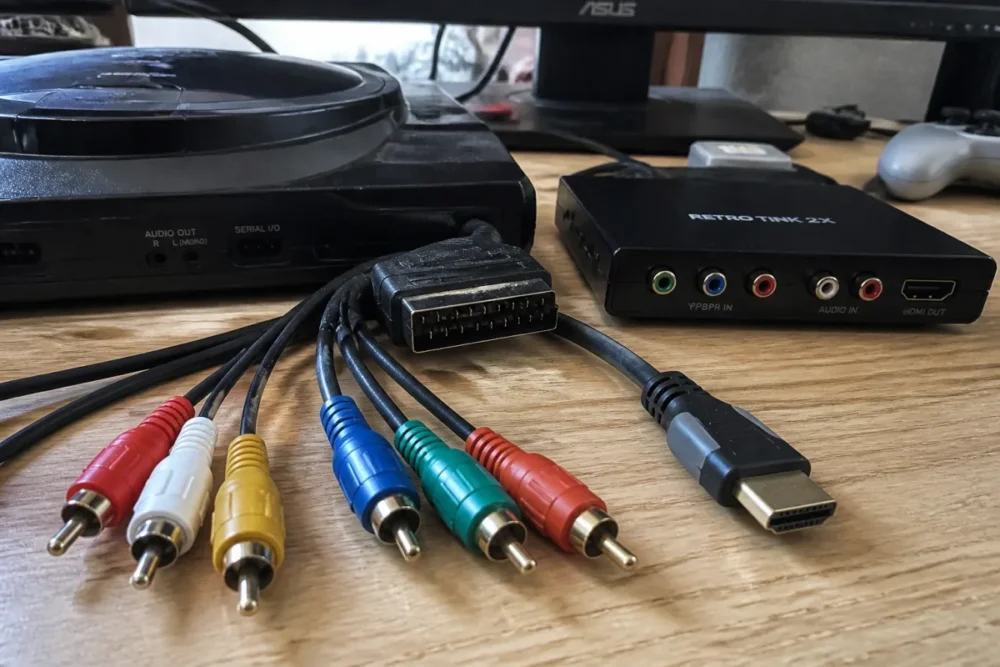
The second, very common mistake is to confuse a retro gaming upscaler with a high-speed HDMI cable. Yes, an HDMI 2.1 cable can be useful in a modern setup with 4K 120 Hz, VRR, or eARC. HDMI specifications also indicate that HDMI 2.0 already supports 4K 60 Hz with HDR depending on compatible devices. But a Super Nintendo, a PlayStation, or a Saturn do not become sharper just because the final cable supports more bandwidth.
Third pitfall: ignoring the television. Some screens handle exotic modes very well, while others lose signal at the slightest resolution change. PlayStation games that switch from a 480i menu to a 240p gameplay phase, for example, can cause a temporary black screen if the console-upscaler-TV setup does not react quickly enough. In this case, stability sometimes matters more than an additional sharpness option.
- Check the actual video output of each console: composite, S-Video, RGB, component, or native HDMI.
- Choose the cables before the upscaler, because a good source signal makes everything else easier.
- Activate the TV’s game mode to reduce the video processing added by the screen.
- Avoid vague promises like “1080p/4K” without specifying support for 240p and 480i.
- Keep a consistent chain: console, cable, upscaler, HDMI, TV settings.
A family that brought out a Wii, a PS2, and a Mega Drive says that the biggest improvement did not come from switching to HDMI alone, but from replacing basic cables with better-suited outputs. The upscaler then stabilized and made the whole setup much more enjoyable on a recent TV.
Our verdict: the best choice according to real needs
The best HDMI upscaler is not universal. For a large collection, a premium solution remains the most comfortable choice: it better absorbs differences between consoles, cables, and signals. For a setup already clean in RGB or component, a more direct and responsive device may suffice, especially if you like to finely control the rendering. For a limited budget, a serious economical solution is preferable to a generic converter bought at random.
Overall, the right trade-off looks like this: if you prioritize simplicity, pay for versatility; if you prioritize visual performance, optimize the source signal first; if you prioritize budget, accept learning at least some settings. In other words, asking which HDMI upscaler to choose mainly comes down to asking how much comfort, fidelity, and tinkering you are willing to accept.
| Your priority | Recommended choice | Why |
|---|---|---|
| Maximum versatility | Premium solution like RetroTINK | Good compatibility with multiple signals and accessible settings |
| Responsiveness and sharpness | OSSC or equivalent low-lag oriented device | Excellent with clean RGB or component sources |
| Controlled budget | Well-configured GBS-C | Interesting compromise if you accept fine-tuning |
| Very occasional use | Simple recognized converter | Sufficient solution if image demands remain moderate |
Key takeaways
- 🎮 The right upscaler depends first on the actual video signal of your consoles.
- ⚡ Low latency matters more than a big displayed 4K resolution.
- 🖼️ 240p and 480i must be properly handled to avoid artifacts.
- 🔌 A high-speed HDMI cable never replaces true retro video processing.
- 🛠️ A good RGB or component cable can transform the result even before the upscaler.
FAQ
Does an upscaler really improve all retro consoles?
It mainly improves display on modern TVs, but the gain varies depending on the console and the starting signal. A console with clean RGB benefits more from good processing than a console with very noisy composite, although some upscalers handle this case better than others.
Is it absolutely necessary to choose a premium HDMI upscaler?
No, not necessarily. A premium model becomes relevant if you have multiple consoles, several types of cables, and a strong demand for comfort. For a simple RGB or component setup, a well-adapted mid-range solution can already deliver excellent results.
Can you get a nice image without modifying your console?
Yes, provided you use the best original video output available. For example, switching from composite to RGB or component can already greatly change the rendering. Internal modifications become mainly interesting for certain limited consoles or for very demanding uses.
Is HDMI 2.1 useful for retro consoles?
In most cases, no. HDMI 2.1 offers up to 48 Gbit/s and modern features like 4K 120 Hz, but a retro console upscaled to 1080p or 1440p generally does not need it. The quality of the video processing matters much more.
Why does my image flicker when a game changes menus?
Some games switch between multiple video modes, for example between 240p and 480i. If the upscaler or the TV takes time to resynchronize the signal, a temporary black screen may appear. A device better suited to resolution changes often limits this issue.









