Why Does a Mouse Double-Click by Itself: Understanding the Real Cause Before Replacing the Hardware
A single click that opens two windows, selects the wrong file, or triggers an action twice can quickly become annoying. The issue seems tiny, almost ridiculous… until it sabotages work, gaming, or an online purchase. Understanding why a mouse double-clicks by itself mainly helps avoid the too-hasty reflex: throwing away the mouse when an adjustment, cleaning, or cross-test might suffice.
In Brief
🖱️ The involuntary double-click often comes from a worn micro-switch, but not always: Windows, a driver, or a loose contact can mimic the fault.
🔍 The most useful test is to plug the mouse into another computer. If the problem follows the mouse, the cause is probably hardware-related.
⚙️ Before replacing the hardware, check the double-click setting, the Windows option “single click to open,” and the manufacturer’s utilities.
🧼 Cleaning, changing the USB port, fresh batteries, or reinstalling the driver are reversible and low-risk actions to try first.
Why Does a Mouse Double-Click by Itself Instead of a Single Click?
A mouse that double-clicks by itself turns a single physical click into two clicks detected by the system. The cause can be mechanical, with a tired micro-switch, or software-related, with a setting that’s too sensitive, an unstable driver, or a misconfigured system option.
To understand the problem, you need to distinguish three often confused phenomena: the involuntary double-click, phantom clicks, and drag-and-drop that stops on its own. The first happens when you click once and the computer interprets two clicks. The second gives the impression the mouse clicks without intentional pressure. The third occurs when you hold down the left button, but the selection releases mid-movement.
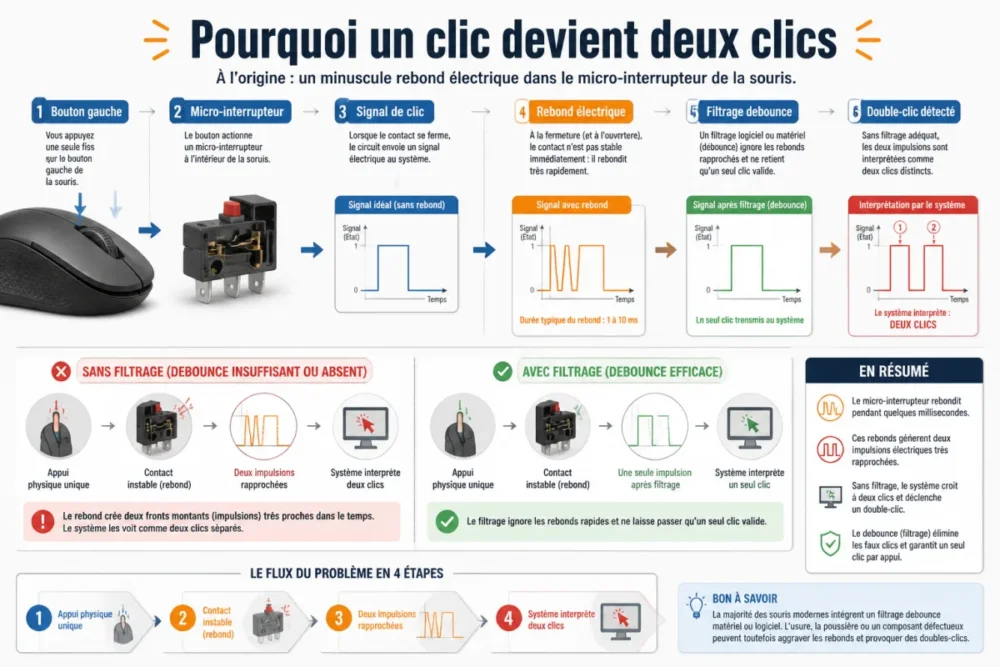
In a classic mouse, the left button presses a small component called a micro-switch. When it ages, the internal contact becomes less precise. Instead of sending a clean signal, it can produce tiny electrical bounces. The system normally filters these bounces thanks to a debounce delay, but if the signal becomes too unstable, the click triggering twice appears.
The right diagnosis starts with a simple idea: do not blame the hardware until the mouse has been tested outside its usual environment.
This is why the symptom often appears gradually. At first, a double-click happens once in a while. Then it becomes more frequent, especially on the left button, because it takes the most presses. In practice, users often notice the problem when opening folders, selecting text, or moving files. This is no coincidence: these actions immediately reveal the extra clicks.
What Are the Most Common Causes of a Mouse That Double-Clicks by Itself?
The most likely causes are micro-switch wear, dust under the buttons, an overly sensitive system setting, an unstable driver, or a connection problem. The most effective approach is to rank them from the easiest to check to the most costly to fix.
Wear of the micro switch
This is the most well-known scenario, especially for a mouse used daily for work, gaming, or editing. The left mouse button undergoes thousands of presses over time. When the microswitch wears out, it no longer returns perfectly or produces an irregular contact. Result: the system thinks it sees two closely spaced impulses.
This case is often recognized by one detail: the problem mainly affects one button, appears even on another computer, and is triggered more when the press is light or placed on the edge of the button. In other words, if your mouse reproduces the same defect everywhere, the hardware diagnosis becomes quite credible.
Dust, dirt, or a little moisture
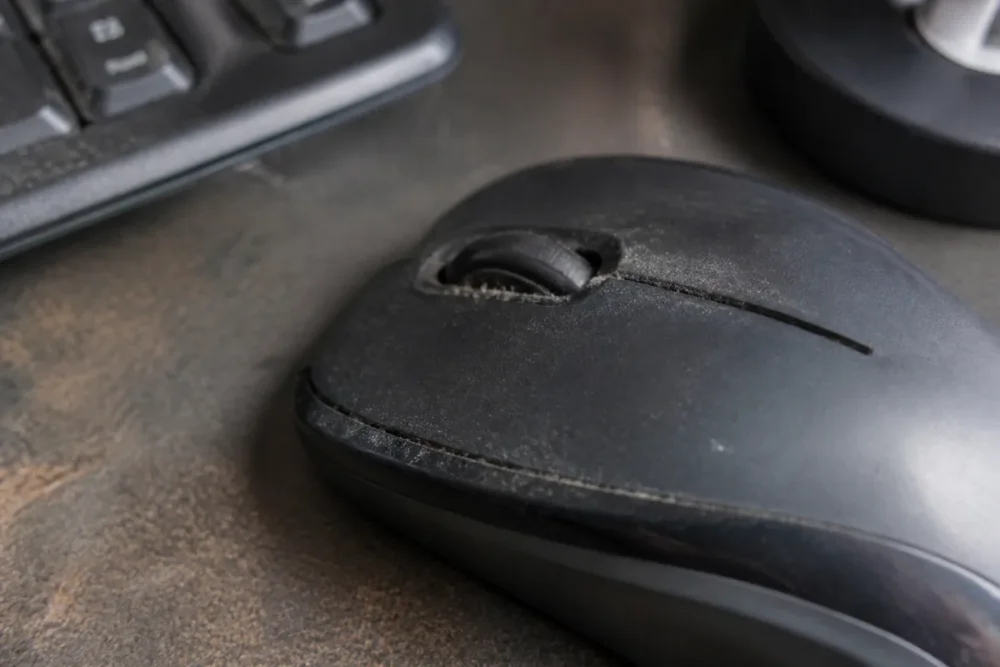
Dust and debris can hinder the button’s movement or create imperfect pressure on the mechanism. It is not necessarily spectacular: a crumb, a greasy deposit, or a little moisture is sometimes enough to make the click less crisp. In practice, it is often observed that shared office mice or those used near meals accumulate this type of minor defect.
In practice, a support technician observes that “defective” mice sometimes return to normal behavior after careful external cleaning and changing the USB port. It’s not magic: it simply eliminates easy causes before considering a switch failure.
A setting or driver that distorts the impression of a fault
Under Windows, the double-click speed can be adjusted in the mouse settings, notably via the Control Panel, under Hardware and Sound > Devices and Printers > Mouse. If the delay is too permissive, two close clicks can be more easily interpreted as a double-click. This is not exactly a defective mouse, but the perceived effect can be similar.
There is also a trickier case: in Windows 10, the option “Single-click to open an item” can give the impression that a single click triggers an action normally reserved for a double-click. Logitech mentions this in its help on double clicks from the first day of use, which reminds us of one thing: an immediate problem on a new mouse is not always a hardware failure. You can consult this recommendation on the Logitech support dedicated to double click detection.
A false contact or connection problem
On a wired mouse, a worn cable, an unstable USB port, or a poor-quality extension cable can cause erratic behavior. On a wireless mouse, the diagnosis is a bit different: dongle too far away, weak battery, unstable battery, Bluetooth interference, or receiver plugged behind a metal tower can disrupt communication. This is not the most frequent case for a real double-click, but it is common enough to warrant a test.
| Observed symptom | Probable cause | Quick test | Logical action |
|---|---|---|---|
| One click becomes two clicks on all computers | Worn microswitch | Test on another device | After-sales service, switch replacement, or new mouse |
| The issue appears mainly in Windows | Double-click setting or open option | Check mouse options | Adjust speed and disable single-click opening |
| The click sticks or feels soft | Dust or dirt | Clean around the button | Dust off without opening if possible |
| The wireless mouse reacts intermittently | Battery, dongle, or interference | Change battery, USB port, or receiver location | Stabilize the connection |
| The problem follows an update or software | Driver or manufacturer utility | Uninstall or reinstall the driver | Return to a clean configuration |
How to quickly diagnose an involuntary double-click problem?
To diagnose a mouse that double-clicks on its own, first test it on another computer. If the defect persists, the mouse is probably at fault. If it disappears, check system settings, drivers, manufacturer utilities, and the USB or wireless connection.
The trap is to start with the most complicated solution: disassemble, order a switch, reinstall all of Windows, or buy a new mouse. Jokes aside, the right method is more down-to-earth. Isolate the fault, then proceed by elimination.
- Test the mouse on another computer: this is the most telling test to separate hardware from the system.
- Test another mouse on the same computer: if the problem disappears, the software environment is less suspect.
- Change the USB port: especially if you are using a hub, an extension cable, or a front port.
- Observe the button concerned: a defect focused on the left button points to mechanical wear.
- Compare wired and wireless: on a wireless model, moving away from sources of interference can clarify the situation.
Microsoft Answers reminds to check mouse settings when a simple click becomes double or multiple, especially options related to click behavior. This is not proof that Windows is responsible, but it is a simple enough check to do before any decision. To delve into this case, the Microsoft discussion on simple click turned into double or triple click provides a coherent troubleshooting lead.
Another clue counts a lot: regularity. A mechanical fault often becomes more frequent over time, while a software setting rather produces stable and reproducible behavior. If the click triggers twice once every ten times, then once every three times, wear should be taken seriously. If the problem appears only in File Explorer, the single-click open option deserves to be checked first.
An intermittent problem is not necessarily less serious: it is often the form mechanical wear takes at the beginning.
What solutions to try before replacing the mouse?
Before replacing the mouse, start with reversible solutions: clean, reconnect, change the port, check the batteries, adjust double-click settings, and reinstall the driver. Replacement only becomes rational if the fault persists after a test on another device.
Clean and reconnect without risk
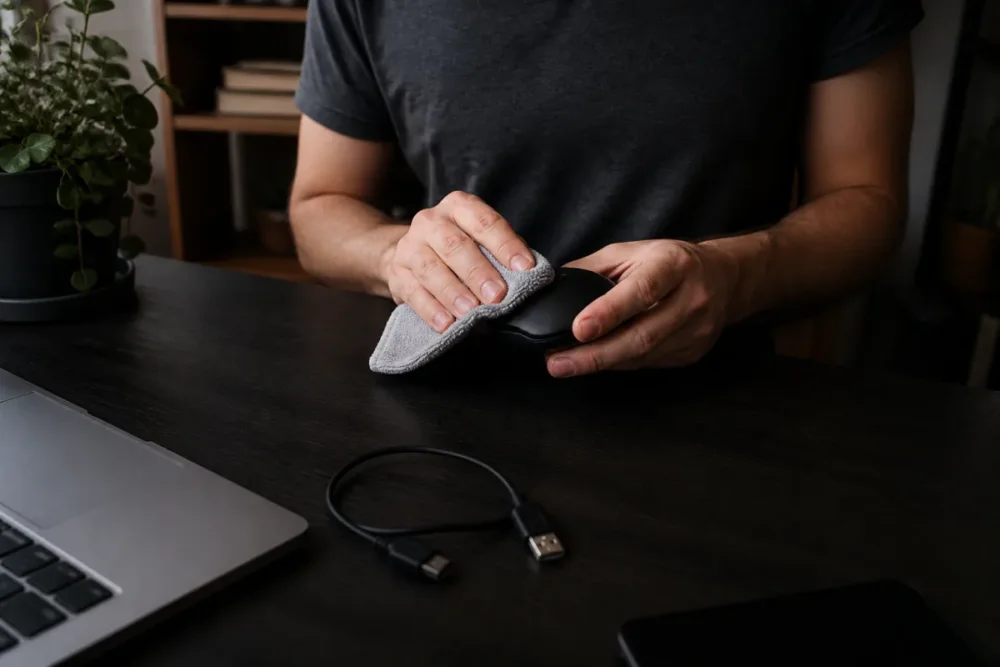
Start simple: unplug the mouse, turn it over, gently blow around the buttons and clean the gaps with a dry or slightly damp cloth. Avoid soaking the mechanism with a liquid product. If you use an air duster, keep a reasonable distance so as not to push dirt deeper.
On a wired mouse, then plug it directly into a USB port on the computer, without a hub. On a wireless mouse, replace the battery or fully recharge the battery, then bring the USB dongle closer. It’s basic, yes. But overall, this diagnosis avoids having to manually perform software manipulations when an unstable contact was the cause.
Review settings and drivers
Under Windows, open mouse settings and adjust the double-click speed. Also check that the “single click to open an item” option is not enabled in Explorer options. On macOS, check mouse or trackpad settings, especially if the issue concerns a Magic Mouse or a Bluetooth device.
Next, move on to the drivers. Updating or reinstalling the mouse driver can resolve a mouse click issue caused by an unstable configuration. For gaming or advanced office models, also consider utilities like Logitech G HUB, Razer Synapse, Corsair iCUE, or SteelSeries GG. These software can modify profiles, macros, or certain click behaviors.
- Temporarily disable macros to check if a profile is repeating the action.
- Reset the mouse profile if the manufacturer’s software offers this option.
- Test without the utility after restarting, when possible.
- Avoid miracle fixes that mask the click instead of addressing the cause.
Fixing a false contact or unstable wireless connection
For a wired mouse, inspect the cable near the case exit and near the USB connector. These are the areas that bend the most. If double-clicking occurs when you move the cable, a false contact becomes plausible. For a wireless mouse, move the receiver to a closer port, ideally at the front of the PC or via a short USB extension cable.
Interference does not mechanically turn a click into a double-click, but it can create a sensation of erratic response: delayed clicks, signal losses, repeated actions. Good to know: if the cursor stutters at the same time as the clicks cause problems, the connection deserves as much attention as the button.
Replacing the switch or the mouse
If testing on another computer confirms the defect and cleaning does not change anything, you reach the real decision: repair or replace. On some gaming mice, replacing the microswitch is possible, but it requires opening the case, identifying a compatible part, and sometimes soldering. So it is not the best option for everyone.
For a mouse under warranty, customer service is often the most rational choice. For an entry-level mouse out of warranty, a complete replacement will generally cost less than the time spent searching for a repair. For an expensive, ergonomic, or professional model, replacing the switch can make sense provided you are comfortable with disassembly.
When should you stop testing and replace the hardware?
Replacement should be considered when involuntary double-clicking persists on multiple computers, mainly concerns the same button, and returns despite cleaning, port changes, settings, and driver reinstallation. At this stage, software solutions cannot repair a worn mechanical contact.
The limit is quite clear: a setting can correct a misinterpretation of the click, but it will not make a tired microswitch like new. Some software allows artificially extending the debounce delay, which can reduce double clicks for a time. But this patch sometimes adds latency and does not fix wear. For gaming, precise work, or daily use, this compromise quickly becomes annoying.
Replacement is particularly logical if you observe several combined signs: soft left button, different click sound, double-click even on another computer, difficulty maintaining drag-and-drop, or a defect that increases week after week. In other words, if the mouse causes you to lose more time than it is worth in troubleshooting, the decision is made.
How to prevent a mouse from double-clicking on its own again?
Completely avoiding wear is impossible, but it can be delayed. A mouse is as much a mechanical as an electronic object: each click stresses a spring, a contact, and a shell. Maintenance, environment, and model choice therefore play a real role.
- Keep the click area clean: avoid crumbs, dust, and moisture around the buttons.
- Do not force clicks: excessive pressure wears out the mechanism faster.
- Store the mouse during transport: shocks in a bag damage buttons and scroll wheel.
- Choose a model suited to the use: office, gaming, mobility, or ergonomics do not stress the mouse in the same way.
- Beware of overly complex software profiles: macros, automatic profiles, and multiple utilities can confuse the diagnosis.
To summarize, a durable mouse is not just an expensive mouse. It is above all a mouse that matches your usage. A fast-clicking gamer does not have the same needs as someone working on a spreadsheet, and a wireless travel mouse does not face the same constraints as a model left on a desk all year round.
Conclusion: the right diagnosis prevents impulsive purchases
Understanding why a mouse double-clicks by itself means accepting that there is no single cause. Yes, a worn microswitch is a classic issue. But a double-click setting, a driver, a Windows option, or a loose contact can produce a very similar symptom. The right reflex is therefore to start with the simplest: test on another device, check the settings, clean, and only then consider customer service, repair, or replacement.
The icing on the cake: this method also works to avoid bad diagnoses in the future. A mouse that clicks by itself is not necessarily destined for the trash. But a mouse that reproduces the same defect everywhere, despite all simple tests, sends you a pretty clear message: the hardware is probably nearing the end of its life.
Key Takeaways
- 🖱️ An involuntary double-click often comes from a tired microswitch, especially on the left button.
- 🔍 Testing the mouse on another computer remains the quickest diagnosis.
- ⚙️ A Windows setting or unstable driver can mimic a hardware failure.
- 🧼 Cleaning, fresh batteries, and changing the USB port should precede any replacement.
- 🛠️ Customer service or replacement becomes logical if the defect follows the mouse everywhere.
FAQ
Can a new mouse double-click by itself?
Yes, but it is not necessarily a malfunction. If the problem exists from day one, first check the Windows settings, especially the “single click to open an item” option, then test the mouse on another computer. If the defect persists everywhere, a customer service return is preferable.
Can an involuntary double-click be caused by a virus?
It is theoretically possible, but not the most likely explanation. A setting, a driver, a mouse utility, or a button failure much more often explains a click that triggers twice. If other strange behaviors appear, do perform a security scan anyway.
Should you open the mouse to clean it?
Not at first. Start with an external cleaning around the buttons, the wheel, and the sensor, then test again. Opening the mouse can void a warranty and requires some caution, especially if the model contains a battery.
Can a wireless mouse double-click because of the battery?
A weak battery rather causes signal losses, delays, or irregular reactions. This can give the impression of an unstable mouse, but a true repeated double-click on the same button is often related to the switch or settings. Recharge or change the batteries before concluding.
Is it worth replacing the microswitch?
Yes, for an expensive, ergonomic, or gaming mouse, provided you are comfortable with disassembly and sometimes soldering. For a basic mouse out of warranty, a complete replacement is often more rational. The right criterion remains simple: cost, time spent, and expected reliability.









