Minecraft Java vs Bedrock: Which Version to Choose Based on Your Mods and Desire for Cross-Play
Minecraft Java vs Bedrock is not just an old forum quarrel between PC purists and console players. It is primarily a real usage decision: do you want to transform Minecraft with mods, shaders, and modpacks, or easily play with friends on PC, console, and mobile? The answer changes everything because the two editions are based on different philosophies.
The thesis is simple: Java remains the queen version for advanced modding, while Bedrock dominates as soon as cross-play becomes a priority. Joking aside, searching for “the best version” in absolute terms often leads to a dead end. The right choice depends on your way of playing, your group of friends, your devices, and your tolerance for settings.
In Brief
🧩 Minecraft Java Edition is generally the best choice for Minecraft mods, modpacks, advanced shaders, and highly customized servers.
🎮 Minecraft Bedrock Edition is the go-to for native Minecraft cross-play between Windows, Xbox, PlayStation, Nintendo Switch, iOS, and Android.
⚙️ Java requires more configuration, especially with Forge, Fabric, or modpack launchers. Bedrock favors a more guided experience through the Marketplace, add-ons, and Realms.
👥 For a mixed group of friends, Bedrock avoids a lot of friction. For a PC player who wants to tinker deeply with their world, Java maintains a clear lead.
Why Does Minecraft Java vs Bedrock Really Change the Decision?
Java is generally the best option for advanced modding, modpacks, and advanced customization. Bedrock takes the lead as soon as you prioritize native cross-play, ease of use, and compatibility between PC, console, and mobile. The right choice therefore mainly depends on your actual usage.
The Minecraft Java vs Bedrock comparison becomes interesting when you stop counting the small block differences and look at the concrete consequences. One edition may be technically more open but less practical for inviting a friend on console. The other may be smoother and more accessible but less free if your pleasure is to install 80 mods and gently break everything in the game files.
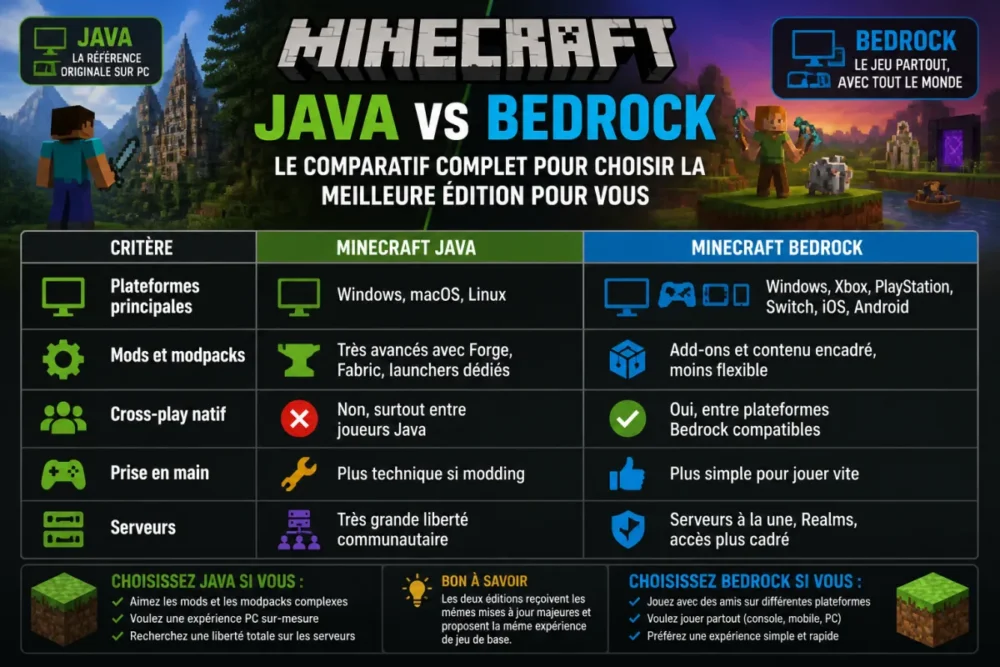
According to the official Minecraft page dedicated to the differences between Java and Bedrock, the two editions do not target exactly the same uses. Java runs on PC, macOS, and Linux, while Bedrock covers a much wider range of platforms, including Windows, consoles, and mobile. That is why the debate is less about “which is better” and more about “which simplifies your life.”
- If you play alone on PC, Java gives you more technical freedom.
- If you play with friends on multiple platforms, Bedrock limits compatibility headaches.
- If you want to install heavy modpacks, Java remains the natural ground.
- If you want to start a game quickly, Bedrock is often more comfortable.
The real question is not “Is Java or Bedrock better?”, but “Which edition will least hinder your way of playing?”.
Java and Bedrock: Two Very Different Gaming Logics
The fundamental difference lies in the ecosystem. Minecraft Java Edition is the game’s historic edition on computers, supported by a community of creators, servers, and modders who have shaped much of Minecraft culture. It allows very advanced customization, but this freedom often requires at least some understanding of what you are installing.
Minecraft Bedrock Edition, on the other hand, is designed as a more unified and controlled version. It allows playing on many devices with a Microsoft account, accessing featured servers, Realms, add-ons, and Marketplace content. In other words, Bedrock trades some of Java’s wild freedom for broader compatibility and a more straightforward user experience.

In practice, on private servers among friends, the first sticking point is not always technical. It is often human: who plays on what? A PC player may agree to configure Fabric or Forge, but if two friends are on Nintendo Switch and another on mobile, the equation quickly shifts towards Bedrock.
| Criteria | Minecraft Java | Minecraft Bedrock |
|---|---|---|
| Main platforms | Windows, macOS, Linux | Windows, Xbox, PlayStation, Switch, iOS, Android |
| Mods and modpacks | Highly advanced with Forge, Fabric, dedicated launchers | Add-ons and curated content, less flexible |
| Native cross-play | No, mostly between Java players | Yes, between compatible Bedrock platforms |
| User-friendliness | More technical if modding | Easier for quick play |
| Servers | Very large community freedom | Featured servers, Realms, more controlled access |
Java, the version of freedom
Java is a bit like Minecraft’s open workshop. You can modify the interface, mechanics, world generation, performance, lighting, biomes, mobs, building tools, and even how technical systems interact. This openness explains why the most ambitious Minecraft mods, complex modpacks, and popular shaders circulate primarily in the Java universe.
This freedom has a cost: sometimes you have to manage game versions, dependencies, mod conflicts, allocated memory, and performance. Nothing insurmountable, but it’s not the same convenience as a simple “install” button. For players who like to tinker, this is precisely what makes Java charming. For others, it can quickly feel like an evening spent fixing a launch error instead of mining peacefully.
Bedrock, the version of simplicity and cross-platform play
Bedrock aims for a more homogeneous experience. The game is available on many devices, and its main selling point remains Minecraft cross-play. Concretely, a player on Windows can join friends on Xbox, PlayStation, Switch, or mobile, provided everyone uses the Bedrock ecosystem and the appropriate online settings.
This simplicity comes with a more closed framework. Additional content exists, notably via Minecraft add-ons and the Marketplace, but they do not replicate Java’s freedom exactly. Bedrock is therefore less a “technical sandbox” and more a “shared gaming platform.” It’s less spectacular for tinkerers but often much more effective for mixed groups.
Which version to choose for Minecraft mods?
For mods, choose Minecraft Java if you want complete modpacks, advanced shaders, transformed mechanics, and a very active community around Forge or Fabric. Bedrock offers add-ons and additional content, but its model remains more controlled and less suited to deep modding.
If your priority is modding, the Minecraft Java vs Bedrock debate clearly leans towards Java. The Java ecosystem relies on tools like Forge and Fabric, two mod loaders that allow adding very varied content and features. This is where you find the most ambitious modpacks, performance packs, advanced Minecraft shaders, and completely revamped survival experiences.
What makes Java strong is the depth of transformation. A modpack can modify the progression economy, add machines, create dimensions, change the combat system, or make exploration more demanding. We’re not just talking about adding three skins and two decorative blocks. Sometimes, it’s about a Minecraft that is almost unrecognizable.
- Forge is often suitable for large historical modpacks and complex mechanics.
- Fabric is appreciated for its lightness, quick updates, and performance mods.
- Java shaders allow for very advanced lighting effects, depending on the machine.
- Modded Java servers can require specific packs to harmonize the experience.
Bedrock is not empty either. Its add-ons allow adding content, behaviors, or visual elements. The Marketplace also facilitates access to worlds, skins, textures, and experiences created by partners. But the spirit is not the same: Bedrock favors simple and compatible distribution, whereas Java accepts more tinkering, testing, and more robust installations.
In practice, PC players who launch a modded server among friends often observe the same thing: Java is more demanding at the start but offers more control once the configuration is stabilized. Conversely, Bedrock reduces settings but imposes its technical framework more strictly.
Why is Bedrock better for Minecraft cross-play?
Bedrock is better for cross-play because it was designed to connect multiple platforms within the same ecosystem. If your friends play on console, mobile, and Windows PC, Bedrock avoids complicated workarounds. Java remains excellent among PC players but does not offer the same native cross-play.
Minecraft cross-play is Bedrock’s trump card. As soon as the group of players mixes an Xbox, a Switch, a Windows PC, and a smartphone, the Bedrock edition becomes the logical choice. It allows focusing on the game rather than compatibility. It’s less romantic than talking about shaders and mods, but it’s often what really decides the version to buy or install.

According to official information from Minecraft Realms, the Realms and Realms Plus offers aim precisely to simplify shared persistent worlds. Depending on the plans and editions, there is generally a logic of small groups, often up to 10 players invited simultaneously around a world more easily accessible. It’s not the only way to play online, but it’s a practical option for families and groups of friends.
Java remains more closed on this point, not because it is inferior, but because its environment is different. It is tailored for PC players in the Java ecosystem. Yes, there are third-party solutions, proxies, and hybrid configurations in some contexts, but these are not native and simple answers for the general public. And that is really the heart of the matter: Bedrock wins when simplicity prevails.
Cross-play is not a cosmetic bonus: for a group of friends on multiple devices, it is often the criterion that makes the game possible.
Other Criteria That Can Tip the Choice
Mods and cross-play dominate the debate, but they are not alone. Performance, ease of installation, controller compatibility, server access, and community style can also tip the balance. The best decision often lies in these everyday details, those that you don’t see on a quick comparison sheet.
Performance, Comfort, and Accessibility
Bedrock is often perceived as smoother on modest devices, notably because its engine aims for broad compatibility across consoles, mobiles, and Windows. However, this impression depends on the platform, viewing distance, loaded worlds, and graphic settings. On Java, optimization can be excellent with the right performance mods, but it requires more tweaking.
The controller is also a real topic. Bedrock is more naturally suited to console and mobile use, with an experience designed for these platforms. Java remains very comfortable with keyboard and mouse, especially for PvP, precise building, and community servers, but it is less obvious if you want a couch experience without hassle.
Servers, Realms, and Community Experience
Minecraft servers tell different stories depending on the edition. Java shines with its freedom: mini-game servers, modified survival, competitive PvP, community SMPs, complex plugins, internal economies, and custom rules. For structured communities, this flexibility remains valuable.
Bedrock emphasizes a more accessible experience, with selected servers, Realms, and a more straightforward operation for casual players. This framework is reassuring, especially for families or groups who don’t want to manage a machine, open ports, or check each plugin’s compatibility. Cherry on top: when everyone is already in the Bedrock ecosystem, the invitation is more natural.
| Player Profile | Recommended Version | Why |
|---|---|---|
| PC player passionate about mods | Java | Modpacks, Forge, Fabric, shaders, and custom servers |
| Group with consoles and mobiles | Bedrock | Native cross-play and simpler access |
| Beginner who wants to play quickly | Bedrock | More direct installation and logical multiplatform |
| Technical server creator | Java | Advanced control of plugins, mods, and configurations |
| Family with multiple devices | Bedrock | Smoother sharing between compatible platforms |
Which Version to Choose According to Your Profile?
Choose Java if your pleasure comes from customization, mods, shaders, and technical servers. Choose Bedrock if your priority is to play smoothly with friends across multiple platforms. For a beginner, Bedrock is often simpler, but Java quickly becomes more interesting if modding is planned.
If You Mainly Want to Mod
Go for Minecraft Java Edition. This is the clearest recommendation of this comparison. Java offers the most mature environment for Minecraft modpacks, custom launchers, shaders, and servers that truly change the game rules. Provided you accept a bit of configuration, you gain enormous freedom.
If You Want to Play with Friends on Multiple Platforms
Go for Minecraft Bedrock Edition. If your cousin plays on PlayStation, your friend on Switch, your brother on mobile, and you on Windows, Bedrock avoids a good part of the “it doesn’t work on my end” issues. In this case, Java’s extra freedom does not compensate for the lack of native cross-play.
If You Are a Beginner Looking for Simplicity
Bedrock often has the advantage for a hassle-free first experience, especially if you play with a controller or on console. Java can also suit a beginner on PC, but it really becomes interesting when you want to explore advanced customization. In short: don’t choose Java “just in case” if you already know you will mostly play with family on different devices.
- Identify your gaming group: is everyone on PC, or are the platforms mixed?
- Assess your desire for modding: a few additional contents or a complete game transformation?
- Consider your tolerance for settings: simple installation or advanced configuration accepted?
- Choose based on the dominant use, not based on the version that seems the most prestigious.
The verdict: Java for freedom, Bedrock for playing together
The duel Minecraft Java vs Bedrock has no universal winner, and that is precisely what many comparisons miss. Java wins on freedom, modding, highly customized servers, and community heritage. Bedrock wins on cross-play, simplicity, broad compatibility, and quick access to a game with friends.
The final recommendation boils down to one sentence: choose Java if you want to shape Minecraft your way; choose Bedrock if you want everyone to be able to join easily. Cherry on top: on PC, the current Java & Bedrock offer often allows having both editions, which makes the choice less dramatic for Windows players. But for your main world, your server, and your habits, you still have to decide.
A family equipped with a Windows PC, a Switch, and a tablet typically says that Bedrock solved the main problem: starting a common game without turning the evening into technical support. Conversely, a group of PC players used to modpacks often prefer Java, despite the initial settings.
Key takeaways
- 🧩 Java remains the strongest choice for mods, modpacks, and advanced shaders.
- 🎮 Bedrock dominates for native cross-play between PC, console, and mobile.
- ⚙️ Forge and Fabric give Java a superior depth of customization.
- 👥 Realms and Bedrock simplify small groups wanting to play quickly together.
- 🧭 The right choice depends on your dominant use, not on theoretical superiority.
FAQ
Can Minecraft Java and Bedrock play together?
Not natively in the general case. Java mainly plays with Java, while Bedrock allows cross-play between compatible Bedrock platforms. Third-party solutions exist in some contexts, but they do not replace simple official compatibility.
Are Java mods free?
Many community Java mods are free, notably via specialized platforms and launchers. However, you need to check the sources, compatible versions, and dependencies. On Bedrock, some content goes through the Marketplace, with both free and paid content.
Is Bedrock better for children or families?
Often, yes, especially if the family uses multiple devices. Bedrock facilitates play between console, mobile, and Windows, with a more guided experience. It remains important to properly configure Microsoft account settings, privacy, and online play.
Is Java more performant than Bedrock?
Not necessarily. Bedrock is generally known to be more stable on a wide variety of devices, while Java can become very performant with optimization mods and good PC configuration. The result depends greatly on the machine, settings, and type of world played.
Which edition to choose for creating a server with friends?
For a modded or highly customized server, Java is generally more suitable. For a small shared world among players on several platforms, Bedrock with Realms or a compatible solution may be simpler. The best choice mainly depends on the devices used by the group.









