Create a WordPress Site Quickly: The Express Method to Launch a Site in 1 Hour
Creating a WordPress site quickly is not an empty marketing promise. If the domain name is ready, if the hosting offers one-click installation, and if you limit the project to the essentials, you can get a clean, functional, and publishable showcase site in one hour. The idea is not to finish everything, but to launch a solid base without getting lost in options.
WordPress remains the most used CMS in the world, with over 42.2 % of websites. This is no coincidence: it allows you to create a professional, robust, and scalable site without writing a single line of code. The method below goes straight to the point: preparation, installation, lightweight theme, key pages, basic settings, then publishing.
Final goal: to end up with a beginner WordPress site, presentable and ready to receive content, without drowning in technicalities.
In brief
🚀 Yes, the one-hour goal is realistic if the domain, hosting, and minimum content are already ready.
🧩 The real time saver comes from a simple theme, only essential pages, and plugins reduced to the bare minimum.
🔒 A fast site is not a sloppy site: check the menu, permalinks, mobile version, and contact form before publishing.
📈 The right strategy is to launch a clean first version, then improve the design, SEO, and features afterward.
What result should you achieve after one hour?
After this hour, you are not aiming for a “perfect” site. You should aim for a WordPress site online, readable on mobile, with a clear homepage, three to five essential pages, a functional menu, and an operational contact method. This foundation makes the site immediately usable.
The right reflex to create quickly is to build a clean base before wanting to refine it.
If you stick to this scope, you will already have a usable WordPress showcase site to present an activity, publish a first message, or collect inquiries. Everything else — advanced portfolio, dense blog, advanced SEO, animations, visual effects — can wait without blocking the launch.
| Element | To achieve in 1 hour | Can wait |
|---|---|---|
| Hosting and installation | WordPress installed and accessible | Fine server optimization |
| Theme | Simple and responsive template | Advanced customization |
| Pages | Home, About, Contact, Services | Complete blog, additional pages |
| Settings | Permalinks, menu, site identity | Advanced SEO, automations |
| Plugins | Form, basic SEO, simple security | Complex functions or duplicates |
What should you prepare to keep within the hour?
Short answer: prepare everything that prevents you from interrupting the installation. Time is rarely lost in WordPress itself; it is lost in back-and-forths to find a logo, an email address, a description, or a menu idea. The more your base is ready, the smoother creating a WordPress site quickly becomes.
- Site name and short description, even provisional.
- Administration email address that you can access immediately.
- Domain name already reserved or ready to be linked.
- Logo or text version of the brand.
- Contact details and minimum legal elements for the contact page.
- A lightweight homepage photo, if you have one, otherwise a simple provisional visual.
The simple rule to avoid getting scattered
Do not prepare ten variants of each element. Choose a single version of your logo, a single tagline, and a single main offer. The moment you start comparing secondary options, the express method falls apart. Here, the goal is to move forward, not to perfect an invisible detail for your visitors for twenty minutes.
Creating quickly is mostly about deciding quickly: what is not essential for going live comes later.
How to choose the fastest path between WordPress.com and WordPress.org?
The answer depends on your immediate goal. To go fastest, a hosted and managed version reduces the technical side. For more control, the self-hosted version offers more freedom but requires a bit more setup. If your absolute priority is to publish quickly, favor the path with the least configuration.
| Criterion | WordPress.com | Self-hosted WordPress.org |
|---|---|---|
| Startup speed | Very fast, managed environment | Fast if the hosting offers one-click installation |
| Technical management | Low | Higher |
| Customization | More controlled | More free |
| Plugins and themes | Depends on the chosen plan | Wide freedom of choice |
| Ideal for | Simple site, quick launch | Project that must evolve without strong limits |
To create a WordPress site quickly, the good compromise is often simple hosting with automatic installation. You keep control over the domain name, theme, and plugins, without drowning in server settings. It’s the best ground for a quick website launch without cold sweats.
Step 1: install WordPress in a few minutes
Start with your host’s client area, then launch the automatic installation. You enter the site name, the admin email address, and the chosen credentials. If the interface shows several options, take the simplest configuration: it will be easier to maintain and faster to finish.
At the end, you should be able to open the WordPress dashboard, check the site URL, and see that the installation works. If the admin page opens properly, you have passed the most technical part of the process. The rest becomes much simpler.
To check immediately after installation
- Possible login to the dashboard.
- Correct site URL with no visible error.
- Default pages present in the admin area.
- Admin email address correctly entered.
Step 2: choose a simple and fast theme
To go fast, look for a lightweight theme, compatible with recent WordPress versions and designed to be modified without hassle. The best theme is not the most spectacular; it’s the one that gives you a clean, responsive base that’s easy to understand from the first click.
The Right Selection Criteria
Avoid themes that promise a thousand effects and twenty page templates. An overly loaded theme wastes time right from customization, then often slows down layout choices. To create a WordPress site in one hour, you need a simple structure, readable typography, and a simple header.
- Responsive on mobile and tablet.
- Visually simple, without unnecessary modules.
- Customizable with basic settings.
- Compatible with recent versions of WordPress.
- Fast loading to avoid the “heavy site” effect.
Then, add only the elements that truly change the perception of the site: logo, main colors, base font, header image if necessary. The footer can remain minimal at first. The important thing is to achieve a coherent whole, not a design masterpiece.
Step 3: Create the Essential Pages of the Site
An effective first version relies on few pages, but good pages. No need to open ten sections if visitors don’t yet know who you are or what to do. In practice, the essential pages are enough to give depth, credibility, and a clear path.
Pages to Create as a Priority
- Home: quick presentation and value proposition.
- About: who you are and why you are legitimate.
- Services or Presentation: what you concretely offer.
- Contact: form, email, or direct contact details.
- Legal notice and privacy policy: at least the necessary basics.
Structure of an Effective Home Page
The home page must answer three questions in a few seconds: who you are, what you do, and what the visitor should do next. A clear title, a short presentation text, a visible call-to-action button, and a reassurance block are enough to create a credible first impression.
- Clear promise at the top of the page.
- Summary of the offer or content.
- Call to action visible without scrolling too long.
- Simple reassurance block: experience, timing, contact.
Step 4: Add Only Useful Plugins
When you want to create a WordPress site quickly, every plugin must have a clear reason to exist. No need to install a gallery, a builder, a social module, and three security tools all at once. The logic remains the same: one plugin = one real need, not a reflex.
Plugins to Install First
- A form plugin to receive requests.
- A basic SEO plugin to manage tags and visibility.
- A simple security solution if your hosting does not already provide a solid one.
- A cache plugin only if your setup justifies it.
What to Avoid at Launch
The classic trap is piling up. The more tools you add, the higher the risk of conflict, slowness, and confusion. If two plugins serve the same function, keep only one. And if a feature is not needed at launch, it can wait for the optimization phase.
Step 5: Set the Essential WordPress Settings
Quick settings save time later. Take five minutes for permalinks, the menu, a static home page if necessary, then the site name and slogan. These settings may seem secondary, but they avoid a good part of last-minute tweaks.
Settings to Do Without Hesitation
- Define readable permalinks.
- Create a main menu with few entries.
- Fill in the site name and slogan.
- Set a static home page if your project requires it.
- Test the contact form.
Checks Before Publishing
Open the site on mobile, click on the menu links, reread the main texts, and verify that the buttons lead to the right place. A site quick to launch can still be clean. The secret is to control the essentials without endless testing.
Step 6: Publish and Launch the First Version
At this stage, you need to think like a publisher, not a perfectionist. The first version has one role: to be usable, understandable, and credible. If each page fulfills its function, you can publish without waiting to have complete content or a highly customized design.
Online Launch Checklist
- Proofread each essential page.
- Check images, buttons, and the menu.
- Confirm mobile display.
- Test the contact form.
- Publish the site and verify navigation in private browsing mode.
From there, the site is online. You can then enrich the content, add testimonials, work on SEO, and refine the design. But the launch itself is already done. This is precisely what you are aiming for when you want to create a WordPress site quickly without getting scattered.
How Long Does It Really Take to Create a WordPress Site?
Direct answer: one hour is reasonable if you have prepared the domain, hosting access, and minimum content. However, if you start from absolute zero, the timeframe quickly extends. The difference does not come from WordPress itself, but from the state of preparation beforehand and your ability to make simple choices.
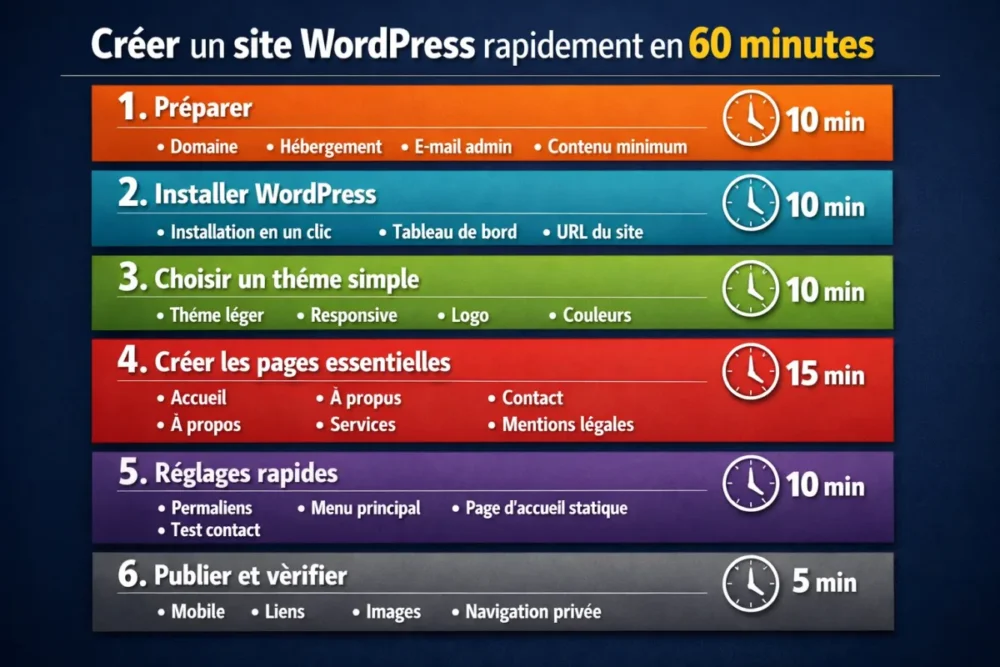
| Step | Estimated Time | Deliverable |
|---|---|---|
| Preparation | 10 min | Access, name, minimum content |
| Installation | 10 min | WordPress accessible |
| Theme | 10 min | Simple visual base |
| Essential pages | 15 min | Home, About, Contact, Services |
| Settings | 10 min | Permalinks, menu, homepage |
| Final checks | 5 min | Publishable site |
If you greatly exceed this estimate, it is not necessarily a technical problem. It is often a sign that you tried to build too many things at once. The right reflex is to reduce the scope, not to push harder.
Common Mistakes When Trying to Go Too Fast
Poorly managed speed creates setbacks. This is where the project really slows down. The most common mistakes are not dramatic, but they waste time and result in a shaky site. It’s better to know them from the start to avoid them properly.
- Customizing every detail from day one.
- Choosing a heavy theme because it seems more complete.
- Installing too many plugins even before publishing.
- Forgetting legal pages or postponing them indefinitely.
- Not testing mobile, even though that’s often where everything shows.
The real trap is believing that “fast” means “half done.” In reality, a site launched quickly and cleanly is often more credible than a site spent three days on unnecessary tweaks. That’s why discipline matters as much as technique.
How to Keep a Site Simple Without Sacrificing Quality?
The answer boils down to one idea: distinguish launch from evolution. At launch, you must aim for clarity and functionality. After going live, you can add testimonials, enrich service pages, improve SEO, and refine the design. This separation prevents turning a small site into a permanent construction site.
- Limit the goals of the first version.
- Publish early to get a real site, not an endless draft.
- Plan an improvement phase after launch.
- Keep a short and readable site structure.
- Add features one by one, according to concrete needs.
If you’re looking for a quick WordPress tutorial that really holds up, this logic is the most reliable. It allows you to create a WordPress showcase site with a solid base, then grow it without breaking everything along the way.
Conclusion
The express method for quickly creating a WordPress site is based on a simple principle: prepare beforehand, limit during, improve afterward. If you stay on this course, you can publish a useful first version in one hour, without coding and without unnecessary stress. The site will not be finished in the broad sense, but it will already be online, clean, and usable.
Key Takeaways
- 🚀 A WordPress site in one hour is realistic with minimal preparation.
- 🧱 The secret is to reduce the scope to essential pages and settings.
- 🎯 A lightweight theme and few plugins avoid wasting time.
- 📱 Mobile testing and the contact form should be checked before publishing.
- 🔁 A quick launch does not prevent improving the site after going live.
FAQ
Can you really create a WordPress site in 1 hour?
Yes, if the domain is ready, the hosting offers one-click installation, and you only keep the essential pages. Most time is spent on choices and back-and-forths. By staying simple, you get a first publishable version quickly.
Do you need to know how to code to start?
No. WordPress allows you to create a professional site without writing code. The important thing is to follow a simple method: install, choose a theme, create the basic pages, and set the essential elements. Code only comes into play for more advanced needs.
What type of site can be launched this quickly?
A showcase site, a service presentation, a starter blog, or a simple brand site. However, a complex e-commerce, a member area, or a platform with multiple user journeys will take more time. For one hour, stick to a light scope.
How to avoid an overloaded site at launch?
Reduce the number of pages, keep only one main objective per page, and limit plugins to real needs. Also avoid themes that are too rich in options. A quick launch works better when each element has a clear and immediate purpose.
What should be improved after going live?
Start with content, testimonials, calls to action, and SEO. Only then work on visual effects or more advanced features. This progression keeps the site stable and prevents you from breaking the creation speed gained at the start.