Why Your Emails End Up in Spam: The Real Causes and Solutions to Get Back to the Inbox
If your emails end up in spam, it is almost never “by chance.” Spam filters look at a set of signals: authentication, domain reputation, content quality, list cleanliness, and recipient behavior. Since February 1, 2024, Google and Yahoo have strengthened their requirements, making deliverability stricter than before. Good news: in most cases, the cause can be identified and methodically corrected.
In Brief
📩 SPF, DKIM, and DMARC must be properly configured, otherwise your legitimacy is weakened right from sending.
🧠 Content that is too “salesy,” too many images, uppercase letters, or trigger words can be enough to derail deliverability.
📉 A poor domain reputation, repeated bounces, or inactive contacts weigh heavily in the filters’ decision.
🧪 The right approach is a step-by-step diagnosis: authentication, reputation, content, contact base, then testing on multiple mail services.
Why do your emails end up in spam even though the content seems correct?
Because an email is not evaluated on its text alone. Receiving servers also observe the sender’s identity, the server used, recipient reactions, and sending history. In other words, a “clean” message can still end up in spam if the overall trust level is too low. Joking aside, filters have no obligation to be lenient.
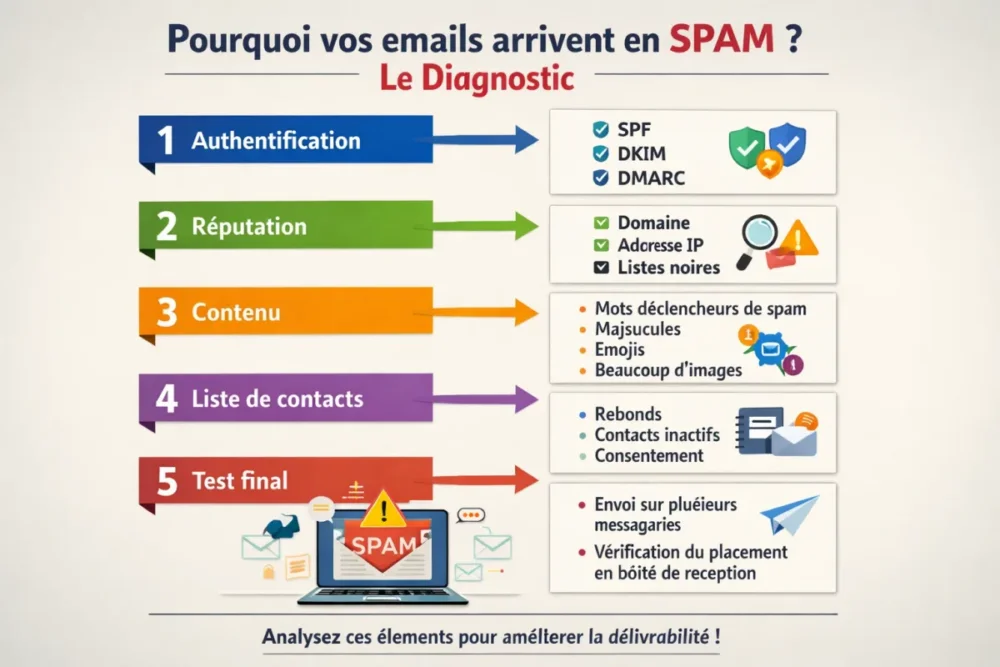
The most frequent causes fall into four categories:
- Incomplete authentication: SPF, DKIM, or DMARC poorly configured, missing, or inconsistent.
- Degraded reputation: new domain, history of complaints, irregular sending volume, or server already blacklisted.
- Suspicious content: too many aggressive words, too many uppercase letters, too many emojis, too many images, or poorly structured HTML.
- Dirty contact base: obsolete addresses, hard bounces, low open rates, and recipients who did not want to receive the message.
An email can be perfectly written and still end up in spam if the trust signal sent to mail services is insufficient.
What are the first tests to do when emails end up in spam?
Start with the checks that give the quickest answer. No need to fix everything randomly: technical causes are often detected faster than content issues. In practice, you must first confirm authentication, then check reputation, then only correct the message itself. This is the fastest way out of the fog.
- Check SPF, DKIM, and DMARC on the domain that actually sends the messages.
- Monitor recent behavior: sudden volume increase, complaints, bounces, drop in opens.
- Review the subject and body: overly aggressive words, too many symbols, too many images, suspicious links.
- Test on multiple inboxes: Gmail, Outlook, Yahoo, and a corporate mail service if possible.
| Observed Symptom | Probable Cause | Priority Check |
|---|---|---|
| Emails go to spam everywhere | Degraded authentication or reputation | SPF, DKIM, DMARC, domain history |
| Spam mostly affects Gmail | Insufficient trust signal or content deemed risky | Subject, text/image ratio, recent engagement |
| Transactional emails perform poorly | Sending configuration, misaligned server or domain | Sending address, headers, authentication |
| The problem occurs after a large campaign | Volume spike and weakened reputation | Sending pace, segmentation, email warm-up |
Lasting correction rarely comes from a single action: you need to realign identity, reputation, and content, in that order.
How to check SPF, DKIM, and DMARC without getting lost?
These three mechanisms serve to prove that your email is authorized to send on behalf of your domain. SPF authorizes servers, DKIM signs the message, DMARC tells mailboxes what to do if something doesn’t match. If any of the three is missing or breaks alignment, your emails are much more likely to end up in spam.
The simplest way is to check point by point:
- SPF: is the sending server listed in the authorized DNS record?
- DKIM: is the signature present and valid on the sent message?
- DMARC: is the policy defined and consistent with your sending domain?
It is always helpful to test with a diagnostic tool before sending a full campaign. A test on a small batch often helps spot a missing DNS record, a broken signature, or an inconsistency between the visible address and the technical sending domain. Such details may seem minor, but sometimes they are enough to shift deliverability.
How to fix the reputation of the domain and IP address?
Reputation is a kind of trust score. The cleaner the history of your domain, IP address, or server, the more the inbox welcomes you. Conversely, repeated complaints, hard bounces, or a too abrupt history can send a red flag. This is even truer if you use a generic address or a new domain without gradual ramp-up.
To get this reputation back on track, you need to act methodically:
- Temporarily reduce volumes if a sudden drop appeared after a campaign.
- Warm up sending gradually when the domain or IP is new.
- Avoid spikes: a sudden massive send quickly looks like risky behavior.
- Remove problematic addresses that generate bounces or complaints.
- Monitor blacklists if your sending seems blocked without clear explanation.
In practice, the same scenario is often seen: a somewhat damaged base, a big send all at once, then a drop in inbox placement. It’s not magic, but reputation rebuilds by showing servers that you send less, better, and to recipients who respond positively.
How to write an email that passes spam filters better?
Content matters, yes, but not just for its “style.” Spam filters detect excesses: too many trigger words, too many capital letters, repeated special characters, overloaded emojis, grammar mistakes, or images instead of text. Emails containing many images are harder to analyze and can be filtered more easily.
A healthier email relies on a few simple rules:
- Clear and sober subject: avoid sensationalism or overly heavy promises.
- Balanced text: keep a real portion of text, not a disguised visual layout.
- Measured images: an image is not forbidden, but an email almost empty of text is risky.
- Useful and limited links: better to have few well-chosen links than a forest of buttons.
- Clean HTML: poorly structured code can degrade message reading by filters.
For transactional emails, the logic is the same, but the tolerance for risk is even lower: invoice, password, order confirmation… these are messages the recipient expects immediately. If they end up in spam, the impact is direct. Therefore, a clear, readable format consistent with the announced sender must be prioritized.
How to clean the list and stabilize your sends?
A poorly maintained contact base can ruin the best technical setup. Hard bounces, obsolete addresses, and inactive contacts drag the reputation down because they signal to providers that your sends no longer reach their audience. Result: emails end up in spam more often, even if the content is correct.
Best practice is to clean and segment continuously, not once a year between two coffees:
- Delete permanent bounces as soon as they appear.
- Reactivate or remove inactive contacts who haven’t opened for a long time.
- Segment by interest and behavior to avoid off-topic sends.
- Avoid non-consenting addresses: they trigger complaints and unsubscribes.
- Adjust frequency to avoid saturating your recipients.
Good to know: a smaller but more engaged list is often better than a large file filled with lukewarm addresses. The anti-spam filter also looks at reaction signals. If people open, click, reply, or read your messages, trust increases. If everything is ignored, the algorithm quickly understands there is a problem.
When should you call on a deliverability specialist?
When the problem persists despite clear corrections, or when the stakes are too high to improvise. If your domain is already degraded, if your volumes are high, or if your transactional emails no longer pass correctly, an expert eye can avoid weeks of trial and error. This is often the best option when the inbox becomes a slippery target.
A specialist becomes useful in these specific cases:
- You have already corrected SPF, DKIM, and DMARC, but emails still arrive in spam.
- You suspect an email blacklist or a server block difficult to diagnose alone.
- You send many messages and the loss of deliverability is costly.
- You need to secure sensitive campaigns or critical transactional emails.
Conclusion: regaining the inbox without fumbling
If your emails arrive in spam, the right strategy is to treat the problem like a diagnosis, not an intuition. First check authentication, then reputation, then content, then list quality. This logic avoids unnecessary corrections and restores order where everything seems mixed up. In the long run, it is the only way to gain a stable place in the inbox.
Key takeaways
Key points to remember before resending a campaign:
- 📌 SPF, DKIM, and DMARC are the foundation: without them, trust drops quickly.
- 📌 The domain’s reputation weighs as much as the message content.
- 📌 Too many images, capital letters, or aggressive words can trigger spam.
- 📌 A clean and engaged list improves deliverability more surely than a massive send.
- 📌 Testing on multiple mailboxes remains the best reflex before a real campaign.
FAQ
Why do my emails go to spam on Gmail but not on Outlook?
Each email service applies its own filters and weighs signals differently. Gmail may be more sensitive to engagement, content, or domain reputation, while Outlook may sometimes react differently. This discrepancy is common and actually helps identify the dominant cause.
How can I tell if my domain is blacklisted?
If your emails are blocked or massively classified as spam without an obvious explanation, a blacklist may be the cause. The simplest way is to check the reputation of the domain and the server, then compare the behavior across multiple inboxes. A block on a single email service does not have the same impact as a global rejection.
How long does it take to repair a reputation?
There is no universal timeframe. An improvement can appear quickly after the technical correction, but a damaged reputation often requires several clean and regular sends. The larger the initial volume, the more gradual the recovery must be.
Do images or links cause an email to go to spam?
Not by themselves, but they can contribute to the problem if their use is excessive or poorly balanced. An email that is almost entirely visual, with little text and many links, appears riskier to filters. The right balance remains the safest.
How to avoid spam for transactional emails?
By maintaining impeccable sending configuration, clear content, and a consistent sending address. Transactional emails must be simple, readable, and sent from a well-authenticated domain. This is the best way to preserve their priority in the inbox.









