.en-bref { max-width: auto; margin: 2em auto; padding: 1.5em 1.8em; color: #78350f; font-family: “Inter”, “Segoe UI”, sans-serif; text-align: left; position: relative; box-sizing: border-box; background: #fff2d7; border: 0; border-left: 0px solid #b45309; border-radius: 0; box-shadow: none; }
.en-bref h2, .en-bref .en-bref-header { font-size: 1.15em; font-weight: 700; margin-bottom: 0.6em; color: #b45309; }
.en-bref p, .en-bref li { font-size: 1em; line-height: 1.65; margin: 10px; }
.en-bref strong { color: #451a03; }
.mg-callout{margin:1.5em 0;padding:.9em 1.1em;border:1px solid;border-left-width:4px;border-radius:10px;font-size:.97em;line-height:1.65}.mg-callout>:first-child{margin-top:0}.mg-callout>:last-child{margin-bottom:0}.mg-callout__label{display:block;margin:0 0 .35em;font-weight:700;font-size:.82em;letter-spacing:.03em;text-transform:uppercase}.mg-callout__label::before{margin-right:.45em;font-size:1.05em;vertical-align:-.06em}.mg-callout–info{background:#eff6ff;border-color:#bfdbfe;color:#1e3a5f}.mg-callout–info .mg-callout__label{color:#2563eb}.mg-callout–info .mg-callout__label::before{content:”\2139\FE0F”}.mg-callout–tip{background:#f0fdf4;border-color:#bbf7d0;color:#14532d}.mg-callout–tip .mg-callout__label{color:#15803d}.mg-callout–tip .mg-callout__label::before{content:”\1F4A1″}.mg-callout–warning{background:#fffbeb;border-color:#fde68a;color:#7a4a10}.mg-callout–warning .mg-callout__label{color:#b45309}.mg-callout–warning .mg-callout__label::before{content:”\26A0\FE0F”}.mg-callout–danger{background:#fef2f2;border-color:#fecaca;color:#7f1d1d}.mg-callout–danger .mg-callout__label{color:#dc2626}.mg-callout–danger .mg-callout__label::before{content:”\1F6D1″}.mg-proscons{display:grid;grid-template-columns:1fr 1fr;gap:16px;margin:1.5em 0}@media(max-width:560px){.mg-proscons{grid-template-columns:1fr}}.mg-proscons__col{padding:.9em 1.1em;border:1px solid;border-radius:10px}.mg-proscons__title{display:flex;align-items:center;gap:.4em;margin:0 0 .5em;font-weight:700;font-size:.9em;letter-spacing:.02em}.mg-proscons__col ul{margin:.3em 0 0;padding-left:1.15em}.mg-proscons__col li{margin:.3em 0;line-height:1.55}.mg-proscons__col–pro{background:#f0fdf4;border-color:#bbf7d0;color:#14532d}.mg-proscons__col–pro .mg-proscons__title{color:#15803d}.mg-proscons__col–pro .mg-proscons__title::before{content:”\2705″}.mg-proscons__col–con{background:#fef2f2;border-color:#fecaca;color:#7f1d1d}.mg-proscons__col–con .mg-proscons__title{color:#dc2626}.mg-proscons__col–con .mg-proscons__title::before{content:”\274C”}ol.mg-steps{list-style:none!important;counter-reset:mgstep;margin:1.6em 0;padding-left:0!important}ol.mg-steps>li.mg-steps__item{counter-increment:mgstep;list-style:none!important;padding-left:0!important;padding-bottom:1.4em}ol.mg-steps>li.mg-steps__item:last-child{padding-bottom:0}ol.mg-steps>li.mg-steps__item>:last-child{margin-bottom:0}ol.mg-steps>li.mg-steps__item>.mg-steps__title{margin:0 0 .25em;font-weight:600}ol.mg-steps>li.mg-steps__item>.mg-steps__title::before{content:counter(mgstep) “. “;opacity:.45;font-weight:500;font-variant-numeric:tabular-nums}ol.mg-steps>li.mg-steps__item:not(:has(.mg-steps__title))::before{content:counter(mgstep) “. “;opacity:.45;font-weight:500;font-variant-numeric:tabular-nums}.mg-kpis{display:grid;grid-template-columns:repeat(auto-fit,minmax(140px,1fr));gap:14px;margin:1.5em 0}.mg-kpi{padding:1em .9em;border:1px solid #e5e7eb;border-radius:12px;background:#f9fafb;text-align:center}.mg-kpi__value{display:block;font-size:1.7em;font-weight:800;line-height:1.15;color:#111827}.mg-kpi__label{display:block;margin-top:.35em;font-size:.85em;color:#6b7280;line-height:1.35}
.wp-block-image,.ai-image{margin-bottom:1.75em}.wp-block-image>figcaption,.ai-image>figcaption{margin-top:.5em}
.magic-lb-overlay{position:fixed;inset:0;background:rgba(15,23,42,.92);display:none;align-items:center;justify-content:center;z-index:99999;cursor:zoom-out;padding:20px}
.magic-lb-overlay.open{display:flex}
.magic-lb-overlay img{max-width:95vw;max-height:95vh;object-fit:contain;border-radius:8px;box-shadow:0 8px 32px rgba(0,0,0,.5)}
.magic-lb-close{position:absolute;top:16px;right:20px;color:#fff;background:rgba(0,0,0,.5);border:none;width:40px;height:40px;border-radius:50%;font-size:24px;cursor:pointer;display:flex;align-items:center;justify-content:center}
.magic-lb-close:hover{background:rgba(0,0,0,.8)}
.wp-block-image img{cursor:zoom-in;transition:transform .15s ease}
.wp-block-image img:hover{transform:scale(1.01)}
.magic-img-link{display:inline-block;text-decoration:none}
(function(){
var ov=document.getElementById(‘magic-lb’);if(!ov)return;
var img=ov.querySelector(‘img’),btn=ov.querySelector(‘.magic-lb-close’);
function open(src){img.src=src;ov.classList.add(‘open’);document.body.style.overflow=’hidden’}
function close(){ov.classList.remove(‘open’);img.src=”;document.body.style.overflow=”}
document.addEventListener(‘click’,function(e){
var a=e.target.closest(‘a.magic-img-link’);
if(a){e.preventDefault();open(a.getAttribute(‘href’));return}
var i=e.target.closest(‘.wp-block-image img’);
if(i&&!e.target.closest(‘a’)){e.preventDefault();open(i.currentSrc||i.src)}
});
ov.addEventListener(‘click’,function(e){if(e.target===ov||e.target===btn)close()});
document.addEventListener(‘keydown’,function(e){if(e.key===’Escape’)close()});
})();
Brawl Stars friend invitations that no longer appear often recover after a full restart of the game, a network change, or an update on both devices. First check these simple elements before clearing data or reinstalling the app, as premature handling can complicate account recovery.
A Brawl Stars invitation not received can also come from a synchronization delay, a wrong Supercell account, an incorrect player code, or a server-side incident. The symptom gives a first indication: a completely empty social list is not treated like a single missing friend.
In brief
- 🔄 Completely restart Brawl Stars, then open the social menu again.
- 📶 Test Wi-Fi and mobile data, then check for a game update on both devices.
- 👤 For a single missing friend, check the player code, the account used, and pending requests.
- 🛠️ Do not reinstall Brawl Stars before confirming the Supercell account association and the service status.
Check in a few minutes what is blocking invitations
The first solution is to restart Brawl Stars, test the connection, and install the latest available version. These checks do not modify progress or the friends list. They help distinguish a blocked display from a broader problem affecting the network, the installed version, or the online service.
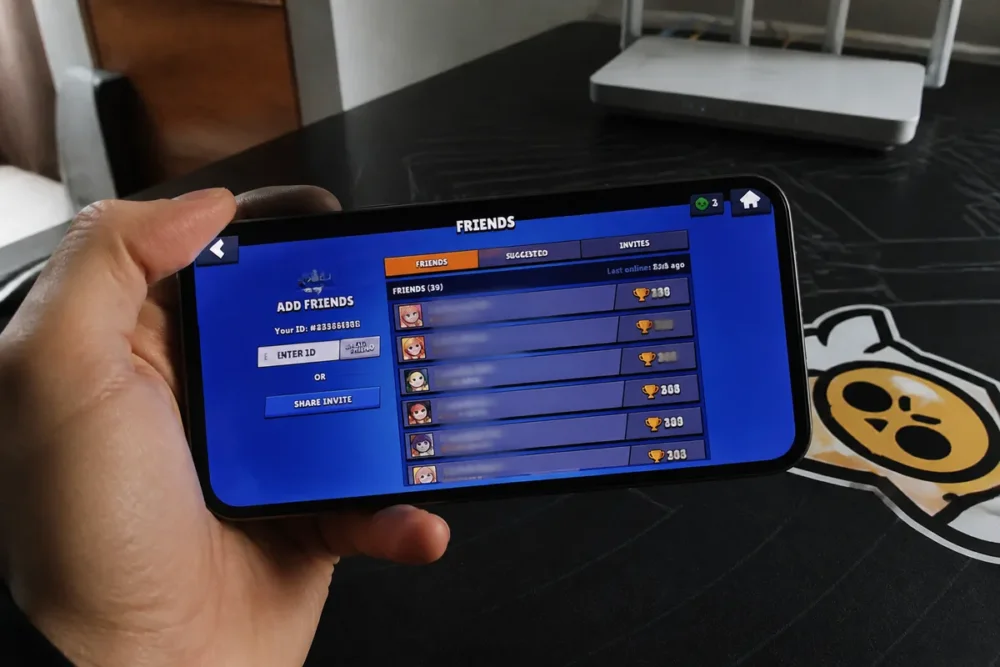
Restart the game and refresh the social menu
Completely quit Brawl Stars instead of just returning to the home screen. On Android as on iPhone, close the app from the recent apps screen, reopen it, then go back to the friends list or received requests.
A full restart is sometimes enough to refresh the social menu. During the check, do not send multiple identical invitations: duplicates make tracking more difficult and do not fix a possible synchronization delay.
-
Close the app
Quit Brawl Stars from the app switcher, then wait a few seconds before reopening it.
-
Open the social menu
Access the friends list again and check requests without sending multiple invitations.
-
Check the connection
Test another connection if the menu remains empty or if online functions respond slowly.
-
Update the game
Look for a Brawl Stars update in the App Store or Google Play on both devices concerned.
Rule out a connection or version problem
Open a match or another online function to see if Brawl Stars communicates properly with its services. If Wi-Fi seems unstable, temporarily switch to mobile data, or try the opposite. After an update, restart the game once more.
Identify the cause based on the symptom encountered
The symptom helps narrow down the diagnosis. A total absence of requests points to the network, version, or service, while a single missing friend rather indicates the player code, the account used, or a poorly updated friendship relation. None of these signs alone proves a blocked account.
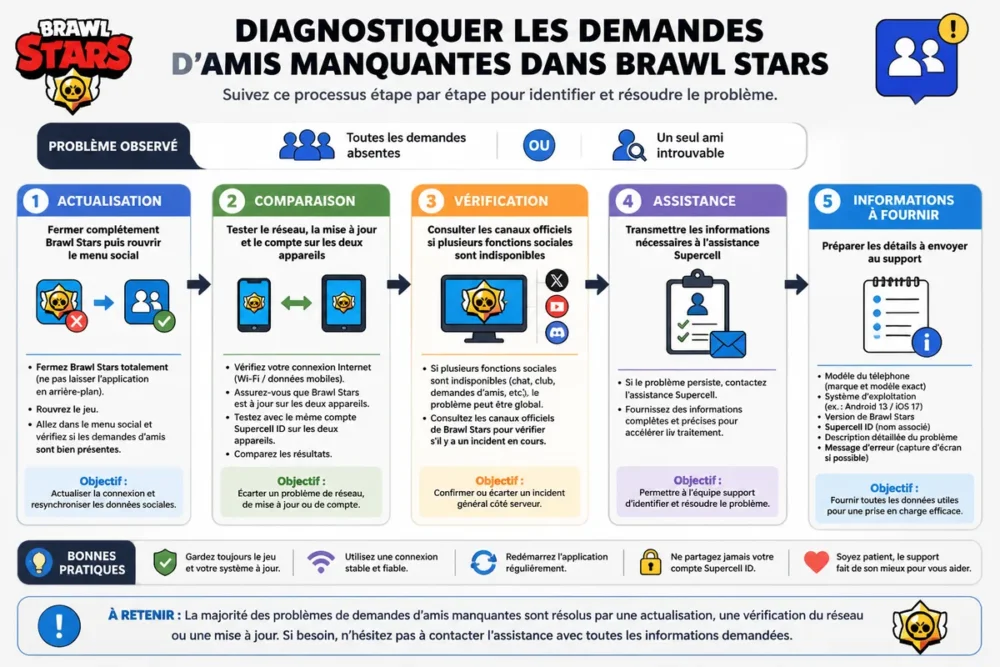
No invitation appears in Brawl Stars
When no request appears, first check the network, the update, and the general status of the service. Then reopen the social menu after restarting. Slow loading of social features can also cause a temporarily empty display; wait a few minutes before resending a request.
Only one friend is missing or does not see the request
Check the Brawl Stars player code and the recipient’s identity character by character. Ask the friend to check their pending requests and, if necessary, to resend the invitation from their own profile. Also verify that no friend removal or blocking could explain the lack of contact.
“My friend blocked me because the button no longer works” is a conclusion reached too quickly. A problem limited to a single relationship may come from an incorrect code or incomplete synchronization; the behavior of other social features provides a more reliable clue.
Invitations appear late
A synchronization delay is recognized when the request eventually appears after a restart, a network change, or a new profile load. Avoid repeated sends during this delay. Try again only once when the connection is stable and the social menu loads normally.
Check the account and settings that may limit interactions
The account used and its settings are a lead to check when social features remain incomplete despite a correct connection. The location of options may change depending on the game version and device. Parental controls or possible restrictions should be consulted with the account holder, without assuming that a given age automatically causes a block.
Verify the correct account and Supercell synchronization
Make sure Brawl Stars is opened with the usual account, the one containing your progress and friend list. Return to the main menu, open the social features again, then observe if contacts reload. Logging out is not a first troubleshooting step: only use it if access to the account and its recovery is confirmed.
If account access is already uncertain, consult the official recovery method before any data deletion.
Examine possible social limitations
Check privacy settings, parental controls, and visible restrictions in the concerned account. Menus may differ between Android and iPhone. An age-related restriction should not be presented as certain without official information from Supercell; request the intervention of the account holder if a setting is protected.
Check if Brawl Stars is experiencing an outage or maintenance
A general outage is distinguished from a local fault when several social features stop responding, multiple players encounter the same problem, or the incident follows maintenance. Check Supercell’s official channels before reinstalling the game. A local action does not fix an unavailable service.
Spot signs of a server-side incident
Impossible connections, repeated error messages, and simultaneous unavailability of the friend list, invitations, or teams indicate a possible incident. Ask another player to check the same point. A problem appearing just after maintenance or an update also deserves verification on official announcements.
The official page Supercell Support Friends describes the add and invite functions. Publisher announcements remain the priority to confirm an ongoing outage or maintenance.
What to do during a Brawl Stars outage
Follow the information published by Supercell rather than third-party tools promising to unlock invitations. Try again after the service restoration announcement. If the problem continues, note the time, the displayed message, and the affected functions to provide a precise report to support.
Clearing the cache or reinstalling Brawl Stars without risking your progress
Clearing the Android cache can help when the display seems stuck, but it should not be confused with deleting the app data. Reinstallation comes afterward, never before verifying the account. Progress that is not linked or poorly recoverable should not be exposed to a hasty uninstallation.
Clearing the cache on Android with caution
The path varies depending on the manufacturer and the version of Android, but the option is generally found in the Brawl Stars app information, then in the storage section. Use only the cache clearing command if it is offered. Do not delete the app data until the account association is confirmed.
Reinstalling the game as a last resort
First confirm that you can reconnect to the Supercell account and retrieve your progress. Then download Brawl Stars only from Google Play or the App Store. If in doubt about account recovery, stop the procedure and contact support rather than deleting the app.
For a game that remains stuck before accessing the menu, the Brawl Stars loading solutions can complement these checks. However, the invitation issue requires returning to the social menu after each manipulation.
Contacting Brawl Stars support with the right information
Support becomes the best option when invitations remain absent after a restart, a network test, an update, and an account verification, or when several social functions remain unavailable without an announced outage. A precise report speeds up diagnosis and avoids repeating unnecessary steps.
Useful information to provide
Prepare the phone model, system version, Brawl Stars version, exact symptom, approximate time of the problem, and any error messages. Also indicate the attempts already made, including network change, update, and full game restart.
Information never to share
Never share your password, a security code, or a recovery code. Also do not send personal data that is not necessary for diagnosis. Before attaching a screenshot, mask identifiers, email addresses, and account elements unrelated to invitations.
If the account must be recovered, use the Brawl Stars QR code only in the context provided by the game or its official services. No third-party site can legitimately require your login codes to add a friend.
Frequently asked questions about friend invitations in Brawl Stars
Why don’t I see friend requests in Brawl Stars anymore?
A connection problem, an outdated version, a synchronization delay, an account restriction, or a server incident can explain this absence. Restart the game, check for updates, and consult official information before any reinstallation.
Why doesn’t my friend receive my Brawl Stars invitation?
Check the player code, the account used by each, and the requests already pending. If several social functions are unavailable, also check the service status and ask your friend to restart the game.
Can you add a friend on Android from an iPhone?
The type of phone is generally not the primary blocking point for adding a friend. Mainly check the accounts, Brawl Stars versions, player code, and connection on both devices.
How long should you wait after a server outage?
Follow the official announcement from Supercell and try again after the service is restored. No universal delay can be guaranteed without communication from the publisher. Do not send repeated requests during the incident.
What to do if invitations remain stuck after all checks?
Contact Brawl Stars support with the phone model, game version, time of the problem, and manipulations already tested. Never share a password, security code, or recovery code.
In the majority of cases, a full restart, a stable connection, and an updated version are enough to restore Brawl Stars friend invitations. Before any reinstallation, always verify the account backup and the official server status.