.en-bref { max-width: auto; margin: 2em auto; padding: 1.5em 1.8em; color: #78350f; font-family: “Inter”, “Segoe UI”, sans-serif; text-align: left; position: relative; box-sizing: border-box; background: #fff2d7; border: 0; border-left: 0px solid #b45309; border-radius: 0; box-shadow: none; }
.en-bref h2, .en-bref .en-bref-header { font-size: 1.15em; font-weight: 700; margin-bottom: 0.6em; color: #b45309; }
.en-bref p, .en-bref li { font-size: 1em; line-height: 1.65; margin: 10px; }
.en-bref strong { color: #451a03; }
.mg-callout{margin:1.5em 0;padding:.9em 1.1em;border:1px solid;border-left-width:4px;border-radius:10px;font-size:.97em;line-height:1.65}.mg-callout>:first-child{margin-top:0}.mg-callout>:last-child{margin-bottom:0}.mg-callout__label{display:block;margin:0 0 .35em;font-weight:700;font-size:.82em;letter-spacing:.03em;text-transform:uppercase}.mg-callout__label::before{margin-right:.45em;font-size:1.05em;vertical-align:-.06em}.mg-callout–info{background:#eff6ff;border-color:#bfdbfe;color:#1e3a5f}.mg-callout–info .mg-callout__label{color:#2563eb}.mg-callout–info .mg-callout__label::before{content:”\2139\FE0F”}.mg-callout–tip{background:#f0fdf4;border-color:#bbf7d0;color:#14532d}.mg-callout–tip .mg-callout__label{color:#15803d}.mg-callout–tip .mg-callout__label::before{content:”\1F4A1″}.mg-callout–warning{background:#fffbeb;border-color:#fde68a;color:#7a4a10}.mg-callout–warning .mg-callout__label{color:#b45309}.mg-callout–warning .mg-callout__label::before{content:”\26A0\FE0F”}.mg-callout–danger{background:#fef2f2;border-color:#fecaca;color:#7f1d1d}.mg-callout–danger .mg-callout__label{color:#dc2626}.mg-callout–danger .mg-callout__label::before{content:”\1F6D1″}.mg-proscons{display:grid;grid-template-columns:1fr 1fr;gap:16px;margin:1.5em 0}@media(max-width:560px){.mg-proscons{grid-template-columns:1fr}}.mg-proscons__col{padding:.9em 1.1em;border:1px solid;border-radius:10px}.mg-proscons__title{display:flex;align-items:center;gap:.4em;margin:0 0 .5em;font-weight:700;font-size:.9em;letter-spacing:.02em}.mg-proscons__col ul{margin:.3em 0 0;padding-left:1.15em}.mg-proscons__col li{margin:.3em 0;line-height:1.55}.mg-proscons__col–pro{background:#f0fdf4;border-color:#bbf7d0;color:#14532d}.mg-proscons__col–pro .mg-proscons__title{color:#15803d}.mg-proscons__col–pro .mg-proscons__title::before{content:”\2705″}.mg-proscons__col–con{background:#fef2f2;border-color:#fecaca;color:#7f1d1d}.mg-proscons__col–con .mg-proscons__title{color:#dc2626}.mg-proscons__col–con .mg-proscons__title::before{content:”\274C”}ol.mg-steps{list-style:none!important;counter-reset:mgstep;margin:1.6em 0;padding-left:0!important}ol.mg-steps>li.mg-steps__item{counter-increment:mgstep;list-style:none!important;padding-left:0!important;padding-bottom:1.4em}ol.mg-steps>li.mg-steps__item:last-child{padding-bottom:0}ol.mg-steps>li.mg-steps__item>:last-child{margin-bottom:0}ol.mg-steps>li.mg-steps__item>.mg-steps__title{margin:0 0 .25em;font-weight:600}ol.mg-steps>li.mg-steps__item>.mg-steps__title::before{content:counter(mgstep) “. “;opacity:.45;font-weight:500;font-variant-numeric:tabular-nums}ol.mg-steps>li.mg-steps__item:not(:has(.mg-steps__title))::before{content:counter(mgstep) “. “;opacity:.45;font-weight:500;font-variant-numeric:tabular-nums}.mg-kpis{display:grid;grid-template-columns:repeat(auto-fit,minmax(140px,1fr));gap:14px;margin:1.5em 0}.mg-kpi{padding:1em .9em;border:1px solid #e5e7eb;border-radius:12px;background:#f9fafb;text-align:center}.mg-kpi__value{display:block;font-size:1.7em;font-weight:800;line-height:1.15;color:#111827}.mg-kpi__label{display:block;margin-top:.35em;font-size:.85em;color:#6b7280;line-height:1.35}
.wp-block-image,.ai-image{margin-bottom:1.75em}.wp-block-image>figcaption,.ai-image>figcaption{margin-top:.5em}
.magic-lb-overlay{position:fixed;inset:0;background:rgba(15,23,42,.92);display:none;align-items:center;justify-content:center;z-index:99999;cursor:zoom-out;padding:20px}
.magic-lb-overlay.open{display:flex}
.magic-lb-overlay img{max-width:95vw;max-height:95vh;object-fit:contain;border-radius:8px;box-shadow:0 8px 32px rgba(0,0,0,.5)}
.magic-lb-close{position:absolute;top:16px;right:20px;color:#fff;background:rgba(0,0,0,.5);border:none;width:40px;height:40px;border-radius:50%;font-size:24px;cursor:pointer;display:flex;align-items:center;justify-content:center}
.magic-lb-close:hover{background:rgba(0,0,0,.8)}
.wp-block-image img{cursor:zoom-in;transition:transform .15s ease}
.wp-block-image img:hover{transform:scale(1.01)}
.magic-img-link{display:inline-block;text-decoration:none}
(function(){
var ov=document.getElementById(‘magic-lb’);if(!ov)return;
var img=ov.querySelector(‘img’),btn=ov.querySelector(‘.magic-lb-close’);
function open(src){img.src=src;ov.classList.add(‘open’);document.body.style.overflow=’hidden’}
function close(){ov.classList.remove(‘open’);img.src=”;document.body.style.overflow=”}
document.addEventListener(‘click’,function(e){
var a=e.target.closest(‘a.magic-img-link’);
if(a){e.preventDefault();open(a.getAttribute(‘href’));return}
var i=e.target.closest(‘.wp-block-image img’);
if(i&&!e.target.closest(‘a’)){e.preventDefault();open(i.currentSrc||i.src)}
});
ov.addEventListener(‘click’,function(e){if(e.target===ov||e.target===btn)close()});
document.addEventListener(‘keydown’,function(e){if(e.key===’Escape’)close()});
})();
Google crawls without indexing a page when Googlebot has visited its URL but did not include it in its index. This status does not automatically indicate a penalty. You must first verify that the page should actually appear in Google, then check its content, canonical tag, technical directives, internal linking, and accessibility.
A page can be technically accessible while being considered too similar to another URL, not very useful, or insufficiently prioritized. The URL inspection tool in Google Search Console allows you to distinguish these cases, but a request for indexing never guarantees that the page will be added to the results.
In brief
- 🔎 “Crawled – currently not indexed” means that Google has visited the URL without keeping it in its index.
- 🧭 First check the page’s purpose, then the canonical, the noindex tag, the robots.txt file, the HTTP code, and the content.
- 🧩 A useful page must be distinct, accessible, linked by internal links, and consistent with the XML sitemap.
- ⏳ The Google indexing request triggers a new crawl request. It does not constitute a promise of indexing or ranking.
Crawled – currently not indexed: what this status really means
The status indicates a visit by Googlebot, not editorial approval. Google may have retrieved the URL and analyzed its content, but the URL was not added to the index at the time of the check. Crawling and indexing are two different decisions.
Google visited the page but did not necessarily keep it
The detection corresponds to the moment when Google becomes aware of a URL, for example through a link or an XML sitemap. Crawling occurs when Googlebot requests the page from the server. Indexing then corresponds to the selection of this page in the results database. Ranking comes even later: an indexed page can remain very hard to find for a given query.
The message “Crawled – currently not indexed” does not, by itself, provide the exact cause. It may accompany an accessible page with redundant content, a different canonical, low internal priority, or insufficiently distinctive editorial value. Google Search Central documentation presents indexing as a non-guaranteed process, including after crawling.
A non-indexed page is not necessarily a problem
A filter URL, sorting, internal search, test, or private area generally is not intended to attract visits from Google. A removed product sheet, an almost identical variant, or a temporary page may also be deliberately excluded. The first decision is therefore to clearly answer this question: does the URL serve an identifiable search and a real site objective?
The belief “every published page must be indexed” is false. A coherent site can contain accessible but excluded URLs, while a strategic page deserves thorough correction rather than a simple re-submission in Search Console.
Diagnose the URL before any correction
Start with the exact address: protocol, subdomain, parameters, and trailing slash can designate different URLs. The URL inspection tool in Google Search Console compares the known status of the URL with the result of a test on the currently accessible version.
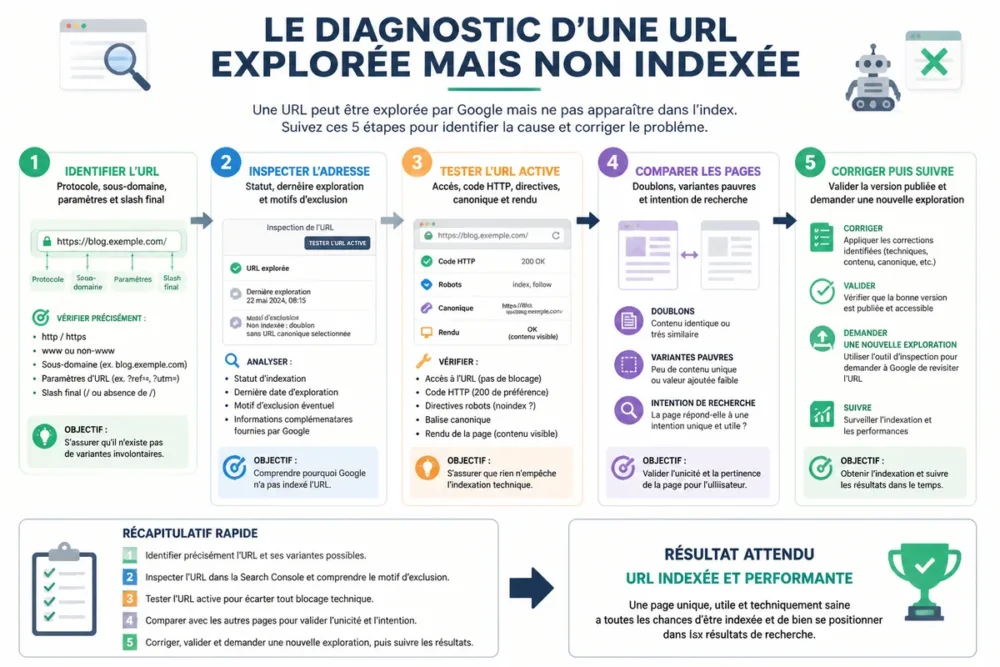
Read useful information in the address inspection tool
Inspect the problematic URL in Search Console, then note the coverage status, the date of last crawl, the declared canonical URL, and the canonical selected by Google when displayed. Also compare the results of the live URL test with the version already known by Google.
A difference between the declared canonical and the selected canonical is an important signal, but not automatic proof of misconfiguration. The page chosen by Google may be considered a more representative version when multiple URLs meet the same need.
Check fundamental technical signals
Verify the final HTTP code. A page intended for indexing should normally be publicly accessible and return a stable response, without redirect loops or persistent server errors. Then check the meta robots tag, the HTTP X-Robots-Tag header, the canonical tag, robots.txt rules, and the presence of the final URL in the XML sitemap.
The robots.txt file deserves particular attention: it can prevent crawling of a resource, but it does not replace a noindex directive. A URL blocked from crawling can therefore remain known to Google without its content being properly evaluated.
Evaluate the page as a search engine and a reader would
Open the page without a logged-in session and verify that the main content actually appears. Incomplete JavaScript rendering, a loading error, or content visible only after interaction can reduce the understanding of the URL.
Compare the page with nearby URLs on the site: similar product pages, local pages, categories, articles addressing the same intent, or parameter variants. An old page can also disappear from the index if its content becomes obsolete, if another URL replaces it, or if its relative value decreases after a redesign.
-
Note the exact address
Copy the URL as published and note any parameters.
-
Inspect in Search Console
Compare the known status, the canonical, and the crawl date with the live URL test.
-
Check indexability
Verify the HTTP code, redirects, noindex, X-Robots-Tag, robots.txt, and rendering.
-
Compare content
Identify duplicates, weak variants, and pages already targeting the same intent.
-
Correct then monitor
Request a new crawl only after validating the published version.
The most common causes of a crawled but not indexed page
A crawled but not indexed page does not have a single cause. The diagnosis must separate voluntary exclusions, technical contradictions, duplication, and low editorial priority to avoid inappropriate correction.
| Observed symptom | Check | Appropriate action | Error to avoid |
|---|---|---|---|
| Noindex directive | Source code and HTTP header | Remove the directive if the page should be indexed | Remove it without verifying the URL’s role |
| Different canonical | Canonical tag and selected URL | Align the canonical with the reference page | Declare a canonical contradictory to the internal linking |
| Very similar content | Comparison with neighboring pages | Differ, merge, or prioritize URLs | Add generic text without new value |
| Orphan page | Internal links and navigation path | Create contextual links from relevant pages | Artificially create unrelated links |
| Unstable access or rendering | HTTP code, server, and live URL test | Fix access and loading of main content | Request indexing before stabilizing the page |
A directive or configuration excludes the URL
A noindex tag can come from a template, a content management system setting, or an SEO tool. A canonical pointing to another page, a misconfigured redirect, a server error, or an access rule can also alter the processing of the URL.
The XML sitemap does not override any of these directives. A sitemap helps Google know which URLs the site considers important, but it does not force crawling or indexing.
Google favors another very similar page
Duplicates are not limited to exact copies. Two listings with an almost identical description, local pages differentiated by only one city name, or filtered URLs can meet the same need with too little useful difference. Google may then select another version as the reference.
The decision must be editorial before being technical: keep two pages if their audiences, information, and intentions truly differ; merge them if their coexistence dilutes the same response. A redirect should only be set after verifying the value of the old URL for users and existing links.
The page lacks editorial value or priority signals
A short page is not automatically bad. The problem arises when it responds incompletely, interchangeably, or less precisely than another page already present on the site. A strategic page must provide an identifiable answer, verifiable information, a unique angle, and a sufficient reading experience for its intent.
An orphan page, rarely linked or published in a poorly accessible section, also receives fewer internal priority signals. External links can help discovery and credibility, but their absence alone does not prove the cause of non-indexing.
Fix according to the cause, without trying to force indexing
The right fix is the one that removes the detected contradiction. Removing a noindex, rewriting a page, or adding an internal link without diagnosis can shift the problem instead of solving it. A strategic URL must be useful, indexable, canonical, and linked to the site.
Fix an unintentional technical block
Remove the noindex directive only if the URL should be visible in search engines. Then align the canonical tag, internal links, XML sitemap, and redirects on the same final URL. Check the source code and the active URL test after publication.
An access error must be handled server-side or application-side. The main content must be retrievable without login and without relying on unstable loading. A request for indexing before this validation does not provide a sustainable solution.
Strengthen a useful but insufficiently distinctive page
Rewrite around the real intent rather than mechanically lengthening the text. Add missing information: procedure, criteria, limits, examples, dated data, or named sources. Expertise elements must be verifiable; a page does not gain reliability by adding promotional wording.
For an editorial site, analysis of an already indexed page can complement this check, provided URLs targeting a similar intent are compared. For a commercial or local page, differentiate data truly specific to the offer, instead of just replacing a few keywords.
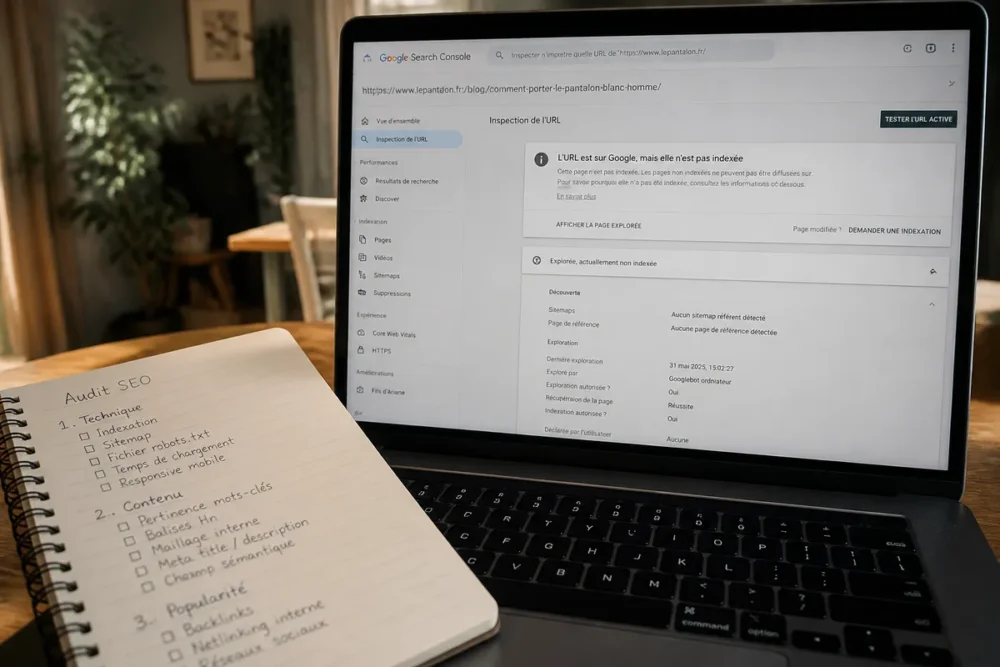
Improve internal linking and handle duplicates
Add contextual internal links from important and relevant pages: a category to a listing, an article to a detailed method, or a service page to a genuinely covered area. The anchor must describe the destination and the link must help the journey, not just transmit a signal.
Remove redirected, excluded, or non-canonical URLs from the sitemap. Maintain the final URL that the site wants to be crawled. When two pages meet the same need, merging can be cleaner than maintaining two weak contents.
Request a new crawl and monitor progress
The Google indexing request is justified after a significant correction on a final URL, accessible and truly useful. The feature may evolve in Search Console; check the wording and limits displayed in the interface at the time of use.
When to use the Google indexing request
Use it after fixing a noindex, a canonical, an access issue, or a substantial editorial overhaul. The request sends a solicitation to Google to recrawl the URL; it does not reserve a spot in the index nor guarantee any Google indexing timeframe.
Do not repeat the same request in a loop. In this case, do not request indexing before fixing the cause. A duplicate page or one without its own intent will remain to be addressed fundamentally.
When to wait, improve, or reconsider the page’s purpose
After a modification, allow Google time to revisit the page and reevaluate its signals. No universal timeframe can be announced without knowing the site, its architecture, crawl frequency, and the importance of the URL.
Follow the status in Search Console and compare the last crawl date. If the URL remains secondary, similar to another, or useless for an identifiable search, improve it, merge it, redirect it, or leave it excluded according to its role. The goal is a coherent index, not a maximal volume of URLs.
A simple monitoring method
Keep for each URL the date of correction, the nature of the change, and the observed result. This record prevents modifying several signals simultaneously without knowing what changed. A log audit can complement Search Console on a large site, notably to verify Googlebot visits and server responses, but it does not replace content analysis.
SEO tools or WordPress extensions can facilitate checking tags, sitemap, and links. They do not have a legitimate way to guarantee indexing; their alerts must be confirmed on the published page and in Google’s official documentation.
Frequently asked questions about Google crawling without indexing
Is a crawled but non-indexed page penalized by Google?
No, this status does not prove a penalty. It indicates that Google crawled the URL without including it in its index at that time. First look for a technical directive, a duplicate, or insufficiently distinct editorial value.
Is an XML sitemap enough to get a page indexed?
No. An XML sitemap signals URLs that the site considers important, but it does not guarantee crawling or indexing. The URL must also be accessible, consistent with its canonical, useful, and properly linked to the rest of the site.
How long to wait after a Google indexing request?
Google does not provide a universal timeframe applicable to all pages. Monitor the last crawl and status in Search Console rather than multiplying requests. A lack of result should lead to reexamining the page, not just relaunching the tool.
Should you delete a page that Google does not index?
No, not automatically. Keep and improve a page that targets its own intent; merge it if another URL meets the same need; exclude it if it serves a filter, a test, or a function not intended to appear in Google.
Why can an old page disappear from the Google index?
An old page can become less useful, be replaced by another URL, lose its technical coherence, or no longer properly meet the search intent. Check content changes, canonical, internal links, redirects, and accessibility before concluding.
Can you request indexing multiple times for the same URL?
A new request can be made after a substantial correction, but identical repetitions do not constitute a strategy. First fix the identified problem, validate the published version, then use the request for a truly useful final URL.
Durable indexing is favored by removing technical contradictions and giving each URL a clear, unique utility well linked to the rest of the site. When the diagnosis does not allow a decision, keep Search Console observations, server responses, and content versions before any further modification.









