GBA SP Flash Cartridge: Why Usage Is Generally Safe, Provided You Avoid Bad Habits
The GBA SP flash cartridge often causes concern even before being inserted into the console: fear of frying the motherboard, wearing out the cartridge port, draining the battery, or losing save data. In practice, the danger is much less dramatic than some forum posts suggest. The real issue is not “flashcart or no flashcart,” but rather build quality, console condition, power consumption, and firmware stability.
The verdict is therefore reassuring but not naive: a good GBA flashcart used on a healthy Game Boy Advance SP should normally not damage the console. On the other hand, a poorly assembled clone cartridge, a questionable microSD card, oxidized contacts, or a tired battery can turn a practical experience into a festival of freezes, bad contacts, and lost saves. Joking aside, this is often where the “risk” really hides.
In Brief
✅ A good quality GBA SP flash cartridge generally does not pose a direct hardware risk to the console if used normally and without forcing insertion.
🔋 The main tangible effect often concerns battery life: some models, like the EZ-Flash Omega, are known to consume more power than a standard GBA cartridge.
⚠️ The real pitfalls mostly come from bad contacts, low-end models, unstable microSD cards, poorly managed saves, and an already worn cartridge port.
🧰 The right approach: choose a well-known flashcart, gently clean the contacts, update the flashcart firmware, and test progressively before entrusting it with a long gaming session.
Why Does the Question of Risk Keep Coming Up with a GBA SP Flash Cartridge?
A flash cartridge on a Game Boy Advance SP is not inherently dangerous. Problems mainly stem from the model’s quality, the condition of the cartridge port, the battery, and the firmware. In other words, the risk is more related to the ecosystem around the flashcart than to its normal use.
The mistrust comes from a fairly classic mix in retro gaming: consoles sometimes over twenty years old, modern accessories made by various manufacturers, very variable user feedback, and a few unpleasant surprises shared online. As a result, a software freeze or a lost save can quickly be interpreted as hardware damage, whereas the two phenomena do not have the same severity.
In practice, it is often observed that players confuse three levels of problems: console failure, cartridge defect, and configuration bug. A GBA SP that boots poorly with a flashcart but works perfectly with an original cartridge is not necessarily “damaged.” It may simply react to a more demanding cartridge, imperfect contacts, or a microSD card that can’t keep up.
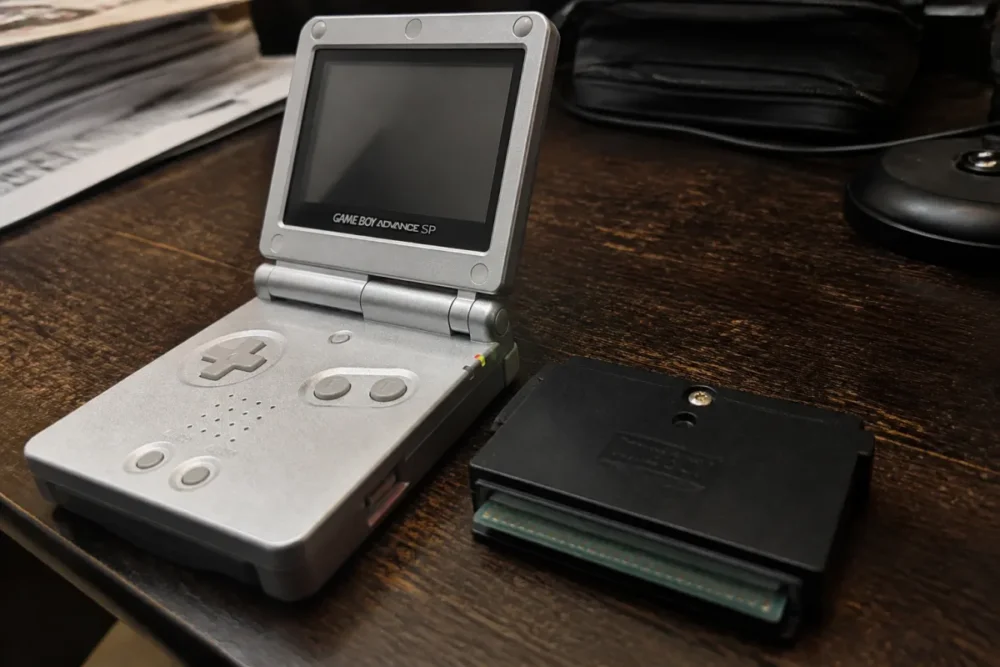
This point is important: the Game Boy Advance SP remains a robust console, but its cartridge connector, battery, and buttons have aged. A retro gaming flash cartridge therefore does not operate in a new environment. That’s why feedback varies so much from one user to another, even with the same model.
The most common risk is not “killing” the console but misinterpreting a software symptom or bad contact as a serious failure.
What Does a GBA Flash Cartridge Actually Do?
A GBA flashcart is a rewritable cartridge that loads games from a memory card via internal firmware. It does not modify the Game Boy Advance SP itself: it behaves like a cartridge inserted into the port, with additional functions depending on the model.
A GBA flash cartridge, also called a GBA flashcart or linker, is used to launch compatible games and software from a memory card. The principle generally relies on three elements: the physical cartridge, the SD or microSD card that stores the files, and the firmware that manages the menu, saves, patches, and sometimes functions like the real-time clock.
A well-known model like the EZ-Flash Omega presented by SenkoGames, for example, announces compatibility with GBA, Game Boy, Game Boy Color, and NES games, as well as storage on an SD card from 128 MB to 128 GB. This is very convenient, but it also means that the cartridge does more than a classic GBA cartridge.
The flashcart does not “pirate” the console in the hardware sense. It installs nothing in the GBA SP, does not modify its BIOS, and does not reprogram its motherboard. It simply exploits the expected operation of the cartridge port. This is precisely why its use can remain safe, provided the cartridge properly respects the electrical and mechanical constraints of the GBA format.
The trio to understand: cartridge, microSD, firmware
To analyze the risk to the console, responsibilities must be separated. A bad microSD can cause read errors, but that does not mean the console is damaged. Outdated firmware can cause incompatibilities without damaging the cartridge port. And a poorly machined shell can catch mechanically, even if the internal electronics work.
- The physical cartridge determines the quality of contacts, the shell, and assembly.
- The memory card influences loading times, file stability, and sometimes saves.
- The flashcart firmware manages the menu, patches, compatibilities, and some advanced functions.
- The console also has its limits: aging battery, dirty port, worn switch, oxidized contacts.
In practice, supposed GBA SP failures often come from too quick a test: one flashcart, one microSD, no port cleaning, then immediate conclusion. In amateur workshops or among collectors, simply testing an original cartridge, another microSD, and gentle cleaning already helps better isolate the cause.
What are the real risks for a Game Boy Advance SP?
Real risks exist, but they are more targeted than one might think. The first concerns battery life, as some flashcarts demand more power. The second involves poor contacts, especially with approximate shells or a dirty cartridge port. The third relates to saves and firmware: annoying, sometimes frustrating, but not necessarily dangerous for the console.
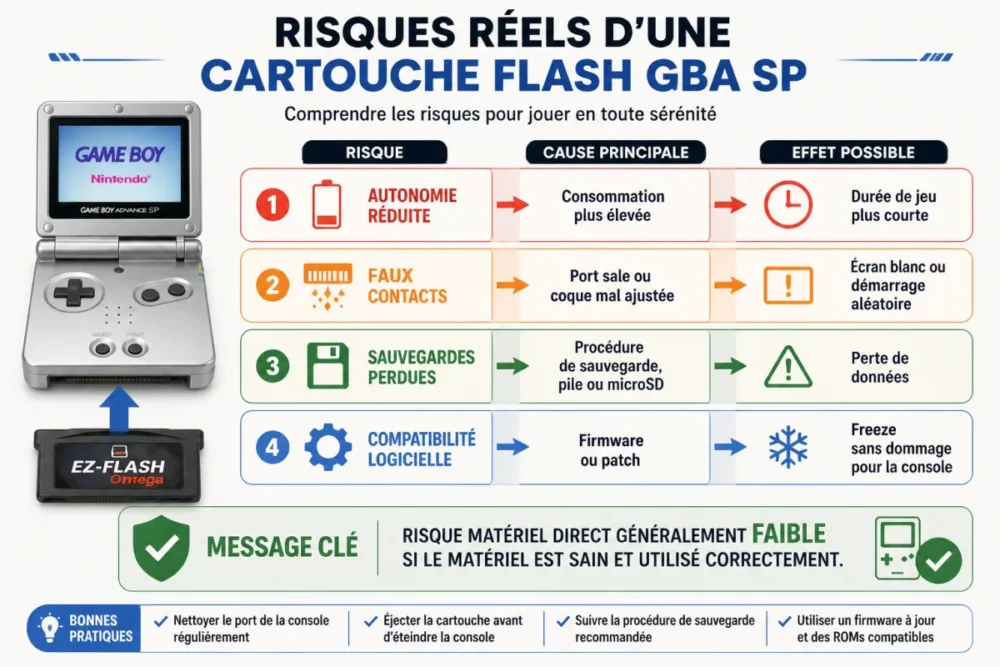
The most concrete point is power consumption. Some reports indicate that the EZ-Flash Omega can consume about twice as much energy as a normal GBA cartridge. This is not insignificant for battery life, especially on an SP whose original battery has already seen much use. However, higher consumption does not automatically mean dangerous overheating or destruction of the console.
False contacts are often more insidious. A cartridge that moves slightly, a case that is too tight, dirty pins, or a rough insertion can cause white screens, freezes, or random startups. This is not unique to flashcarts: an old official cartridge with oxidation can produce the same symptoms. But low-end flashcarts sometimes add poorer mechanical tolerance.
Finally, compatibility bugs can be frightening. A game that crashes on launch, a save that disappears, or a real-time function that does not respond correctly gives the impression that the console is “suffering.” In reality, it is most often a firmware, patch, file, or internal battery issue on the cartridge. It is unpleasant, clearly, but it is not the same as damage to the Game Boy Advance SP.
| Observed symptom | Probable cause | Risk to the console | Useful reflex |
|---|---|---|---|
| Shorter battery life | Higher consumption from the flashcart | Low, mainly battery wear | Test with a healthy battery |
| White screen at startup | False contact or poorly recognized cartridge | Low to moderate if forced insertion | Clean contacts and port |
| Freeze during gameplay | Firmware, microSD, or compatibility | Very low | Update and test another card |
| Lost save | Too rapid shutdown, battery, or save method | None for the console, high for data | Follow the model’s procedure |
| Cartridge difficult to insert | Poorly fitted case or dubious clone | Moderate for the port | Do not force, change model |
The special case of saves
Saves deserve a special mention because they concentrate a lot of frustrations. According to detailed feedback published in a comparison between Everdrive Mini and EZ-Flash Omega, saving on the EZ-Flash Omega can depend on a proper reboot, with a risk of loss if the console is turned off too early or if the internal battery is discharged. The soldered battery, difficult to replace for an unequipped user, reinforces this point of caution.
The nuance is essential: losing a save is not the same as damaging the GBA SP. It is a data reliability risk, not a direct hardware risk. But for a player progressing in an RPG for several hours, the emotional result is almost the same. That is why save stability should weigh as much as price when choosing a flashcart.
What generally does not cause problems with a GBA flashcart
The very principle of a GBA flashcart is not supposed to damage a Game Boy Advance SP. A properly designed cartridge respects the physical format, communicates via the cartridge port, and remains within usage intended by the console: reading an inserted medium. In other words, the console has no reason to deteriorate simply because the loaded content comes from a memory card.
Heat is also often overestimated. Yes, some models draw more from the battery. Yes, they may seem a bit more demanding than an official cartridge. But that does not mean the GBA SP operates beyond its normal limits at every use. In reasonable use, with a clean console and a good battery, the most likely scenario remains reduced battery life, not a sudden failure.
A reliable flashcart mainly changes the way games are loaded; it does not turn a healthy GBA SP into fragile hardware overnight.
It is also necessary to distinguish hardware compatibility from software compatibility. The EZ-Flash Omega is announced compatible with Game Boy Advance, Game Boy Advance SP, and Nintendo DS. This concerns insertion and general operation of the medium. However, depending on the games, functions, patches, or internal emulators for GB, GBC, or NES, the experience may vary. A punctual incompatibility therefore does not prove that the console is in danger.
When should you be more cautious with a retro gaming flash cartridge?
Caution becomes necessary as soon as several weak signals accumulate: cartridge sold without clear information, case that is tight, visibly irregular contacts, obscure firmware, seller impossible to identify, or inconsistent user feedback. A poorly manufactured accessory does not become dangerous by magic, but it increases the chances of false contacts, bugs, and repeated handling, thus avoidable wear.
Clones and low-end products mainly raise a quality control issue. Two visually similar cartridges can have different PCBs, less clean soldering, or a slightly misaligned case. This is exactly the kind of detail that is not always visible on a product sheet but is quickly felt in use: hard insertion, console that only starts every other time, menu freezing, or corrupted files.
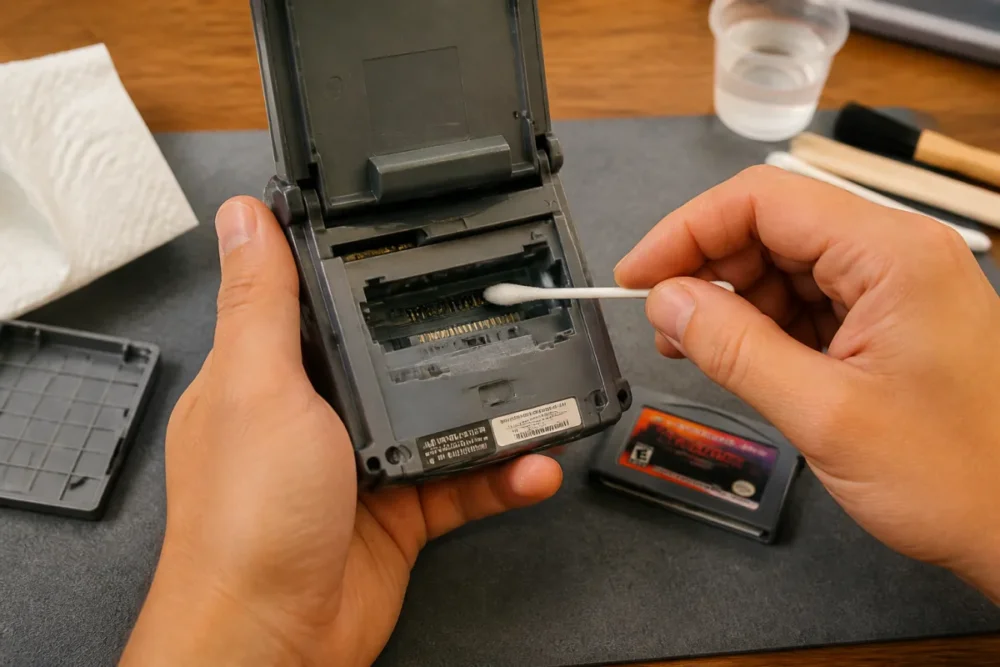
The console itself can also amplify problems. A GBA SP with an aging battery, a fickle switch, or an oxidized cartridge port will be less tolerant. The trap is to immediately blame the flashcart when the console already shows signs of aging. Conversely, a dubious cartridge can reveal a latent problem that was not visible with a low-power original cartridge.
An amateur retro console repairer regularly observes that “flashcart failures” disappear after cleaning the connector or replacing a very tired battery. In practice, the flashcart sometimes reveals the actual condition of the console more than it degrades it.
Signals that should alert you
- The cartridge is tight when inserting or removing: this is never a good sign for the port.
- The menu crashes even before launching a game, especially with several tested memory cards.
- Saves disappear despite a correct procedure and a reliable microSD.
- The case seems poorly finished, with excessive play, burrs, or approximate alignment.
- The seller provides no information about the model, firmware, or return conditions.
The memory card is another weak link. A poor-quality microSD can cause random errors, file corruptions, and unstable loading. It’s not glamorous, but reliability often depends on this. Better a reasonably sized card, properly formatted, than a huge no-name card found at the bottom of a drawer.
How to limit risk with a GBA SP flash cartridge?
To limit risk, you have to act on truly controllable points: choose a reputable flashcart, avoid dubious clones, keep contacts clean, use a reliable memory card, update the firmware, and test progressively. This simple method reduces most problems without turning usage into a laboratory procedure.
The first criterion is the model’s reputation. A cartridge like the EZ-Flash Omega has the advantage of being documented, widely used, and sold with precise features: support for SD cards from 128 MB to 128 GB, built-in real-time clock, fast loading, cheat codes, and announced compatibility with several systems. It is not an absolute guarantee, but it is preferable to an anonymous product.
Next, you need to adopt a simple routine. No need to follow an endless protocol at each session, but a few habits change everything. The GBA SP cartridge port dislikes dust, crooked insertions, and cartridges forced “because they should fit.” If it catches, stop. Period.
- First test an original cartridge to check that the console starts normally.
- Insert the flashcart without forcing it and remove it immediately if the casing catches.
- Use a reliable microSD, properly formatted according to the model’s recommendations.
- Update the firmware from an official or clearly identified source.
- Test a few short games before starting a long session with important saves.
- Monitor the battery life to distinguish normal consumption from a truly tired battery.
For saves, the right reflex is to understand the exact behavior of your cartridge. Some models write directly, others require a precise sequence or a restart to finalize the save. If the documentation says to wait before turning off, you must do so. This is not a detail: it is often the difference between a saved game and a ruined evening.
What is the real verdict on the risk of a GBA SP flash cartridge?
The verdict is clear: in the vast majority of cases, a good quality GBA SP flash cartridge does not pose a serious risk to the console. The actually observable dangers concern battery life, poor contacts, saves, software compatibility, and poorly made models. Caution remains useful, but alarmism does not help.
A good approach is to classify risks by severity. The direct hardware risk is generally low if the cartridge is well designed and does not force into the port. The comfort risk is more real: battery drains faster, games fail to launch, saves are unreliable. The data risk is also serious if the save method of the used model is not respected.
There remains one last point, often forgotten: legality. A flashcart can be used to launch homebrews, test tools, or personal backup copies according to the applicable framework. It can also be used to load ROMs for which the user does not have rights, which raises another issue. This topic does not change the hardware risk for the GBA SP, but it clearly changes the usage framework.
To summarize without beating around the bush: if your console is healthy, your battery is good, your port is clean, and your flashcart is reliable, the risk is low. If you combine a dubious cartridge, low-end microSD, tired console, and sudden shutdowns during saves, problems become much more likely. This is not the black magic of the flashcart; it is just aging consumer electronics.
Key Takeaways
- ✅ A reliable GBA SP flashcart generally does not damage the console under normal use.
- 🔋 Battery life can decrease with some models that consume more than a classic cartridge.
- ⚠️ Poor contacts often come from a dirty port, poor casing, or forced insertion.
- 💾 Lost saves mostly relate to the cartridge, firmware, or procedure.
- 🧰 A reliable microSD, up-to-date firmware, and progressive testing avoid most issues.
FAQ
Can a flash cartridge damage the cartridge port of a GBA SP?
Yes, but mainly if the casing is poorly fitted or if the user forces insertion. A well-made flashcart that inserts and removes normally should not wear the port more than a classic cartridge under reasonable use.
Does a flashcart drain the battery faster?
Often yes, especially with some more power-hungry models. For the EZ-Flash Omega, reports mention consumption that can approach double that of a normal GBA cartridge, which mainly results in shorter battery life.
Are all flashcarts compatible with a Game Boy Advance SP?
No, you must check the actual compatibility of the model. Some flashcarts are advertised as compatible with Game Boy Advance, GBA SP, and Nintendo DS, but stability can vary depending on firmware, memory card, and games launched.
How to recognize a reliable GBA flash cartridge?
A reliable model generally has clear documentation, identifiable firmware, numerous user feedbacks, and a seller able to provide an exchange in case of defect. Be wary if the product is anonymous, very poorly finished, or sold without any technical information.
What to do if the console freezes or if the saves disappear?
You should first test another microSD, update the firmware, and check the backup procedure of the model. If an original cartridge works perfectly, the problem probably comes from the flashcart, its configuration, or the memory card, not necessarily the GBA SP.









