To transfer a Brawl Stars account to a new phone, first link the progress to a Supercell ID, then reconnect that same ID on the new device. Then check the player name, trophies, brawlers, resources, and purchases before resetting the old phone.
The method also works when switching from Android to iPhone or from iPhone to Android. The main risk does not come from installing the game, but from an incorrect email address, accidentally choosing a new local game, or prematurely erasing the old device.
In brief
🔐 The Supercell ID is the official method to recover Brawl Stars progress on another phone.
📱 Keep the old device until the recovered account is fully verified on the new one.
✉️ The login code is sent to the associated email address. Never share it with a third party.
⚠️ Google Play Games and Apple Game Center do not replace the Supercell ID when changing systems.
Before changing phones: secure progress with the Supercell ID
The Supercell ID links Brawl Stars progress to an accessible email address. Logging in on the new phone then restores the associated account, instead of relying solely on the local storage of the old device or the mobile system used.
**Progress must be linked before any reset.**
On the old phone, open Brawl Stars and check the currently displayed account. Note the player name, trophies, unlocked brawlers, visible resources, and significant purchases. A screenshot can help compare progress after reconnection.
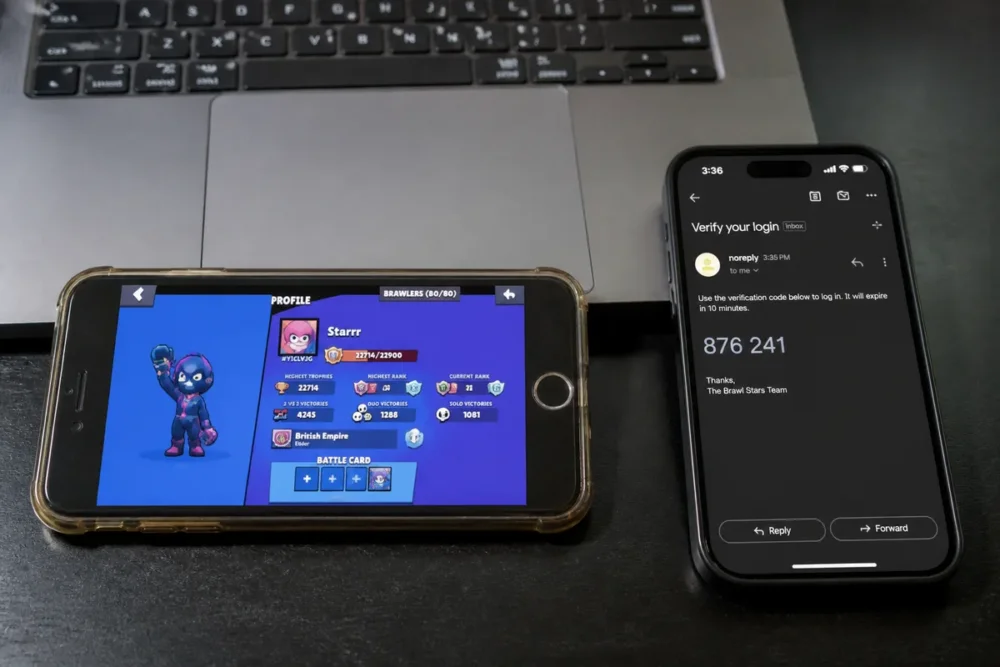
Verify that the correct account is open on the old device
The player name and number of trophies allow quick recognition of progress. Also note the available brawlers and, if possible, keep purchase receipts in the email inbox or the history of the store used.
Link or verify the Supercell ID
In Brawl Stars, open settings then locate the section dedicated to the Supercell ID. The general process is to link a personal email address, request a code, then enter this code in the official app. Exact wording may change with game updates.
Verify that the email address used remains accessible from the future phone. The old device must remain on and connected until progress has been confirmed on the new device.
Transfer Brawl Stars to the new phone: official steps
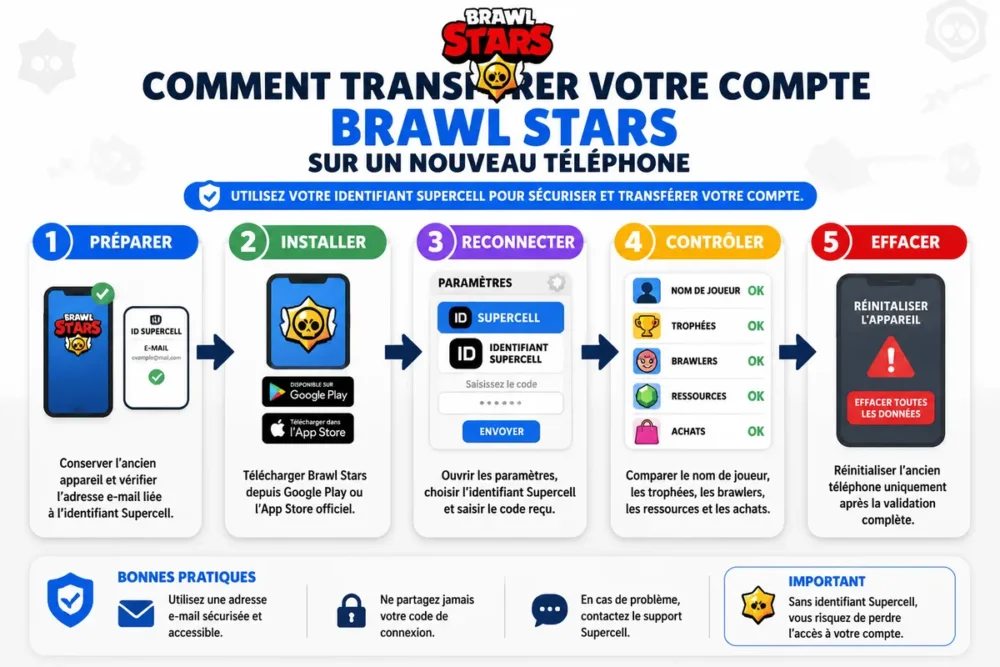
The transfer relies on a simple sequence: install the official version of Brawl Stars, open the Supercell login, use the same email address, and verify the restored progress. A new game automatically created should not be confused with the existing account.
-
Install Brawl Stars
Download Brawl Stars only from Google Play on Android or the App Store on iPhone. Install the version offered by the official store, then open the game without making any purchase.
-
Open the Supercell login
Go to Brawl Stars settings on the new phone. Choose to log in with the Supercell ID rather than continuing a new local game.
-
Enter the correct address
Use exactly the email address associated with the progress from the old device. Request the verification code, check the corresponding inbox, then enter the code in the official app.
-
Select the progress
If multiple accounts or progressions appear, compare the player name, trophies, and brawlers with the information noted on the old phone. Do not choose a recent game just because it is displayed first.
-
Confirm the transfer
Close and then reopen Brawl Stars. Check the trophies, brawlers, account level, resources, and relevant purchase history. Keep the old phone until this confirmation.
Switching from Android to iPhone, or from iPhone to Android
A Brawl Stars account transfer between Android and Apple is possible when the progress is linked to the same Supercell ID. Google Play Games and Apple Game Center can manage data within their own environments, but they are not the universal method to switch from one system to another.
| Transition | Action to take | Mistake to avoid |
|---|---|---|
| Android to iPhone | Install Brawl Stars from the App Store and log in with the same Supercell ID. | Relying solely on Google Play Games. |
| iPhone to Android | Install Brawl Stars from Google Play and use the same Supercell ID. | Relying solely on Apple Game Center. |
| Same system | Reinstall the game then reconnect the associated Supercell ID. | Confirming a new game before logging in. |
Prepare access to the email inbox before leaving the old system. On iPhone, install the game from the App Store before logging in with the Supercell ID. On Android, perform the same operation from Google Play.
For an Android-to-iPhone switch, use the Supercell ID, not the phone’s game service. This distinction prevents creating a new progress instead of loading the expected account.
Old phone lost, broken, or inaccessible: what options remain possible?
Recovery mainly depends on the existence of a Supercell ID and access to the associated email address. An already linked account can be reconnected without the old device, while progress never associated must be examined by official support without guarantee of recovery.
The account was already linked to a Supercell ID
Install Brawl Stars on the new phone, open settings, and request a login with the associated email address. The received code allows retrieving the progress without needing the old device.
If the email inbox is inaccessible, first recover this access from your email provider. Multiple code requests in Brawl Stars do not fix a forgotten or blocked address.
The account was never associated or the email address is forgotten
Use the help integrated into Brawl Stars or the official Brawl Stars support portal. Prepare the player name, player ID if known, approximate level or trophies, the old device, and available purchase receipts.
Provide consistent and verifiable information. Supercell support decides the necessary verifications, and no external method can guarantee the restoration of unassociated progress.
Troubleshooting missing Brawl Stars progress or an unreceived verification code
Missing progress often results from a wrong email address, an outdated version, an incorrectly selected account, or a delay in receiving the code. Check these points in this order before contacting support, while keeping the data present on the old device.
Progress does not load on the new phone
Check the spelling of the email address and log back into the expected Supercell ID. Update Brawl Stars, restart the app, then compare the player name, trophies, and brawlers before confirming a proposed progress.
The Supercell code does not arrive in the email inbox
Check the spam folder and the address entered in Brawl Stars. Wait a few minutes before requesting a new code, as repeated attempts can make diagnosis more confusing.
Multiple Brawl Stars accounts appear
Identify the correct progress from the player name, known statistics, and unlocked brawlers. A recent game may be displayed before the old account without being the sought progress.
A common misconception often returns: “reinstalling Brawl Stars is enough to recover the account.” This is false because a reinstallation does not replace the association with the Supercell ID and does not automatically recreate unlinked progress.
Transfer software, code generators, and unofficial intermediaries do not solve this problem. Never provide a verification code to a person claiming to speed up recovery.
Security rules to follow during the transfer
Transfer security relies on three channels: the Brawl Stars app, the phone’s official store, and Supercell support. Account sharing, account selling, and code transmission increase the risk of loss of access or impossible recovery.
- Use only Brawl Stars downloaded from Google Play or the App Store.
- Keep access to the email address linked to the Supercell ID.
- Do not share any code received by email, even with someone who knows your player name.
- Do not lend, sell, or buy a Brawl Stars account.
- Keep the old phone until data verification on the new one is complete.
The correct sequence is Supercell ID, full verification, then resetting the old phone. To transfer your Brawl Stars account without losing your progress, this official method is suitable; workarounds are not appropriate.
Frequently Asked Questions
How to transfer your Brawl Stars account to a new phone?
Link your progress to a Supercell ID on the old phone. Then install Brawl Stars on the new one, log in with the same email address, and check the displayed data before erasing the old device.
Can you recover your Brawl Stars progress without the old phone?
Yes, if the progress was already linked to a Supercell ID and the email address remains accessible. Without prior association, use official support, which will conduct its own checks without guaranteeing recovery.
Are trophies, brawlers, and purchases retained after the transfer?
The progress linked to the correct Supercell ID should be the one loaded on the new phone. Compare trophies, brawlers, resources, and relevant purchases before considering the transfer complete.
Does transferring a Brawl Stars account work between Android and iPhone?
Yes, when the account is linked to a Supercell ID. Google Play Games and Apple Game Center remain useful within their own ecosystems but do not replace the Supercell ID for switching between Android and iPhone.
Why doesn’t the Supercell verification code arrive or why do multiple accounts appear?
Check the email address, spam folder, and mailbox status, then wait a few minutes before requesting again. If multiple progressions appear, compare their player names and stats; do not automatically choose the first one.
The Supercell ID remains the secure gateway for changing phones. Reconnect the correct account, verify every visible data in Brawl Stars, then only part ways with the old device.